This document describes the overall systems view and implementation specifics of the Globalstar satellite data service implementation for the MOOS test mooring. The implementation was accomplished mostly with system-level software and scripting under the Linux operating system working with the Globalstar satellite data service.
System level software included pppd version 2.4.1 built with specific extensions enabling PPTP, and the PPTP client version 1.1.0 for Linux. There exists a good amount of supporting system documentation, which will comprise the first area addressed by this document. We will then outline the system services utilized and their configuration under the Linux 2.4 operating system.
In this document the following sources of documentation will be referenced and are generally of value to have when working with the Globalstar system.
|
Documentation Description |
Documentation Resource |
|---|---|
|
Globalstar satellite transceiver |
|
|
PPP v 2.4.1 for Linux |
|
|
PPTP v1.1 for Linux |
|
|
'uschedule' Linux scheduling daemon |
From a user's perspective the access point for the Globalstar system is the data transceiver, which is documented thoroughly in the PDF file that is referenced in the previous section. This transceiver presents a PPP-like interface to the system and is controlled through both standard and Qualcomm proprietary AT-modem commands. To start a satellite PPP session, the client issues a single command to the transceiver and a virtual PPP session is created.
There are two methods of data transport with the Globalstar system that are referred to as 'Packet Data' and 'Asynchronous Data'.
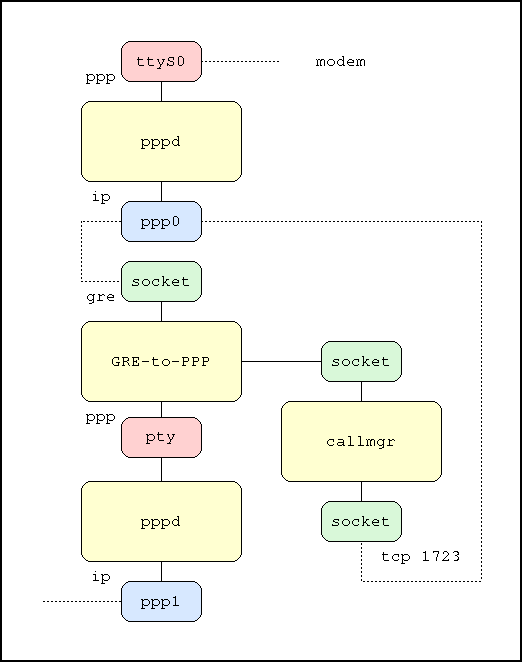
PPTP is the acronym for Point-to-Point Tunneling Protocol. PPTP is used to 'tunnel' an encrypted data stream over an existing IP data stream such as PPP or even ethernet. PPTP allows a secure 'tunnel' to be established between a host on the internet and a trusted host behind a corporate firewall. The functions that a PPTP client performs include authentication and negotiation of compression and encryption with the PPTP server. PPTP was utilized to allow data to be tunneled into MBARI through the institute's Microsoft VPN server, vpn.mbari.org. In this case, PPTP was tunneling through the PPP (Point-to-Point Protocol) IP data stream which was implemented by the Globalstar modem. A top level view of this mechanism is shown below.
Note that a second ppp stack is actually started and acts as the conduit for PPTP data to the primary ppp stack via standard Unix pseudo-terminal IPC mechanism (pty, as shown in the diagram above).
The PPP implementation used for the Globalstar deployment is version 2.4.1, which was built with support for PPTP, such as Microsoft CHAP v2 support. This version of ppp allows the user to specify connection-specific parameters in per-connection files that reside in /etc/ppp/peers on the target system.
The Linux implementation consisted of building the appropriate applications for StrongARM Linux, and writing appropriate scripts to establish and teardown the satellite connection. Compilation was done in a native environment to minimize the possible issues associated with cross-compilation that could crop up.
Because of the unpredictable nature of allowing a satellite link to be established on demand, it was decided that the link would be scheduled for a pre-determined amount of uptime at pre-determined times during the day. In order to accomplish this, pppd was used so that a connection would be terminated after a maximum connect time and re-established at particular times by scheduling software. The scheduling software utilized is a modern cron replacement called uschedule, which was relatively easily ported to ARM Linux. The 'uschedule' daemon was installed as part of the standard Linux startup sequence at the very end of the startup process.
The uschedule facility bis utilized by issuing various uschedule* commands which are located in /usr/bin in a normal installation. These include uschedulecmd, uschedulelist, and uschedulerm, which are the three most commonly used uschedule commands. Normally the user creates a periodic command with uschedulecmd, displays any currently active commands with the uschedulelist command, and removes a periodic command if necessary, with the uschedulerm command. The uscheduled daemon is started automatically by the startup scripts of the Linux system and should re-activate all commands that were created with the uschedulecmd command.
For example, a user may want to invoke '/usr/sbin/pppd call home' every two hours. The first thing we do is create a periodic command using uschedulecmd:
bash-2.03# uschedulecmd –id=gsppp '/usr/sbin/pppd call home'
Next, we need to schedule this command for periodic execution, and this is performed with the uschedule command. Uschedule needs two principal arguments, the periodic command ID and a TIMESPEC. The timespec specifies the absolute time or interval that you want to execute the specified periodic command at and is very similar to cron syntax. The general format of a periodic command interval string is “<year>-<month>-<date> <24hourtime_hour>:<minute>:<second>. Of course, the real power comes into play when specifying wildcards. Numbers may be specified in two formats – the absolute value or a value of “n/m”, which translates to (n+m*x) where x is a positive integer. This feature was put to use in scheduling the MOOS test mooring PPP invocations for every two hours and we'll illustrate an example with our gsppp periodic command that we've just created:
bash-2.03# uschedule –late=1 gsppp '*-*-* 0/2:00:00'
This command schedules the gsppp periodic command for execution every two hours allowing a late period of at most 1 second. Since the gsppp command is the only command we are executing, we need not be concerned with the 'late' parameter. It comes into play when multiple commands are scheduled for execution simultaneously and the command must be executed within a certain grace period or not executed at all. This is the command that was used for the 2-hour PPP via satellite invocations on the MOOS test mooring. Please see the 'uschedule' documentation in the Supporting documentation section of this document for more information.
Another example of the uschedule command to run our gsppp perioic command once, immediately, is the following
bash-2.03# uschedule –count=1 gsppp '*-*-* *:*:*'
This command must be used with great care to ensure that the '--count=1' argument is given, or else the system will attempt to execute the periodic command every second. A command of this form was used in the MOOS test mooring deployment to activate the satellite link once after the system was booted
Once a periodic command has been created and scheduled as we have done above, you can display the schedule and the next calculated execution time using the uschedulelist command. This command takes no arguments.
bash-2.03# uschedulelist
gsppp
  schedule: *-*-* 0,2,4,6,8,10,12,14,16,18,20,22:0:0
  last: never
  next: 2002-11-28 02:00:00
  grace: may start up to 1 seconds late.
Use the 'date' command to compare these numbers with what the system's current notion of time is. The 'next' value is the one that you're most interested in – the next time that the scheduled periodic command will occur.
Periodic commands may be removed from the system by using the uschedulerm command. It just takes the ID of the periodic command that you created with the uschedulecmd command:
bash-2.03# uschedulerm gsppp
When the configuration utilizing PPTP to tunnel into the MBARI intranet was tested, common TCP/IP applications such as ping, telnet, curl, and ftp worked as expected. When we tried to establish an RMI connection using this method, we ran into significant problems. While not conclusively proven, it is believed that the problems that we encountered were due to the RMI protocol embedding internet addresses within the data of TCP packets. Unlike traditional TCP-based applications, like telnet. Because network address translation (NAT) was employed at the Globalstar satellite downlink center
$Id: mtm-globalstar.html,v 1.4 2003/01/30 02:57:57 timm Exp $
Comments? Email mailto:timm@mbari.org?subject=mtm
globalstar doc comments