# WEC Network Configuration Notes
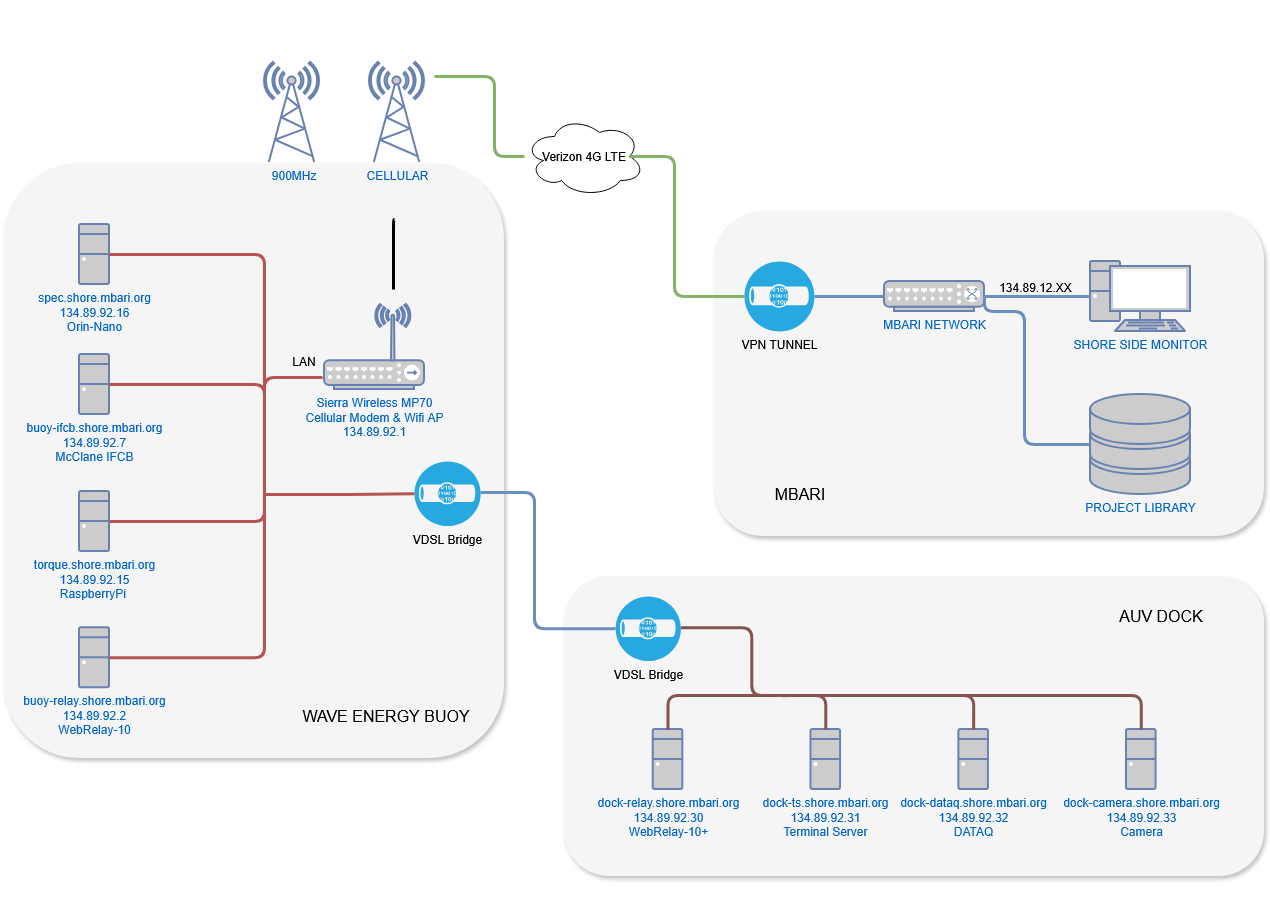
## IP Table
| Item | IP Address | DNS Entry |
| :----------------- | :------------- | :----------------------------- |
| Cell Gateway | 134.89.92.1 | |
| WebRelay | 134.89.92.2 | buoy-relay.shore.mbari.org |
| IFCB | 134.89.92.7 | buoy-ifcb.shore.mbari.org |
| RaspberryPi | 134.89.92.15 | torque.shore.mbari.org |
| Orin-Nano | 134.89.92.16 | spec.shore.mbari.org |
| Dock Web-Relay | 134.89.92.30 | dock-relay.shore.mbari.org |
| Dock Term-Server | 134.89.92.31 | dock-ts.shore.mbari.org |
| Dock Dataq | 134.89.92.32 | dock-dataq.shore.mbari.org |
| Dock Camera | 134.89.92.33 | dock-camera.shore.mbari.org |
## RaspberryPi Buoy Control Computer
You can ssh to the controller, if you are outside the institute, VPN in first.
- ssh using command `ssh buoy@torque.shore.mbari.org`,
- ftp using command `ftp buoy@torque.shore.mbari.org`
## Orin-Nano Buoy Computer
You can ssh to the computer, if you are outside the institute, VPN in first.
- ssh using command `ssh username@spec.shore.mbari.org`
## Wave-Energy Web Relay
With VPN access you can reach this page. Enter user/pass (admin:PowerBuoy) in order to login.
- LOGIN: [http://buoy-relay.shore.mbari.org](http://buoy-relay.shore.mbari.org)
- ADMIN: [http://buoy-relay.shore.mbari.org/setup.html](http://buoy-relay.shore.mbari.org/setup.html)
## Sierra Wireless MP70 Cellular Modem
**WARNING**: Meddling with the modem during at-sea operations carries the risk of losing remote communication with the buoy if configured incorrectly. You should expect certificate warning from your web-browser when connected.
- LOGIN: [https://134.89.92.1:9443](https://134.89.92.1:9443)
- USER/PASS: user:WaveEnergyFTW
## Dock Web Relay
With VPN access you can reach this page. Enter user/pass (admin:admin) in order to login.
- LOGIN: [http://dock-relay.shore.mbari.org](http://dock-relay.shore.mbari.org)
- ADMIN: [http://dock-relay.shore.mbari.org/setup.html](http://dock-relay.shore.mbari.org/setup.html)
# Appendix A: Network Diagram
# Appendix B: Buoy Console Commands
When logging in you will see this message, and can be reprinted to the shell via `cat ~/helpful.txt`
Some helpful commands and tips:
pbcmd - See a list of commands to the buoy controllers
llogs - alias for 'tail -f /logs/latest/latest'
doorwatch - Monitor important trefoil controller data
battwatch - Monitor important battery controller data
springwatch - Monitor important spring controller data
powerwatch - Monitor important power controller data
ispbcon - Check process list for pbcon, aka automator (one match)
ispbcon - Check process list for pbcon, aka automator (one match)
isahrs - Check process list for ahrs server (one match)
isdog - Check process list for watchdog timers (2 matches)
pblogrestart - Use systemctl to restart pblog.service
pblogstart - Use systemctl to start pblog.service
pblogstop - Use systemctl to stop pblog.service
pblogenable - Use systemctl to enable pblog.service
pblogdisable - Use systemctl to disable pblog.service
ahrsrestart - Use systemctl to restart ahrs_server.service
ahrsstart - Use systemctl to start ahrs_server.service
ahrsstop - Use systemctl to stop ahrs_server.service
ahrsenable - Use systemctl to enable ahrs_server.service
ahrsdisable - Use systemctl to disable ahrs_server.service
introhelp - Show this list
These commands do not persist through reboots (pblog will be started when you reboot):
> `pblogstop` - stop the service, Linux will not attempt to auto-restart
> `pblogstart` - start the service after a stop, Linux will attempt auto-restarts if the service unexpectedly stops
> `pblogrestart` - stop then restart the service with auto-restarts (use this when pblog is running, but not all output seems to be written to the log)
These commands persist through reboots:
> `pblogdisable` - stop the service from running at boot, Linux will not attempt to auto-restart
> `pblogdenable` - have the service run at boot, Linux will attempt to auto-restart
## Change Log
- 2026: A few IP devices have been added to the network as follows: An Orin Nano on the buoy, and the AUV dock location (subsurface) a web-relay device, a terminal server for an acoustic modem, an IP-based camera, and a Dataq data-acquisition device. The Garmin radar on the buoy has been removed.
- 2022: The TS7970 has been replaced with a [RaspberryPi](https://www.raspberrypi.org/) for better compatibility with ROS2. There is a [Waveshare isolated CAN hat](https://www.waveshare.com/2-ch-can-hat.htm) attached to the RaspberryPi. The cellular modem and wifi router have been replaced with a Sierra Wireless MP70 and now uses Verizon's network. The radar has been changed from a Simrad to [Garmin 24xHD](https://www.garmin.com/en-US/p/86236)
- 2020: We replaced the beaglebone with a TS-7970 from Technologic Systems, and have installed a simple wifi router for low-power download and diagnostics.
- 2019: We have more tools available for controlling processes on the beaglebone, see [Appendix B](#apdx_b)
- 2018: We have implemented a VPN tunnel between the buoy and the MBARI network. This allows for an encrypted connection and flat network traversal of all components on the buoy. As a reset, ports are no long routed through the Moxa gateway.