Performing a Vims Query and using p_vims
Using Vims Query
For instructions on using VIMS consult the video lab web page.
Setting the Constraints
You are free to set whatever constraints you want when performing a Vims query.
Setting the Returns
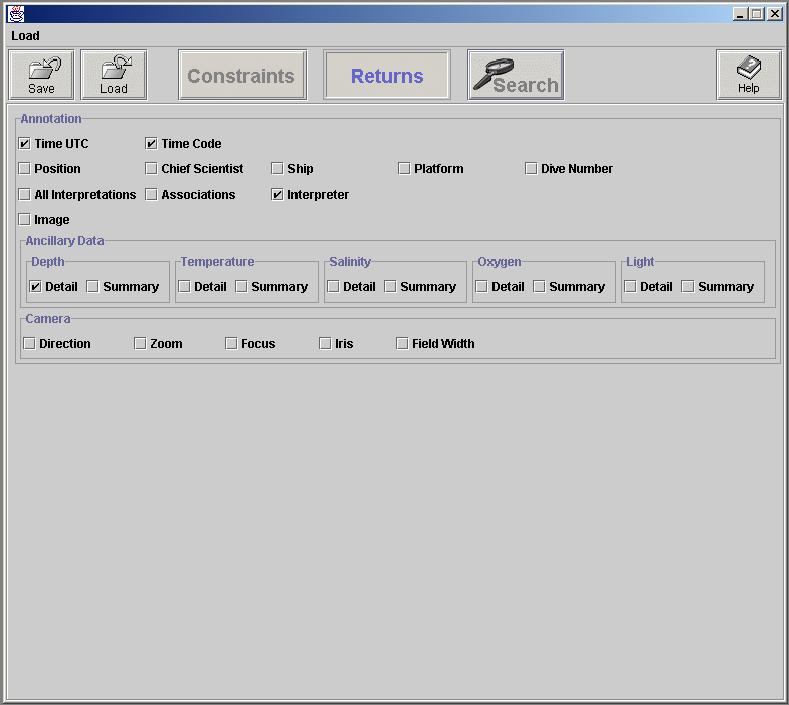
You must only set ‘Time UTC’, ‘Time Code’, ‘Interpreter’, and ‘Depth -> Detail’ for your returns. Your returns page should look like the image below.
Using p_vims
Save the results of your query to disk and use the p_vims.exe command line tool to convert your query to an Adobe Premiere batch list. Use p_vims at the command line as follows
C:\p_vims vimsquery outputfile secs-for-timecode-window
For example:
C:\p_vims 043099dive1598tape3.txt 043099dive1598tape3.pbl 3
The p_vims tool will generate an ‘043099dive1598tape3.txt’ file and a ‘043099dive1598tape3.pbl’. The ‘043099dive1598tape3.pbl’ file is an Adobe Premiere file batch capture file with a 1.5 second window around each VIMS entry. Use the ‘043099dive1598tape3.pbl’ to perform automated video capture with Adobe Premiere. The ‘043099dive1598tape3.txt’ file is an information file that relates the filenames used in the .pbl file to the data base query results from Vims.