|
DaqView™
Out-of-the-Box™ Spreadsheet-Style Setup, Data Acquisition, and Display Software
 View complete catalog information on DaqView in PDF format. View complete catalog information on DaqView in PDF format.
Features
DaqView™
allows you to verify signal connections, acquire and save data to disk,
and graphically view real-time data within moments of taking your
IOtech hardware Out-of-the-Box™. Easily
set up all your hardware, acquisition, and display parameters, without
programming, via a simple spreadsheet-style screen. DaqView*
is a full-featured acquisition and display application that provides
all the functionality you’ll need for many data-logging applications.
For more demanding applications, use DASYLab®.
* DaqView is available as an option for DaqBoard/1000 series, and DaqBoard/2000 series (DaqView2000)
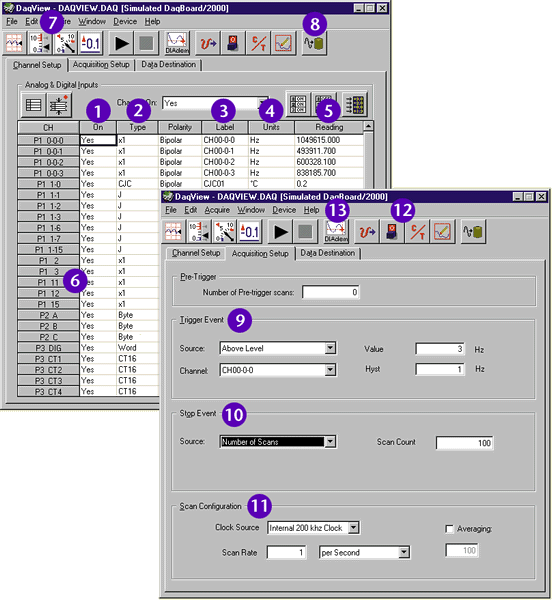
DaqView software provides Out-of-the-Box™ setup, acquisition, and real-time display
DaqView lets you:
- Designate an individual data channel as active or inactive by clicking on a selected channel.
- Choose
different ranges or gains for each channel, based on the installed
signal conditioning options. You can also select bipolar or unipolar
scales for each channel.
- Assign each channel a unique label, which will be automatically referenced throughout eZ-PostView™ series.
- Choose
the desired engineering units in which to display acquired data, based
on the installed signal conditioning options. You can also enter
parameters to perform mX+b on each reading before displaying it.
- Display real-time readings of all selected channels.
- Scan digital and counter inputs with the analog inputs, for time-correlated data.
- Customize a real-time display using any combination of strip charts, bar graphs, dials, and digital displays.
- Store
data to disk in real-time at up to 100 Ksamples/s. You can also select
an auto-increment mode to create a new, numerically indexed data file
each time a trigger is received.
- Select programmable trigger conditions (e.g.,
immediately, keyboard hit, external TTL, and channel value). Analog and
digital trigger latency is less than 10 µs.
- Acquire up to 10 million scans post-trigger. In addition, you can acquire up to 32K pre-trigger scans.
- Program the scan sequencer, from one scan every 10 µs to once per hour.
- Set up analog output, digital I/O, and counter/timer functions.
- Review acquired waveforms with a stripchart-style display via eZ-PostView™.

Complete Information
View complete catalog information on DaqView in PDF format.
Ordering Information
Prices may vary due to local destination charges.
|
Description
|
Part No.
|
Price
|
Shop Online
|
|
DaqView is included free with IOtech's DaqBooks, DaqScans, DaqLabs, and Daq/216B
|
Included
|
|
Microsoft® Excel™ add-in for data acquisition
|
DaqViewXL
|
-
|
Add to
Cart
|
|
DaqView and DaqViewXL software package for DaqBoard/1000 series, and DaqBoard/2000 series
|
DaqView2000
|
-
|
Add to
Cart
|
|
Supported IOtech Hardware
|