DataTurbine TCP Caster

rbnbTCPCaster

User Manual

V1.0

June 9, 2005

Copyright, Creare Inc.


Table Of Contents

Introduction

Overview
Setup and Startup

Menu Bar

File

User Interface Fields

RBNB address
RBNB channel

Select Chan...
TCP server port
Stream RBNB data

Number of RBNB frames fetched

Timestamp of last RBNB frame


Introduction

Overview

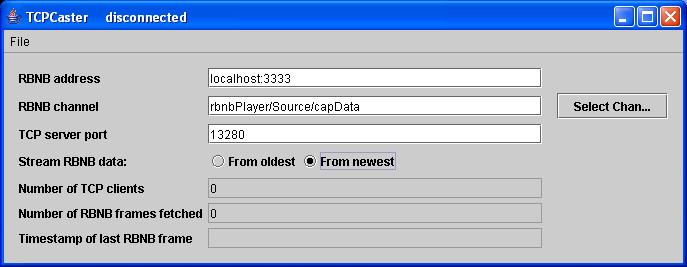
rbnbTCPCaster is a Java application which fetches data from a DataTurbine channel and writes the data to connected TCP clients.  rbnbTCPCaster is a TCP server application.  A client connects to rbnbTCPCaster by creating a socket connection to a specific host and port.  The host specified by the client must be the host name or IP address of the machine that rbnbTCPCaster is running on.  The port specified by the client must be the same as the port specified in the TCP server port field of the rbnbTCPCaster user interface (this is the server port that rbnbTCPCaster is "listening" for connections on).  The following figure illustrates a sample rbnbTCPCaster user interface window:

TCPCaster GUI

Setup and Startup

rbnbTCPCaster needs to be run under a Java Virtual Machine (JVM). rbnbTCPCaster has the following optional command-line arguments:

Option Description
-a <DataTurbine host:port>
Specifies DataTurbine to which to connect; defaults to "localhost:3333".
-c <DataTurbine channel>
Specifies the DataTurbine channel to which to subscribe; no default value.
-h
Print a help message displaying the command-line options.
-s <server socket port>
Port on which to listen for client connections; defaults to 13280.

Here is a sample command line:

java -jar tcpcaster.jar -a "localhost:3333" -c "mySource/foo" -s 3456


Menu Bar

rbnbTCPCaster has the following pull-down menu.

File

The File pull-down menu provides selections for opening and closing connections and for exiting the application.
 
 Open    The following actions are performed:
1. Open a TCP server socket at the port specified in the TCP server port field; be ready to accept TCP client connections.
2. Open a connection to the DataTurbine at the address specified in the RBNB address field.
3. Fetch data from the channel specified in the RBNB channel field.  Fetch either From oldest or From newest as specified by the Stream RBNB data radio button selection.
4. Send each fetched data block as a TCP packet to each connected client application.
 Close The following actions are performed:
1. Close the TCP server socket.
2. Stop fetching data from the DataTurbine.
3. Close the connection to the DataTurbine.
 Exit Close the TCP server socket and DataTurbine connections and exit program.

User Interface Fields

RBNB address

Specify the host and port of the DataTurbine to which to connect.  For example, enter "localhost:3333" (without the quotes) to connect to the DataTurbine running on the local machine at port 3333.

RBNB channel

Specify the DataTurbine channel to which to subscribe - that is, which channel to fetch data from.  As a convenience, the Select Chan... button may be used to help select the appropriate channel.

Select Chan...

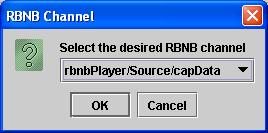
A convenient method of selecting a DataTurbine channel is provided with the Select Chan... button.  Pressing this button pops up a dialog similar to the one shown below.  The pull-down list is populated with channels available from the DataTurbine specified in the RBNB address field.  Selecting a channel and clicking the OK button copies the desired channel name to the RBNB channel field on the user interface.

Select Channel Dialog


TCP server port

This is the port on which rbnbTCPCaster is listening for client connections.  A client application must use this port number to connect to rbnbTCPCaster.

Stream RBNB data

Specify the starting point for fetching data from the DataTurbine channel.  There are two options: From oldest and From newest.  Selecting From oldest begins fetching at the oldest available data in the DataTurbine channel.  Selecting From newest will start fetching data with the next frame put into the specified channel.

Number of RBNB frames fetched

Displays the number of data fetches that have been completed since the user opened the DataTurbine connection.

Timestamp of last RBNB frame

Displays the timestamp of the last frame fetched from the DataTurbine.