The RBNB V2 JPEG video package provides the capability of capturing and displaying video using M-JPEG (a series of JPEG images) through the V2 RBNB server.
The package consists of two applications:
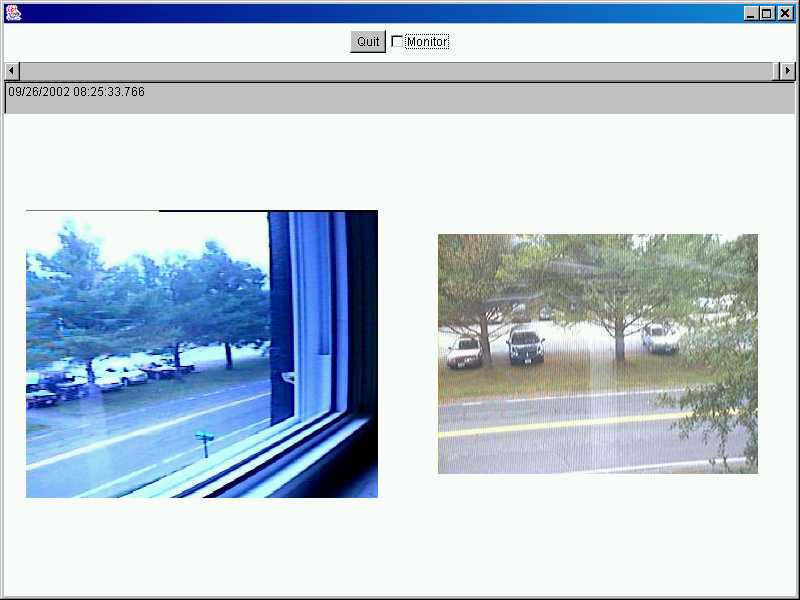
Figure 1. JPEGViewer Display
The JPEGCapture application provides the capability of capturing a video stream off a video card or video camera as a series of JPEG images. The captured images are placed into the V2 RBNB server, each image representing a single data point.
The JPEGCapture application uses the Java Media Framework™ (JMF) API to capture the video off the first card or camera that it can locate.
To be able to use the software, you must place the following into your classpath:
Use the operating system specific JMF library, rather than the generic Java version of the JMF library. The JMF library can be found at http://java.sun.com/products/java-media/jmf/.
The JPEGCapture application takes the following command line arguments to control its operation:
|
Command Line Switch |
Meaning |
Default |
|
-a <server address> |
Specifies the address of the V2 RBNB server to store the captured video. |
-a localhost:3333 |
|
-A <archive frames> |
Specifies the number of frames to store in a permanent archive. A value of zero (0) means no archive is created. |
-A 0 |
|
-C <cache frames> |
Specifies the number of frames to store in high-speed RAM memory. |
-C 100 |
|
-d <capture dimensions> |
Specifies the size of the captured video. The valid sizes are:
|
-d SMALL |
|
-D <device> |
Specifies the device to use (see –I). |
-D 1 |
|
-I x |
Requests information about the available devices or the specified device, if used in combination with the –D switch. The information consists of the devices and their supported formats. The formats are numbered. The numbers determine the valid capture dimension selections. |
|
|
-n <capture name> |
Specifies the name of the captured video within the server. |
-n rbnbVideo |
|
-q <JPEG quality> |
The quality of the captured JPEGs, ranging from 0 to 100. |
-q 50 |
|
-R <frame rate> |
The nominal rate at which frames should be captured, in frames per second. This value may be less than one if the rate should be in seconds per frame. |
-R 1 |
Table 1. JPEGCapture Command Line Arguments
The JPEGViewer application provides the capability of displaying one or more time-synchronized M-JPEG video streams retrieved from the V2 RBNB server. It can display the data as it arrives in real-time or the user can scroll through the images in the stream using a simple slider interface.
The JPEGViewer application uses the standard Java AWT to display the images.
To be able to use the software, you must place the following into your classpath:
The JPEGViewer application takes the following command line arguments to control its operation:
|
Command Line Switch |
Meaning |
Default |
|
-a <server address> |
Specifies the address of the V2 RBNB server to store the captured video. |
-a localhost:3333 |
|
-c <channel list> |
Specifies a comma-separated list of RBNB channels to be displayed. |
-c rbnbVideo/Video.jpg |
|
-d <display dimensions> |
Specifies the dimensions of the viewer display, using the format <width>x<height>. |
-d 220x250 |
Table 2. JPEGViewer Command Line Arguments
User Interface ControlsThe JPEGViewer application has a few very simple controls. Figure 1 shows the application in operation. The controls are:
Quit Button
The Quit button simply exits the application.
Monitor Toggle
The Monitor toggle turns on and off real-time monitoring mode. In this mode, the display updates as new data arrives in the server on any of the displayed channels.
Time Selection Slider
The time selection slider allows the user to scroll through the available data, one frame at a time. The slider selects times between the oldest time on any channel and the newest time on any channel (the channels may be different). It has a range of 0 (oldest time) to 1000 (newest time).