|
|
Overview of Microsoft Offline PresentationsMicrosoft helps IT Professionals learn new ways to respond to business demands by providing valuable information in a multimedia format. This page is intended to facilitate your use of Microsoft Offline Presentations.
Using Microsoft Offline PresentationsHow the Offline Presentations workprovides a list of presentations you can sort by all available column headers.
To select a presentation, click on the word play in the View column of the table. The presentation opens in a new window. Controlling a Presentation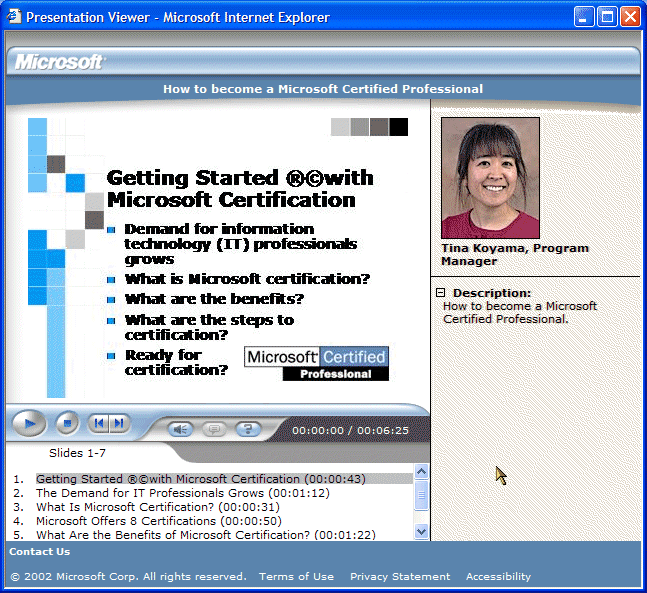
You can take control during the presentation.
System RequirementsAudiouses Microsoft Media Player for audio. It does not support the use of the RealAudio player. When you open a presentation, Microsoft Windows Media Player should automatically load if it is not already installed on your machine. If
you are not using a recent version of Microsoft Internet Explorer or running Windows 98 SE or later, you may need to install Microsoft Windows
Media Player yourself. We recommend that you install and use the Windows Media Player 9 Series player
Note: Windows Media Player 9 Series should NOT be installed on computers running Windows 95, Windows 98 or Windows NT 4. BrowserThe offline presentations are optimized for Internet Explorer 5.0 or later, which is available on Client Utilities CD or at http://www.microsoft.com/windows/ie. Note: The offline presentations have limited functionality for Netscape 4.5 or later. Media Player Requirements
Codecs:If you can hear the audio are not recieving video you will need to install the appropriate decompressor.
Note: This package requires IE4 or greater to install. FeedbackWe welcome your comments. If you are having difficulty viewing a presentation, you may contact us at Contact Us. You can find this link in the footer of the offline presentations index page. |
||
| Contact Us |
| © 1999- Microsoft Corp. All rights reserved. | Terms of Use. |

