Reference Positions
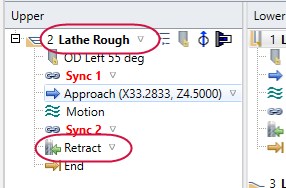
Use reference positions (not to be confused with reference points) to specify where to start and end operations. To select a reference position, click the arrow to the right of an operation, and then choose from the Reference position drop-down list.
For example, to move to the tool change position between operations, select G28 Home for the first operation's retract position. Then select G28 Home as the second operation's starting position. (The position name may be different, depending on your machine.)
NOTE
Reference positions appear only on the operation and retract nodes.