Syntax Highlighting
To make code files easier to read, Code Editor uses syntax highlighting, which displays code elements in different colors. For example, the editor displays MP code in the following colors:
- Comments: Green
- Keywords: Blue
- User code: Black
- Strings: Brown
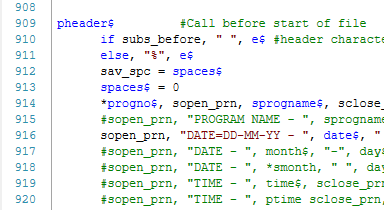
Code Editor also displays NC, MP, and MPNET files with syntax highlighting. You can customize the code colors used for each language in the Application Options dialog box.


