Along Mode: Selection Bar
The Along option in the Selection Bar's AutoCursor drop-down activates the Along mode.
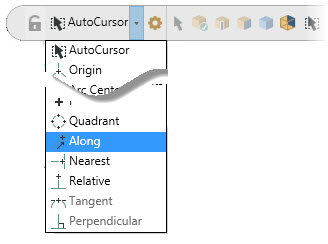
This mode allows you to create a new entity along an existing entity. In Along mode, Mastercam prompts you to select a line, arc, or spline. Select the entity at a position nearest to the endpoint from which you will specify the along length. When you select one of these entities, Mastercam prompts you to enter a length value.
NOTE
- If the entity you select is broken into multiple arc or line segments, the segment that you hover your cursor over highlights. You then click the segment closest to the endpoint to which you want your new point to be relative.
- When you select closed arcs (circles), the endpoint used for calculation is always the 0-degree quadrant point. If you click the circle in the bottom half, your distance from the zero point is calculated in a clockwise direction. If you click the circle in the top half, your distance from the 0 quadrant point is calculated in a counterclockwise direction.


