Machine Components
A component is the basic building block of a machine definition. Machine components include linear axes, rotary axes, tool spindles, tables, chucks, tailstocks, steady rests, turrets, automatic tool changers, aggregates, drill blocks, and multi-heads. A miscellaneous type is provided so that you can add a component, such as a parts catcher, to the machine definition.
Components can be stored in a component library file with a .mcam-gmd extension. Open component libraries in the Component File window in the Machine Definition Manager.
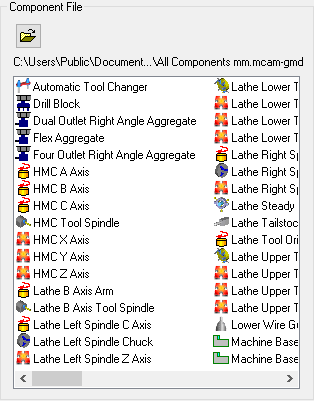
Components can be added to your machine in two ways.
- To add a component from a library, open the library and drag the component from the Component File window to its proper place in the component tree. This lets you add pre-defined components whose properties have already been set.
- To create new components, right-click in the component tree and select Add component.
Before adding a component to the machine definition, you will need to define the component group. Each machine type supports a predefined set of component groups. Each group describes a subassembly of the machine tool that the components are attached to.
Add the components in the order that corresponds to the way the components are attached to each other on the machine tool. For example, a 3-axis mill may have an X axis attached to the machine base, a Y axis attached to the X axis, and the table attached to the Y axis. You would add these components to the machine base as shown below:

Most components have properties pages. You will need to consult your machine tool documentation for information to complete the component properties. To open the properties, double-click a component in the tree, or right-click the component and choose Properties from the menu. Most components have Parameters, Geometry, and Position/Orientation On Machine properties. Unless you are using machine simulation, you typically do not need to complete the Geometry or Position/Orientation On Machine.
Relationships between components
When adding components to a machine definition, the components can be either sibling or child of another component. The first component in a component group is always an "only child" and cannot have any siblings.
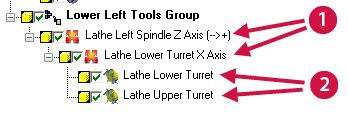
- Children
- Siblings
 Component Properties
- Parameters tab: Machine Component Manager (Linear Axis)
- Parameters tab: Machine Component Manager (Rotary Axis)
- Parameters tab: Machine Component Manager (Chuck)
- Parameters tab: Machine Component Manager (Tool Spindle)
- Parameters tab: Machine Component Manager (Turret (Lathe))
- Parameters tab: Machine Component Manager (Automatic Tool Changer)
- Parameters tab: Machine Component Manager (Drill Block)
- Parameters tab: Machine Component Manager (Aggregate)
- Parameters tab: Machine Component Manager (Router Spindle)


