Push-Pull panel
Use the Push-Pull function to extend bosses or produce cuts based on selected faces, features, or surfaces. Push-Pull can be used to create solid bodies from open (show below), closed and nested wireframe geometery as well as sheet bodies. You can also use Push-Pull to create or remove fillets and chamfers from edges.

The results you get depend on how you select the geometry and the direction you drag the control arrow. For example, selecting the top face lets you modify the boss' height (shown below), while selecting the side face lets you widen the boss.
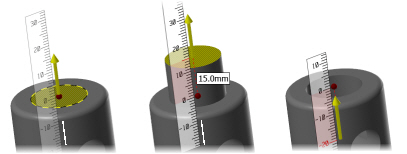
Click and drag the arrow on the solid to change the distance or type a distance while the arrow is highlighted and press [Enter].


