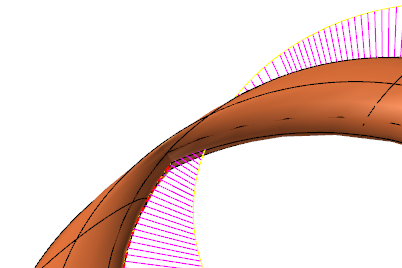
Edit Surface panel
Use the Edit Surface panel to edit existing surfaces. Press [Ctrl+click] to select and then [Enter] to edit multiple nodes, isocurves, and/or control points. You can modify the tangencies and magnitudes of the curve at node points, or edit tangencies at the vectors of control points. You can also add or remove node points and isocurves to increase your editing control and to make finer adjustments.
Mastercam automatically displays a temporary AutoCursor point to indicate the midpoint of the selected surface, a flowline, or between two nodes.
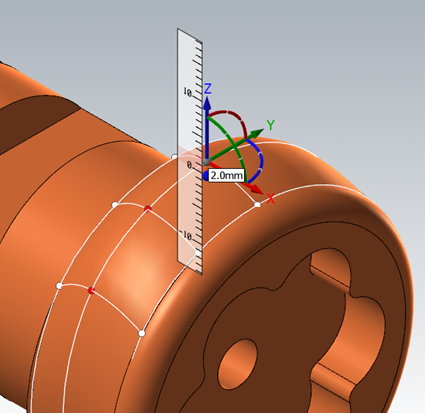
Edit Surface also assesses and analyzes the surface you are working on. From the Advanced tab, you can add or remove the visibility of flowlines along the U or V axes. Curvature combs represent the curvature of the surface and display curvature continuity or discontinuity.
 How do I use the curvature comb?
Use the options on the Advanced tab to enable and adjust the display of the curvature comb. Control the display of the curvature vectors by adjusting the value in the Scale field. Control comb spacing with the Chord height and Number options.
The yellow curve that displays when you enable the curvature comb is the curvature offset curve. A physical break in this yellow curve indicates that curvature continuity is lost.
The purple lines represent the curvature vectors and point away from the center of curvature.
Use the purple grab handle that displays on the yellow curve to adjust the size of the purple curvature vectors. This allows for improved visibility and magnifies smaller gaps in continuity. The purple grab handle is an alternative to entering a value in the Scale field.
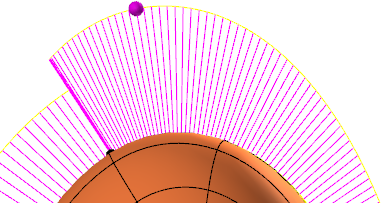
Use the Edit Surface function panel to manipulate the surface so that its curvature is continuous. When the yellow curve is connected at the nodes, the surface has curvature (G2) continuity; and when the yellow curve is tangentially continuous (smooth) at the nodes, the surface has flow (G3) continuity.
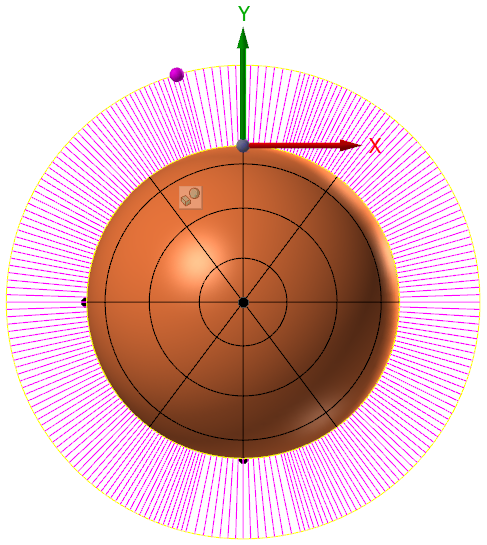
The curvature comb can also show inflection points on the curve. These are points where the curvature changes its sign and points in the opposite side of the curve. Inflection points exist wherever the curvature offset curve (yellow curve) crosses the surface.