Surface Sweep panel
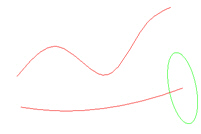
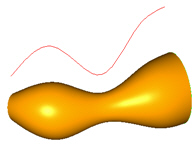
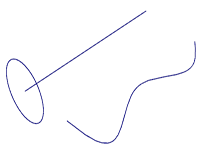
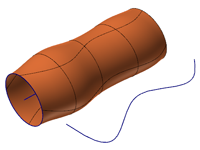
Use this function to create a surface by sweeping curves along a path. You define the surface with two types of curves, the across curves (which perform the sweep, defining the surface's cross-sections) and the along curves (which defines the sweep's path or trajectory). Besides surfaces, you can also use this function to create sheet solids or meshes.
 What are the
different kinds of across and along curve combinations?
What are the
different kinds of across and along curve combinations?
- 1 across/ 1 along: Mastercam sweeps one across curve along one along curve. You have the option to translate or rotate the across curve along the path.
- 2 or more across/1 along: Mastercam transitions from one across curve to the next, in the order in which you defined them, while following one along curve. This process is known as a linear blend.
- 1 across/2 along: Mastercam proportionally scales one across curve between two along curves.
How are swept
surfaces with translate produced?
With translate, notice how the across curve's orientation does not rotate with the along curve.
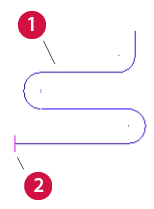
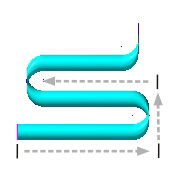
- Along curve
- Across curve
How are swept
surfaces with rotate produced?
With rotate, notice how the across curve's orientation rotates with the along curve.
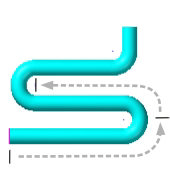
- Along curve
- Across curve
How do I work
with twisted nonplanar along curves?
With a twisted, nonplanar along curve, you must specify how the across curve will move. In this case, the construction plane can act as an axis for the moving coordinate system, but the following restrictions apply:
- When viewed in the construction plane, the along curve must not self intersect.
- No part of the along curve can be perpendicular to the plane.
In the case of an along-curve that spirals around the Z axis, for example, you must set the construction plane to the top plane. Otherwise, the surface will likely have imperfections or fail to build.
When you use the Rotate method, if the across curve is twisted, you must set the construction plane appropriately. That is, if the Surface fails to build (you get an ‘Unable to fit Swept Surface’ error), consider if the along curve is twisted, and then check whether the current construction plane is appropriate.
How do I work
with piecewise planar along curves?
A piecewise planar along curve has sections which are themselves planar, but the curve as a whole is non-planar. Mastercam recognizes these curves and handles them specially, applying the correct orientation controls.
The following pictures show such a curve both before and after creating a swept surface on the curve:
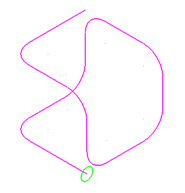
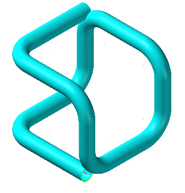
In this example, the along curve has lines and arcs that form a cube-like shape. The across curve is the green arc at the lower end of the along curve. Although the along curve is twisted, its six planar sections ensure a good swept surface. That is, the across curve rotates and twists correctly as it moves down the along curve.
How are two-rail
swept surfaces produced?
With the Two Rails (two along curves) method of swept surface generation, the rulings between equal points on the along curves control the across curve's twisting movement, just as with a ruled surface.
- If the across curve intersects both along curves (rails) at the ends, it will stay in contact with the along curves their entire length.
- If the across curve does not intersect both along curves at the ends, continued contact with both is not guaranteed. In this instance, the second along curve only guides the across curve and is not guaranteed to become an edge of the swept surface.
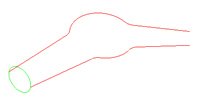
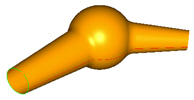
In the following example, the green circle sweeps down two along curves. Because the circle touches both curves at the ends, it maintains contact down the full length of the curves.
The next example uses two across curves: a line and an arc. The across curves sweep down the red along curves. Mastercam blends the two across curves as they move toward each other.
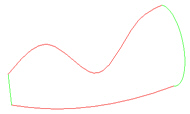
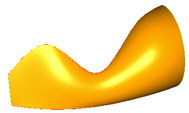
In the final example, the green circle sweeps down two along curves, but intersects neither. The upper along curve both orients and scales the resulting surface, but does not become a part of the surface.