Maximum Stepover dialog box
Maximum stepover sets the size of the step between XY cuts in a Surface toolpath. A smaller maximum stepover creates a more accurate toolpath, but it also creates a longer NC program and may take longer to generate.
| Maximum stepover = 0.05 | Maximum stepover = 0.2 |
|---|---|
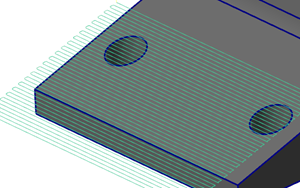
|
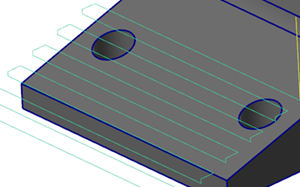
|
 Parameters
Maximum stepover
Sets the distance between adjacent passes in the surface toolpath. A smaller maximum stepover value creates a more accurate toolpath, but may take longer to generate the toolpath. Changing this value updates the other two values on the dialog box.
Approx. scallop height on flat floor
Calculates the maximum stepover value by determining how far apart the adjacent cuts would need to be in order to create the selected scallop height on a flat floor. Changing this value updates the other two values on the dialog box.
Approx. scallop height at 45 degrees
Calculates the maximum stepover value by determining how far apart the adjacent cuts would need to be in order to create the selected scallop height at a 45-degree wall. Changing this value updates the other two values on the dialog box.


