Non-cutting Region dialog box
Use the Non-cutting Region dialog box to specify the non-cutting portion of a round insert when the Prevent up-cutting option is active in Lathe Dynamic Rough parameters.

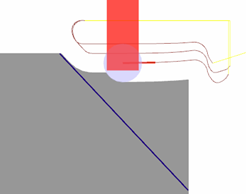
For example, in the first image above, you can see the tool shank crashing into the material as it tries to cut the toolpath. When Prevent up cutting is selected, and Angle is set to 0 degrees, Mastercam generates a toolpath that cuts only with the lower portion of the tool insert.
 Parameters
Angle
The angle at which the non-cutting area of the insert points.
Resolution (deg.)
The value by which the Angle setting increments.


