Coolant dialog box
Use the Coolant dialog box to turn coolant on or off in the stand-alone Tool Manager for mill and router tools. The active machine definition defines the coolant options. This dialog box has both Standard Coolant and Custom Coolant options. Use the Standard Coolant options to allow the post to work without canned text modifications. Use the Custom Coolant options to allow coolant customization through the use of canned text.
 Setting
coolant options
Setting
coolant options
Options will differ depending on your machine definition's coolant settings in the Coolant commands tab of the General Machine Parameters dialog box. You can get to this tab as follows:
-
In the Toolpaths Manager, select Machine under Properties to open the Machine Group Setup function panel.
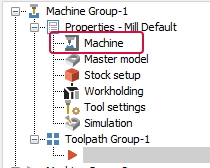
-
Click Configure machine to open the Machine Definition Manager.
-
Click Edit general machine parameters.

- Select the Coolant commands tab in the General Machine
Parameters dialog box.
- If you select Support coolant using coolant value in post processor and save your settings, the next time you access Tool Manager coolant options, the Standard Coolant options are available and the Custom Coolant options are unavailable. This allows the post to work without modification to the canned text section.
- If you deselect Support coolant using coolant value in post processor and save your settings, the next time you access Tool Manager coolant options, the Standard Coolant options are unavailable and the Custom Coolant options are available, allowing you to make modifications through canned text to customize your coolant.
The default setting for each coolant type is Ignore, which sets the operation to ignore any default settings.
For each type of coolant, you can set a maximum of two states:
- Whether to turn the coolant on, off, or maintain the current state (as set by a previous operation or point).
- Whether to apply the change at the current location/block, before it, or after it.
Your machine definition might not allow all possible states. For example, you might be limited to an On/Off toggle. You can turn on several different coolant options at the same time, if your machine definition allows it.
Generally, you can turn coolant options off individually. However, for some machines, the first coolant-off code turns off all coolant. The coolant section of the machine definition contains this setting.
Each tool definition can include a default coolant selection; operations use this selection if the Use tool's step, peck, coolant option is turned on in Mastercam's Tool page of the Machine Group Setup function panel.


