Distribute panel
Use the Distribute function to create multiple copies of geometry between two defined points. Distribute places the transformed geometry between the points along a vector or chain. It automatically arranges the copies according to the parameters that you set in the function panel.
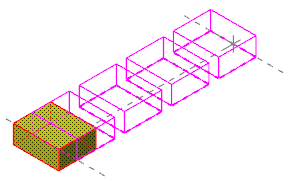
 What is the difference between the Vector and Chain options?
When distributing entities, you can choose to place them along a vector or a chain. Depending on the Type you select, some options in the Distribute function panel are unavailable.
Vector
Vector places the geometry along a vector you define. Use Select vector to return to the graphics window to place the two endpoints of your vector.

Use the Style options in the Vector group to modify how the geometry lies within the vector.
-
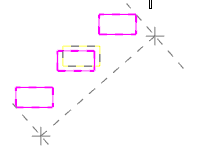
Contain: All transformed geometry lies within the fit vector margins.
-
Center: The fit vector margins bisect the first and last instance of the transformed geometry.

Chain
Chain places the geometry along a selected chain. Use Select chain to return to the graphics window to select a chain to place the geometry along.

Use the Chaining type options in the Rotation/Alignment group to modify how the geometry lies on the chain.
-
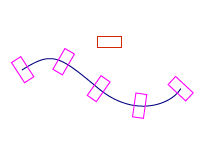
Rotate: Changes the orientation of the transformed geometry relative to the selected chain.
-
Transform: Maintains the original geometry orientation as it is placed along the chain.


