Stretch panel
Use the Stretch function to move (translate) entities or one or more copies of the entities to new positions and optionally lengthen or shorten selected lines. Lines are stretched when they cross or intersect the window used to select the entities. The line endpoints that lie within the selection window are translated, while the endpoints that lie outside the selection window maintain their original positions. You can select all geometric and drafting entities within the Stretch function.
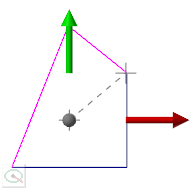
You can enter values into the function panel, or use the Polar and Delta on-screen control to dynamically stretch the selected geometry.
 Why does the Stretch function panel not appear?
The Stretch function panel will not display if none of the selected intersecting geometry is a line segment.


