Working with Machine Groups
Machine groups are created automatically when you select a machine from the Machine tab. Mastercam displays machine groups in the Toolpaths Manager.
Use machine groups store complete jobs for a specific machine. They contain:
- Toolpaths and other operations
- Tools
- Stock model and material selection
- Pointers to toolpath defaults, your post processor, and operation libraries
- Job setup information, such as tool and program numbering
Depending on the type of machine you have selected, you may see different options under Properties in the Toolpaths Manager. Selecting those options opens either the Machine Group Setup function panel or the Machine Group Properties dialog box.
 Understanding the
active machine group
Understanding the
active machine group
The machine group that has the red arrow is called the active machine group. In the example, the router machine group is the active group:
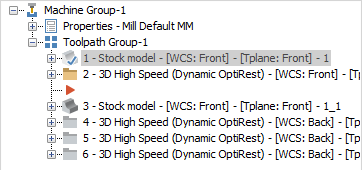
The active machine group controls which Mastercam product is actually running. When you create a new toolpath, it is inserted at the location of the red arrow. For example, in the image above, creating a new toolpath places it between Operation 2 and Operation 3. If your part has no machine groups, you are running Mastercam Design, and the Toolpaths tabs will not be available.
Understanding
default settings for machine groups
When you create a new machine group, the default group properties are read from several different places:
- The post processor, tool library, and material library are read from the machine definition.
- The toolpath defaults file, operations library, and file paths for NC and NCI files are read from the control definition.
- Default values for other machine group properties are stored in the toolpath defaults file.
Using machine
groups and views/planes
You can use machine groups to save view and plane settings. Mastercam saves the most recently used plane, view, and WCS selections for each machine group, and restores them whenever you activate the machine group. For example, if one machine group has toolpaths on the front of the part, and another machine group has toolpaths on the side of the part, whenever you activate either machine group, Mastercam automatically activates whichever views and planes you were using the last time the group was active.
Using toolpath
groups
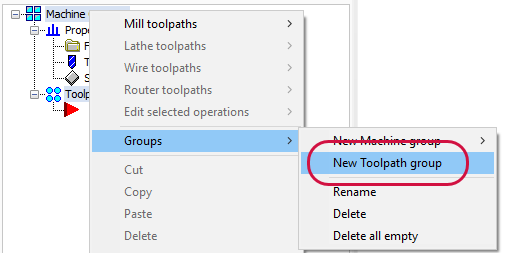
You can also create toolpath groups within each machine group. Toolpath groups inherit all the properties of a parent machine group. These are useful for creating sets of toolpaths on the same machine that you want to post separately. You can nest toolpath groups to create different layers of operations. Mastercam creates a default toolpath group when you create a machine group. Use the right-click menu to create new toolpath groups:
How do I...?
How do I replace a machine definition?
Mastercam lets you change the machine definition associated with the machine group. For example, if you need to run a job on a different machine, you can replace the machine definition instead of recreating your toolpaths. Mastercam validates the existing operations against the new machine definition. It also loads the post processor and control definition settings for the new machine. This ensures that when you post the operations, all of the tolerances and other NC settings are appropriate for the new machine.
For Mill or Router machines, select File under Properties in the Toolpaths Manager. Then choose Select machine definition.
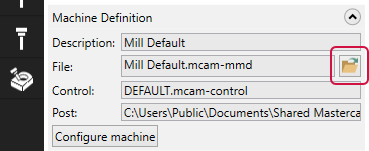
For Lathe and Wire machines, select File under Properties in the Toolpaths Manager. Then select Replace and choose a new machine.

How do I delete all machine groups from the Toolpaths Manager
Follow these steps to delete all machine groups from the Toolpaths Manager. When there are no machine groups in the Toolpaths Manager, Mastercam runs in Design mode.
This procedure deletes all toolpaths and other operations from your part file, and cannot be undone.
- Choose Design from the Machine tab.
-
Click Delete all operations in the Toolpaths Manager toolbar.

- Click Yes to confirm the deletion.
- Mastercam deletes all the machine groups, toolpath groups, operations, and tools from the Toolpaths Manager.
How do I create and use multiple machine groups
Mastercam lets you create as many machine groups as you need to organize your work. For example, if some toolpaths will be cut on one machine, and other toolpaths on a second machine, you can simply create a second machine group. Each machine group can store a its own setup information and tools, and use a different set of toolpath defaults. The toolpaths from each group will post to separate NC files.
In this example, the part is first turned on a lathe, then finished on a router:
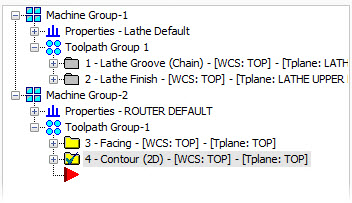
Even though you are using toolpaths from two different Mastercam products—in this case, Lathe and Router—you can save them all in the same part file.


