Find Extents pane
The Find Extents pane displays the extents of the current file's operations. To open the Find Extents pane, click Find Extents in Code Expert's lower-left corner. The pane displays the current extents in a grid. The grid shows each coordinate's address character and the minimum and maximum extent associated with that coordinate.
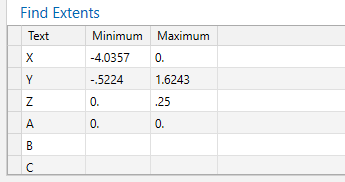
To locate extents in the open file, double-click a minimum or maximum value in the Find Extents grid. Code Expert highlights the first occurrence of the selected extent. Double-click again to find the next occurrence.
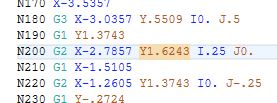
 Additional functionality
- To add a new address character to the Find Extents grid, double-click in the Text column, and then type the address character you need.
- To delete a row in the grid, select the row, and press [Delete].
- To copy the contents of the grid as text, right-click in the grid, and choose Copy from the pop-up menu.
- To restore the contents of the grid to its original state, right-click, and choose Reset from the pop-up menu.
- The address characters specified for the Find Extents function are located on the Utilities tab of the NC Configuration dialog box.
- The values in the grid automatically update when you edit the code file.


