Note dialog box
Use the Note dialog box to create or edit drafting notes and labels. You can also use the Note dialog box to create freestanding single, segmented, or multiple leader lines.
-
Notes are blocks of text that can contain one or more lines.
-
Labels are blocks of text with one or more leader lines. You can choose to add arrow heads or other terminating symbols to your leader lines.
Start the note by typing text in the Editor window. Click Properties to show the Drafting Options dialog box, where you can format the text. You can also import text from an ASCII file.
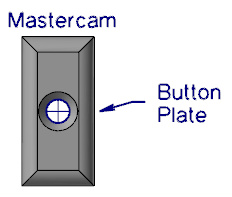
In the following picture, "Mastercam" is a note, and "Button Plate" is a label with a single leader.
 Parameters
Note text box
Displays note text, which you enter in this window by typing or loading from a file.
Load File
Displays the Open dialog box, where you can import text from an ASCII file into a note.
Add Symbol
Opens the Select Symbol dialog box, where you can choose a symbol to insert into a note.
Properties
Opens the Drafting Options dialog box, where you can use the Note Text or the Leaders/Witness property page to edit note, label, or leader parameters.


