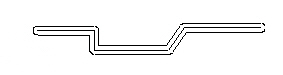
Partial Chaining
Partial chaining is used to select a portion of a closed chain when chaining would select too many entities automatically. Partial chaining is useful when chaining geometry for Lathe toolpaths, chaining geometry for net or swept surfaces, or in situations where you do not want to automatically chain all the entities in a path.
When using partial chaining, select the entity where you want the chain to start. Then select the entity where you want the chain to end. Mastercam creates an open chain from the entities between these two points and sets the chaining direction depending on where you selected the first entity. Choose Reverse from the Chaining dialog box to change the chaining direction. Choose Apply or press [E] to end a chain but remain in the Chain function.
 Partial chaining
using the Wait parameter
Partial chaining
using the Wait parameter
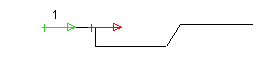
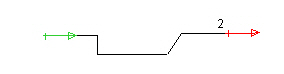
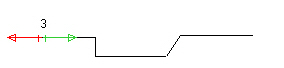
Partial chaining provides a technique for retracing entities. Select the Wait parameter in the Chaining dialog box to allow entities to be retraced. Retracing can be used to minimize tool rapid moves. Following is an example of entity retracing.
Using partial chaining click position 1.
Change Wait to Y and click position 2.
Click position 3.
Below is an example of a contour toolpath generated after retracing with partial chaining.