Add Component dialog box
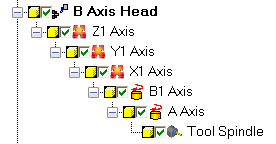
Use the Add Component dialog box to tell Mastercam whether it should create a child node in the component tree for a new component or add it to the same level as another component ("sibling"). For example, in the following picture, the components are children of each other. Each component is on a level below the previous one.
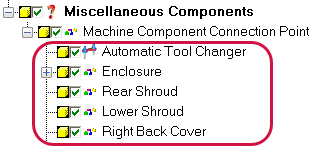
In contrast, in this picture the highlighted components are siblings of each other. Each is on the same level, and connects directly to the Machine Component Connection Point component.
Mastercam displays this dialog box whenever you add a component and the currently selected component already has a child.


