Solid Impression function
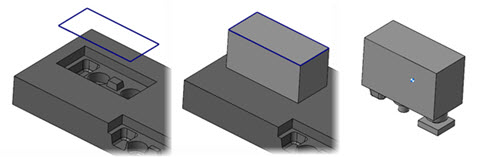
Use this function to create a new solid body that is a negative impression of a selected closed solid body. To create the impression, you select a planar wireframe chain that the function then projects to the solid body. The depth of the projection is from the wireframe chain to the bottommost face of the selected solid or to a selected solid face.
 How can
I control the projection depth?
How can
I control the projection depth?
You can control the projection depth by selecting a solid face rather than a solid body. The function then projects the chain to the selected face.
Why do
I get an error about disjoint bodies?
The selected wireframe and solid body are positioned such that the wireframe cannot be projected to the solid body.
Can I modify
the resulting solid body?
The resulting body is a brick solid and can be edited using all Solids and Model Prep functionality.


