Edit UV panel
Use Edit UV to flip flowline directions or to swap the U and V axes. You can also match the flowlines of multiple surfaces to a "seed" surface. You would do this in preparation for a flowline toolpath, which follows the shape and direction of surfaces to create a smooth and flowing toolpath motion.
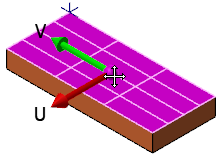
Besides using the controls in the Edit UV function panel, you can edit flowlines directly in the graphics window. For example, when you click the arrow representing the U or V direction, the direction flips, as shown in the following before and after pictures, where the V direction has been switched.

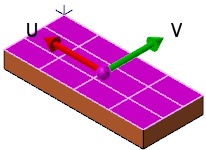
Also, you can swap the U and V axes by clicking the purple grab handle, as shown in the following before and after images.