Reflow UV panel
Use the Reflow UV function to manipulate flowlines on a surface so that you can more effectively utilize the flowline milling toolpaths. There are two ways to manipulate flowlines:
- The Rotation angle reflow method.
- The Boundary curves reflow method.
To view initial flowlines, select Reflow UV and click Rotation angle in the Reflow UV function panel. Then select the desired surface.
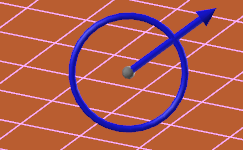
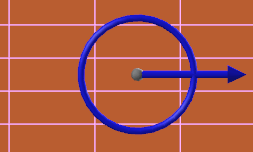
For example, the surface shown in the first image below has UV curves that may not be appropriate for the toolpath you want to use. By selecting the Rotation angle reflow method, you can use a Rotate control to change the direction of the flowlines, as shown in the second image below.
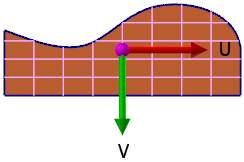
As another example, the image below uses Edit UV to show the initial flowlines of a surface. These flowlines may not be appropriate for your intended flowline toolpath.
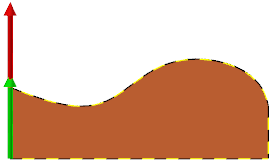
In this case, you can use the Boundary curves reflow method to select boundary curves (first image). You then manipulate the UV curves such that they flow with the shape of the selected boundary (second image).
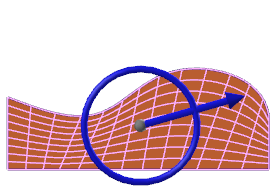
 Reflowing by rotation angle
- From Mastercam's Surfaces tab, choose Reflow UV.
- In the Reflow UV function panel, select Rotation angle, and set other options as needed.
- Select the surface to reflow.
-
Drag the Rotate control's arrow to the desired setting, and click to set the angle.
NOTEYou can also set the angle by manually entering a value into the function panel's Rotation angle field or by entering a value from your keyboard directly into the Rotate control.
- Press [Enter] to accept the changes.
Reflowing by boundary curves
Select up to four chains of curves to define the boundaries of a new surface, which will be formed over the existing surface. Mastercam redefines the flow by the shape of the boundary curves.
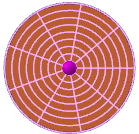
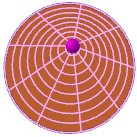
Circles have extra capabilities when used as a boundary curve. When chained, the center of the circle becomes a purple grab handle (first image) that can move the pole position off-center if desired (second image).
- From Mastercam's Surfaces tab, choose Reflow UV.
- In the Reflow UV function panel, select Boundary curves, and set other options as needed.
- Select the surface you want to reflow.
- Chain up to four curves to define the reflow surface.
-
Press [Enter] to accept the chains.
If you have chained a circle, follow these additional steps. To:
- Adjust the center or pole of the circle to off-center, use the purple grab handle that displays at the flowlines intersection. Click the purple grab handle and move your mouse to where you wish to place the pole. Click again to set the pole. Press Enter.
- Keep the pole at the center of the circle, press Enter.
- Use the grab handle, Rotate control, or both to further refine the reflow surface results.
- Press [Enter] to accept the changes.


