AUV Science Data Processing
This document describes the steps taken after an AUV CTD run in order to process the data from the vehicle into useful science data products.
Before Starting
You can save yourself some grief if you make sure the appropriate SSDS components are running correctly before starting this process. You can ssh into pismo.shore.mbari.org and change into the /opt/ssds/logs directory. This is where the UpdatBot process writes it's log files to. The name of the log file is ssds-updateBot.log and it rotates a new log file each day. If there is a log file for today's date, you can be pretty sure things are running OK. The UpdateBot process runs a scheduled crawl of SSDS as well as listens for messages from SSDS. Often times, if you cat the ssds-updateBot.log file with today's date, the last couple of lines will usually read:
    2021-06-03 13:51:32,923 DEBUG [moos.ssds.clients.updateBot.UpdateBot doesDataContainerNeedNetCDF ?] Hellow world
    2021-06-03 13:51:32,942 DEBUG [moos.ssds.clients.updateBot.UpdateBotRunner main ?] Done crawling all deployments, will now go to sleep for 21600 seconds
This means the process crawled correctly and it should be ready to receive any messags from SSDS. Also you an make sure the UpdateBot process is running by executing ps -ef | grep java and you should see a line like:
ssdsadm+ 1217 1 0 Apr19 ? 04:59:39 /usr/java/jdk1.8.0_121/bin/java -Duser.timezone=UTC -Xms512m -Xmx4096m -classpath /opt/ssds/updatebot/ssds-updatebot-client-new-ssds.jar moos.ssds.clients.updateBot.UpdateBotRunner
If those two conditions are met, that is a pretty good indication SSDS is in good shape to process the AUVCTD files
Instructions
Warning
In all these examples, I am using 2021.153.00, but that will change depending on the mission you are processing data for
-
After an AUV mission is run, the AUV operations team copies the data files to a directory on an atlas share that is also mounted on the server elvis. Often times they copy it to Mike McCann's tempbox. For this example, the files were copied to
smb://atlas.shore.mbari.org/tempbox/mccann/2021.153.00. You should see approximately 35-40 files ending in extension like .cfg and .log (along with others).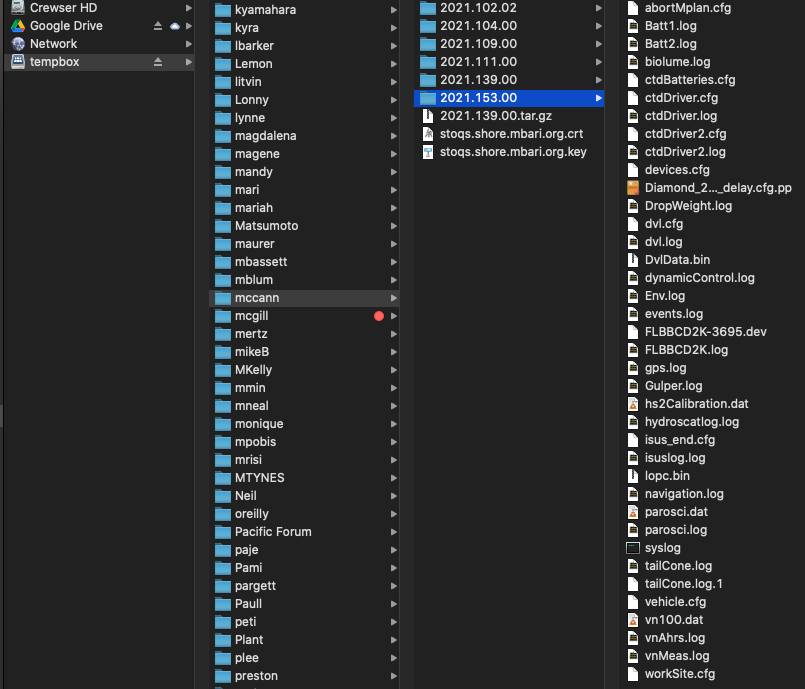
-
Once the files have been copied, you need to login to the server elvis.shore.mbari.org with your own account
- Now, switch over to the ssdsadmin account using
sudo -u ssdsadmin -i(if you can't do this, you will need to submit a ticket to IS to enable this for your account). -
Now, create a tarball of the mission directory you are processing data for
<102 elvis.shore.mbari.org /u/ssdsadmin> cd /mbari/Tempbox/mccann <103 elvis.shore.mbari.org /Tempbox/mccann> tar cvf 2021.153.00.tar 2021.153.00 2021.153.00/ 2021.153.00/Gulper.log 2021.153.00/Batt2.log 2021.153.00/dvl.cfg 2021.153.00/DropWeight.log 2021.153.00/dynamicControl.log 2021.153.00/ctdDriver.log 2021.153.00/hydroscatlog.log 2021.153.00/FLBBCD2K.log 2021.153.00/tailCone.log.1 2021.153.00/abortMplan.cfg 2021.153.00/vehicle.cfg 2021.153.00/ctdDriver2.log 2021.153.00/isus_end.cfg 2021.153.00/vnMeas.log 2021.153.00/vn100.dat 2021.153.00/isuslog.log 2021.153.00/Batt1.log 2021.153.00/events.log 2021.153.00/FLBBCD2K-3695.dev 2021.153.00/tailCone.log 2021.153.00/lopc.bin 2021.153.00/parosci.log 2021.153.00/Env.log 2021.153.00/syslog 2021.153.00/DvlData.bin 2021.153.00/dvl.log 2021.153.00/navigation.log 2021.153.00/ctdBatteries.cfg 2021.153.00/parosci.dat 2021.153.00/ctdDriver.cfg 2021.153.00/workSite.cfg 2021.153.00/hs2Calibration.dat 2021.153.00/devices.cfg 2021.153.00/vnAhrs.log 2021.153.00/biolume.log 2021.153.00/Diamond_20210414_recover_delay.cfg.pp 2021.153.00/ctdDriver2.cfg 2021.153.00/gps.log <104 elvis.shore.mbari.org /Tempbox/mccann> -
Gzip the file for compactness using:
<104 elvis.shore.mbari.org /Tempbox/mccann> gzip 2021.153.00.tar -
Now, copy the new tarball to /usr/local/auv_ctd using
cp 2021.153.00.tar.gz /usr/local/auv_ctd -
Change into that directory using
cd /usr/local/auv_ctd - If you happened to have logged into pismo to check the SSDS processes outlined in the section at the top of this document, you can monitor progress of next step which is the the SSDS processing by running (on pismo)
tail -f /opt/ssds/logs/ssds-updateBot.login a separate window. This will allow you to see when the AUV message arrives and monitor the progress of SSDS' conversion of raw data files to NetCDF files. -
Now, on elvis, run the portal software which processes the data files into the right directory structure and sends a summary XML document to the SSDS system for processing. Do this using:
./portal AUVCTD2021153 2021.153.00.tar.gz -
After the processing has finished, you should see something like:
Marshalled the AUV mission in /mbari/AUVCTD/missionlogs/2021/2021153/2021.153.00 into XML Attempting to publish AUVCTD /mbari/AUVCTD/missionlogs/2021/2021153/2021.153.00 to SSDS server jnp://bob.shore.mbari.org:1099/ published XML describing mission AUVCTD /mbari/AUVCTD/missionlogs/2021/2021153/2021.153.00 to SSDS server jnp://bob.shore.mbari.org:1099/ If everything goes well in SSDS:Ingest/Ruminate an email message to auvctd@listserver.mbari.org will arrive shortly. Thu, 3 Jun 2021 11:41:57 PDT: Done receiving AUV mission data. <110 elvis.shore.mbari.org /local/auv_ctd> -
The portal software basically untar's and copies all the raw data files to the location
smb://atlas.shore.mbari.org/AUVCTD/missionlogs/2021/2021153and then generates and XML document in a format that SSDS is expecting and publishes that message to the SSDS. This will fire off a bunch of processing that happens on pismo which converts the raw log files to NetCDF format and then sends an email toauvctd@listserver.mbari.orgdescribing the mission and it's data. Here is the directory structure for the raw data files after they are copied to the AUVCTD share.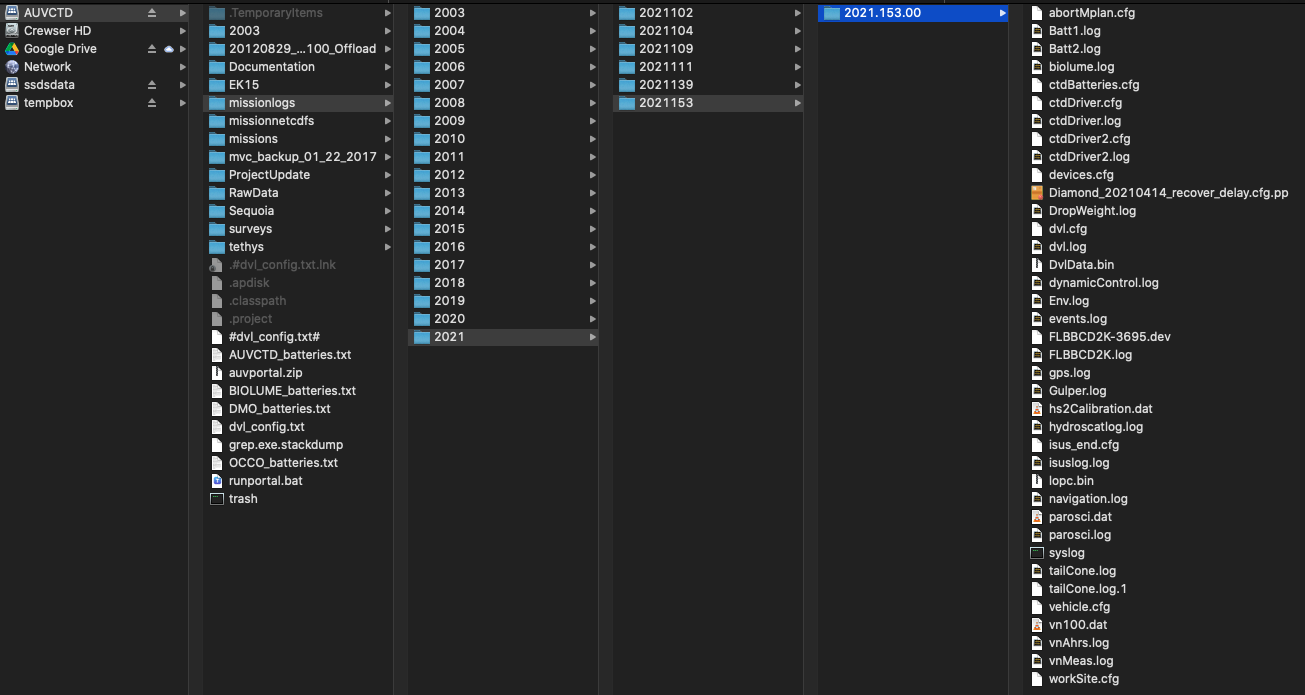
-
When SSDS generates the NetCDF files, it places them on a different share located at
smb://atlas.shore.mbari.org/ssdsdata/ssds/generated/netcdf/files/ssds.shore.mbari.org/auvctd/missionlogs. You can see this structure in the image below for this example.
-
That takes care of the SSDS side of things so the next steps all take place on the machine elvis.shore.mbari.org.
-
To process the LOPC data, run the following:
cd ~/dev/auv_ctd.cvs/src/py/auv /bin/bash export PATH="/u/ssdsadmin/dev/auv_ctd.cvs/src/py/auv:/usr/local/miniconda2/bin:$PATH" source activate auv_ctd (auv_ctd) bash-4.2$ processLOPC.pl 2021.153.00 -
This will take awhile to process, but after it finishes you will end up with a lopc.log and lopc.nc file in the SSDS file directory. At the end of the processing, you should see an entry similar to
INFO 2021-06-03 12:30:08,281 main(): Created file: /mbari/ssdsdata/ssds/generated/netcdf/files/ssds.shore.mbari.org/auvctd/missionlogs/2021/2021153/2021.153.00/lopc.nc INFO 2021-06-03 12:30:08,282 main(): Processing finished: Thu Jun 3 12:30:08 2021 Elapsed processing time from start of processing = 235 seconds -
You then need to exit the environment for the previous step by running
(auv_ctd) bash-4.2$ exit -
Now it's time to run the Matlab science data processing and product generation. First, change to the right directory on elvis using:
cd ~/dev/auv_ctd.cvs/src/matlab/doradosdp/process/ -
You then need to edit the reprocess_surveys.m file to add the new mission for processing. Usually
viworks finevi reprocess_surveys.m -
The first thing to do is go to the end of the file and comment out any active lines that were from a previous run. Basically, if you see any line that does not start with
%, add one at the beginning of the line to comment it out. In this example, the file ended with the following lines:% Overnight diamond in Monterey Bay remark='Monterey Bay Diamond Mission - 13921G - No isus data'; AUVprocess_main('AUVCTD', 2021, ['139.00'], server, ssdsLoadFlag, ssdsLoadsJar, localFlag, localDataDir, localCalDir, notifyEmail, skipMissionProc, [], 'ctd1', remark) -
I commented them out using
%%and it ended up looking like:% Overnight diamond in Monterey Bay %%remark='Monterey Bay Diamond Mission - 13921G - No isus data'; %%AUVprocess_main('AUVCTD', 2021, ['139.00'], server, ssdsLoadFlag, ssdsLoadsJar, localFlag, localDataDir, localCalDir, notifyEmail, skipMissionProc, [], 'ctd1', remark) -
Then, you need to add a new entry for the mission you want to process and that is usually done by copying the lines you just commented out, edited them for the year and year day for your mission and then uncommenting them. In my examples, the final lines of the file looked like:
% Overnight diamond in Monterey Bay %%remark='Monterey Bay Diamond Mission - 13921G - No isus data'; %%AUVprocess_main('AUVCTD', 2021, ['139.00'], server, ssdsLoadFlag, ssdsLoadsJar, localFlag, localDataDir, localCalDir, notifyEmail, skipMissionProc, [], 'ctd1', remark) % Diamond run in Monterey Bay remark='Monterey Bay Diamond Mission - 2021153'; AUVprocess_main('AUVCTD', 2021, ['153.00'], server, ssdsLoadFlag, ssdsLoadsJar, localFlag, localDataDir, localCalDir, notifyEmail, skipMissionProc, [], 'ctd1', remark) quit -
Save and exit the editor and then fire off the processing by running:
RunReprocessJob -
The processing will take awhile to run but will result in an email with all links to the products.
If things don't go as expected
Sometimes the processing fails or there may be some changes needed in the Matlab code. Here are some steps to follow to guide that process.
Enable X11 graphics in the ssdsadm account
-
Log into elvis with the
-Yoption:ssh -Y elvis.shore.mbari.org -
Get the X11 authorization key by executing
xauth list | tail -1, e.g.:[mccann@elvis ~]$ xauth list | tail -1 elvis.shore.mbari.org:11 MIT-MAGIC-COOKIE-1 47fc17df7e825af3d7c6fe3cbe6986c4 -
Become the ssdsadmin user and enable X11 graphics; test with the
xclockcommand:[mccann@elvis ~]$ sudo -u ssdsadmin -i ... <101 elvis.shore.mbari.org /u/ssdsadmin> xauth add elvis.shore.mbari.org:11 MIT-MAGIC-COOKIE-1 47fc17df7e825af3d7c6fe3cbe6986c4 <102 elvis.shore.mbari.org /u/ssdsadmin> xclock ^C -
Run the reprocess job interactively:
/mbari/matlab/bin/matlab -nodesktop ... >>> reprocess_surveys -
The graphics will pop up as they are generated during the script's execution. Debugging of problems that crop up can be facilitated by appropriate placement of
keyboardstatements and examination.