TRN Software Appendices
- TRN Software Appendices
Appendix: trnplayer-sandbox.sh
Download and build a sandboxed installation of libtrnav with trn-player
#!/bin/bash

# Default canfiguration
SESSION=$(date +%Y%m%d_%H%M%S)
MFRAME_BRANCH=master
LIBTRNAV_BRANCH=master
LIBTRNAV_DATA_BRANCH=main
PKG_NAME=pkg
STAGE_NAME=trnplayer
VERBOSE=N
KEEP_WORK=N

# set paths
BUILD_PARENT=$PWD

WORK_DIR=$BUILD_PARENT/trnplayer-$$
MFRAME_BUILD=$WORK_DIR/mframe/build
MFRAME_INSTALL=$MFRAME_BUILD/$PKG_NAME
LIBTRNAV_TOP=$WORK_DIR/libtrnav
LIBTRNAV_BUILD=$WORK_DIR/libtrnav/build
LIBTRNAV_INSTALL=$WORK_DIR/sandbox
LIBTRNAV_DATA_BUILD=$WORK_DIR/libtrnav-data/build
LIBTRNAV_DATA_INSTALL=$LIBTRNAV_DATA_BUILD/$PKG_NAME

STAGE_DIR=$WORK_DIR/$STAGE_NAME

# function: verbose output
vout() {
    if [ $VERBOSE == "Y" ]; then
        echo $1
    fi
}

print_help() {
    echo ""
    echo " trnplayer-sandbox.sh : build trn-player binary distribution"
    echo ""
    echo " Use: trnplayer-sandbox.sh [options...]"
    echo " Options"
    echo ""
    echo "   -h : print help message"
    echo "   -k : keep working files"
    echo "   -v : enable verbose output"
    echo ""
}

# function: command line parser
parse_opts() {
    while getopts "hkv" opt ; do
      case $opt in
        h) print_help
            exit 1
        ;;
        v) VERBOSE="Y"
          ;;
        k) KEEP_WORK="Y"
          ;;
        :) # Catch missing arguments for options that expect one
          echo
          echo "Error: Option -${OPTARG} requires an argument." >&2
          echo
          print_help
          exit 1
          ;;
        ?) # Catch invalid options
          echo
          echo "Error: Invalid option -${OPTARG}." >&2
          echo
          print_help
          exit 1
          ;;
        esac
    done
}

# get command line options
parse_opts $*

# show config (verbose)
vout "VERBOSE $VERBOSE"
vout "KEEP_WORK $KEEP_WORK"

# make working directory
vout "mkdir $WORK_DIR"

mkdir -p $WORK_DIR

# clone, build install libtrnav
vout "cloning mframe..."

cd $WORK_DIR
git clone git@bitbucket.org:mbari/mframe.git

vout "building mframe branch ${MFRAME_BRANCH}..."

cd mframe
git checkout ${MFRAME_BRANCH}
mkdir build

cd build
cmake -DCMAKE_INSTALL_PREFIX=$MFRAME_INSTALL ..
cmake --build .
cmake --install .

# clone, build install libtrnav
vout "cloning libtrnav..."

cd $WORK_DIR
git clone git@bitbucket.org:mbari/libtrnav.git

vout "building libtrnav branch ${LIBTRNAV_BRANCH}..."

cd libtrnav
git checkout ${LIBTRNAV_BRANCH}
mkdir build

cd build
cmake -DCMAKE_INSTALL_PREFIX=$LIBTRNAV_INSTALL -DCMAKE_PREFIX_PATH=$MFRAME_INSTALL ..
cmake --build .
cmake --install .


#  clone libtrnav-data into staging directory
vout "cloning libtrnav-data branch $LIBTRNAV_DATA_BRANCH in $LIBTRNAV_INSTALL..."

cd $LIBTRNAV_INSTALL
git clone git@bitbucket.org:mbari/libtrnav-data.git

cd libtrnav-data
git checkout $LIBTRNAV_DATA_BRANCH

vout "running post-install..."
for APP in $(ls $LIBTRNAV_INSTALL/bin/*)
do
# change netcdf library load path to use RPATHs
# to make it relocatable
install_name_tool -change /opt/local/lib/libnetcdf.22.dylib @rpath/libnetcdf.dylib $APP

# codesign executable so it won't be rejected by SIP/Gatekeeper
codesign --force --deep --sign - $APP
done

if [ ${KEEP_WORK} == "N" ] ; then
    vout "removing mframe..."
    rm -rf $WORK_DIR/mframe
    vout "removing libtrnav..."
    rm -rf $WORK_DIR/libtrnav
fi

vout "libtrnav installed: $LIBTRNAV_INSTALL"
vout "done"
Appendix: trn-player Configuration File Reference
Syntax
- key = value pairs
- leading/trailing whitespace OK
- supports terrainAid.cfg and/or trn-player options
- semicolon terminations (terrainAid.cfg) optional
- comments may start with '#' or '//''
- environment variables using $[A-Za-z0-9_-.] (no braces) will be expanded
trn-player Options
  Option  : Description
 ----------------------------------------------------------------
 cdir     : config directory
 config   : config file path
 ddir     : data directory
 dperiod  : decimation period (ms) alias: samplePeriod
            >0  : Decimates records to match specified
                  input period as nearly as possible
            <=0 : Disabled (use all records)

 eofile   : estimate output file name (w/o path)
 ftype    : TRN filter type
              0: TRN_FT_NONE
              1: TRN_FT_POINTMASS
              2: TRN_FT_PARTICLE (default)
              3: TRN_FT_BANK
              values other then 2 are experimental

 fstat    : force beam status true (TerrainNav.log)
 oflags   : output flags (may include multiple)
              p: pretty
              m: measurement CSV
              e: estimate CSV
              q: quiet
              S: output MMSE
              L: output MLE
              B: output both MLE, MMSE

 interp  : map interpolation method (DEM maps only)
              0: nearest-neighbor (no interpolation)
              1: bilinear
              2: bicubic

 iformat : input format
              0: MbTrn.log
              1: TerrainNav.log
              2: TerrainAid.log
              3: DVL CSV [1,2]
              4: IDT CSV [1,2]
              5: MB/Generic CSV [1,2]

              [1] implies moformat = iformat; use -Z --moformat to override
              [2] no default name; use -O, --mofile to set/enable

 ifile    : log/input name (override lookup based on type)
 mdir     : map directory
 mfile    : map file name (w/o path)
 odir     : TRN output directory
 mofile   : measurement output file name
 pfomode  : particles file logging mode
              0: HISTOGRAM (distribution summary)
              1: PARTICLES (all particles; large data volume)

              log full particle states or a histogram
              Note: generates a large volume of data
              writes to odir/filterDistrib.txt

 pfile    : particles file name (w/o path)
 reinits  : allow TRN particle filter reinits
 stype    : Bathymetry data format passed to
            measurement update; may differ from sensor of origin
            Corresponds to terrainAid.cfg sensor_type
              0: UNDEFINED
              1: TRN_SENSOR_DVL    DVL
              2: TRN_SENSOR_MB     Multibeam
              3: TRN_SENSOR_PENCIL Single Beam
              4: TRN_SENSOR_HOMER  Homer Relative Measurement
              5: TRN_SENSOR_DELTAT Imagenex DeltaT

 vfile    : vehicle spec file name (w/o path)<
 mweight  : set modified weighting scheme
              0: TRN_WT_NONE No modification
              1: TRN_WT_NORM  Shandor's original alpha modification
              2: TRN_WT_XBEAM Crossbeam with original
              3: TRN_WT_SUBCL Subcloud with original
              4: TRN_FORCE_SUBCL Force Subcloud every measurement
              5: TRN_WT_INVAL Force invalid

 mtype    : map file format
              0: UNDEFINED
              1: TRN_MAP_DEM Digital Elevation Map (.GRD)
              2: TRN_MAP_BO  Binary Octree Map (.BO)

 moformat : measurement output CSV file format (input file format enum)
              Use -Z, --moformat to override default (== iformat)
              i.e. to convert DVL, IDT to MB/Generic format

              No default name

              Use -Z, --mofile to enable measurement output, set file name

Defaults:

 - sensor   : TRN_SENSOR_MB
 - mfile    : PortTiles
 - vfile    : mappingAUV_specs.cfg
 - ifile    : Mbtrn.log
 - mdir     : ./maps
 - cdir     : ./data
 - ddir     : ./data
 - iformat  : IOFMT_MBTRN
 - oflags   : pS
 - odir     : trnplayer[-TRN.n]
 - moformat : same as input format for CSV input; IOFMT_MB otherwise
 - eofile   : none
 - mofile   : none
terrainAid.cfg Options
 Option               : Description (trn-player alias)
 ----------------------------------------------------------------
 mapFileName          : map file name (mfile)
 particlesName        : particles file name (pfile)
 vehicleCfgName       : vehicle spec file name (vfile)
 dvlCfgName           : DVL spec file name
 resonCfgName         : Multibeam spec file name
 lrauvDvlFilename     : LRAUV DVL spec file name
 map_type             : TRN map format (mtype)
 filterType           : TRN filter type (ftype)
 allowFilterReinits   : allow TRN filter reinitializations if true (reinits)
 useModifiedWeighting : use modified weighting scheme (mweight) [1]
 mapInterpMethod      : map interpolation method (interp)
 forceLowGradeFilter  : Use low grade filter (flgf) [2]
 terrainNavServer     : trn-server host IP address
 terrainNavPort       : trn-server host IP port
 samplePeriod         : decimation period (msec) (dperiod)
 maxNorthingCov       : TRN convergence criteria
 maxNorthingError     : TRN convergence criteria
 maxEastingCov        : TRN convergence criteria
 maxEastingError      : TRN convergence criteria
 RollOffset           : roll angle (phi) bias (deg)
 useIDTData           : process as IDT
 useDVLSide           :
 useMbTrnData         : use MbTrn log
 useMbTrnServer       : use MbTrn server

 Notes:
 [1] Modified Weighting:
     pmf grid resolution is specified in the ones digit as follows (0 to 5)
      0 == default
      1 == 1
      2 == 2
      3 == 3
      4 == 4
      5 = 0.5
     Examples:
      use == 125, grid res == 0.5
      use == 123, grid res == 3
     Number of filters is calculated using the 10's digit
     as follows (0 to 5)
      0 == default
      1 == 1
      2 == 2
      3 == 4
      4 == 10
      5 == 11
     pmf grid size is specified using the 100's digit
     as follows (0 to 2):
      0 == 100
      1 == 200
      2 == 300
     Examples:
      useModifiedWeighting = 15;  1  Numfilt=1, Pmf grid .5m
      useModifiedWeighting = 11;  2  Numfilt=1, Pmf grid 1 m
      useModifiedWeighting = 21;  3  Numfilt=2, Pmf grid 1 m
      useModifiedWeighting = 51;  4  Numfilt=11,Pmf grid 1 m
      useModifiedWeighting = 41;  5  Numfilt=10,Pmf grid 1 m

 [2] forceLowGradeFilter:
      if true,filter performs angular rate
      integration and estimates attitude and position.
      if false, filter will choose its settings based on
      the kearfott system is available.
Appendix: Example mbtrnpp.cfg
SeafloorMapping/2024/AxialSeamount/TRN/TRNtest/0_TRNconfig/mbtrnpp-sentry.cfg
#  mbtrnpp configuration
#  [generated by mbtrncfg]
#
# - option naming same as command line (w/o '--')
# - use '#' or '//' for comments
# - "opt" annotations indicate option name and internal type
    # - some options support variable substitution:
    #     option        variable          description
    #     ------        --------          -----------
    #     output        SESSION           mbtrpp session ID (YYYYMMDD-hhmmss)
    #     input         TRN_RESON_HOST[1] input socket IP address
    #     mb-out        TRN_HOST[1]       TRN processing host IP
    #     trn-out       TRN_HOST
    #     trn-mid       TRN_SESSION       TRN mission ID (YYYY-JJJ) (JJJ: year day)
    #     log-directory TRN_LOGFILES[2]   TRN log directory
    #     trn-map       TRN_MAPFILES[2]   TRN map file directory
    #     trn-par       TRN_DATAFILES[2]  TRN data/cfg file directory
    #     trn-cfg       TRN_DATAFILES
    #   Notes
    #     [1] use current host IP address if environment unset
    #     [2] use current directory if environment unset

// opt verbose [int]
// debug output level
// <0 : TRN debug (-2 typical)
// >0 : MB-System debug (>2 very verbose)
verbose=0

// opt log-directory [mb_path]
// log directory
log-directory=mbtrnpp-SESSION

// opt input [input_mode_t]
// input data source specifier
// file_path
// socket:IP:port:bcast_group
input=socket:TRN_RESON_HOST:239.255.0.1:6020

// opt format [int]
// input data format
format=261

// opt auv-sentry-em2040 [none]
// enable special pressure depth encoding in Sentry EM2040
auv-sentry-em2040

// opt output [?]
// output mode specifier
output=file:mbtrnpp_SESSION.mb1

// opt swath-width [double]
// sonar swath (decimal degrees)
swath-width=90

// opt soundings [int]
// number of sonar soundings to output
soundings=21

// opt median-filter [?]
// median filter parameters
// <threshold>/<n_across>/<n_along>
median-filter=0.05/7/3

// opt platform-file [mb_path]
// description TBD
#platform-file=

// opt platform-target-sensor [int]
// description TBD
#platform-target-sensor=

// opt projection
// cartographic(?) projection ID
#projection=

// opt mbhbn [int]
// MB1 server heartbeat modulus
// (timeout preferred, use mbhbt)
#mbhbn

// opt mbhbt [double]
// MB1 server heartbeat timeout (s)
mbhbt=0

// opt trnhbt [double]
// TRN server heartbeat timeout (s)
trnhbt=0

// opt trnuhbt [double]
// TRNU (udp update) server heartbeat timeout (s)
trnuhbt=30

// opt delay [int64_t]
// Delay main TRN processing loop (msec)
delay=0

// opt statsec [double]
// TRN profiling logging interval (s)
statsec=30

// opt statflags [mstats_flags]
// TRN profiling flags
// MSF_STATUS - include status
// MSF_EVENT - include events
// MSF_ASTAT - include aggregated stats
// MSF_PSTAT - include periodic stats
// MSF_READER - include R7K reader stats
statflags=MSF_STATUS|MSF_EVENT|MSF_ASTAT|MSF_PSTAT

// opt trn-en [bool]
// opt trn-dis [bool]
// enable/disable TRN processing
// use Y/1: enable N/0: disable
trn-en=Y

// opt trn-utm [long]
// UTM zone for TRN processing (1-60)
// Monterey Bay : 10
//        Axial :  9
trn-utm=9

// opt trn-map [char*]
// TRN map file (required for TRN processing)
// (may be a directory path for tiled map)
trn-map=TRN_MAPFILES/AxialTiles2022

// opt trn-cfg [char*]
// TRN configuration file (required for TRN processing)
trn-cfg=TRN_DATAFILES/sentry_specs.cfg

// opt trn-par [char*]
// TRN particles file (optional for TRN processing)
#trn-par=

// opt trn-mid [char*]
// TRN mission ID
// (used for TRN log directory name prefix)
trn-mid=mb-TRN_SESSION

// opt trn-mtype [int]
// TRN map type
// TRN_MAP_DEM  1
// TRN_MAP_BO   2
trn-mtype=2

// opt trn-ftype [int]
// TRN filter type
// TRN_FILT_NONE       0
// TRN_FILT_POINTMASS  1
// TRN_FILT_PARTICLE   2
// TRN_FILT_BANK       3
trn-ftype=2

// opt trn-fgrade [int]
// filter grade
// 0: use low grade filter
// 1: use high grade filter
trn-fgrade=1

// opt trn-mweight [int]
// use modified weighting
// 0 - No weighting modifications
// 1 - Shandor's original alpha modification
// 2 - Crossbeam with Shandor's weighting
// 3 - Subcloud with Shandor's origina
// 4 - Subcloud with modified NIS always on
trn-mweight=4

// opt trn-ncov [double]
// TRN convergence criteria
// northing covariance limit
trn-ncov=49

// opt trn-nerr [double]
// TRN convergence criteria
// northing error limit
//trn-nerr=50
trn-nerr=500

// opt trn-ecov [double]
// TRN convergence criteria
// easting covariance limit
trn-ecov=49

// opt trn-eerr [double]
// TRN convergence criteria
// easting error limit
trn-eerr=500

// opt mb-out [?]
// MB1 output specifier
// comma delimited list including one or more of:
// mb1svr:<ip>:<port>  - enable MB1 server
// mb1                 - enable MB1 binary record logging
// file:<path>         - enable MB1 binary record logging
// file                - enable MB1 binary record logging (use default name)
// reson               - enable reson S7K frame logging
// nomb1               - disable MB1 binary record logging
// noreson             - disable reson S7K frame logging
// nomb1               - disable MB1 server
// nombtrnpp           - disable mbtrnpp message log (not recommended)
mb-out=mb1svr:TRN_HOST:27000,mb1r

// opt trn-out [?]
// TRN output specifier
// comma delimited list including one or more of:
// trnsvr:<ip>:<port>  - enable trn server interface
// trnu                - enable TRN update ascii logging
// trnub               - enable TRN update binary logging
// trnusvr:<ip>:<port> - enable TRN update server
// sout                - enable TRN output to stdout
// serr                - enable TRN output to stderr
// debug               - enable TRN debug output
// notrnsvr            - disable trn server interface
// notrnusvr           - disable TRN update server
trn-out=trnsvr:TRN_HOST:28000,trnu,trnusvr:TRN_HOST:8000

// opt trn-decn [int]
// TRN updpate decimation modulus
// (update TRN every nth MB1 sample)
trn-decn=1

// opt trn-decs [double]
// TRN updpate decimation interval (decimal seconds)
// (update TRN every dec seconds)
#trn-decs=3.0

// opt reinit-gain [none]
// enable/disable gating TRN resets using sonar transmit gain
reinit-gain

// opt reinit-file [bool]
// reinitialize TRN every time a new
// file is read when parsing a datalist
reinit-file=0

// opt reinit-xyoffset [double]
// reinitialize TRN whenever the magnitude of the
// lateral converged offset exceeds specified limit
reinit-xyoffset=0

// opt reinit-zoffset [double]
// reinitialize TRN whenever the converged z-offset
// is is outside specified range.
reinit-zoffset=-5.0/1.0

// opt covariance-magnitude-max [double]
// TRN convergence max covariance limit
covariance-magnitude-max=10

// opt convergence-repeat-min [int]
// TRN convergence minimum repeat limit
convergence-repeat-min=400
Appendix: Example mbtrnpp environment
SeafloorMapping/2024/AxialSeamount/TRN/TRNtest/0_TRNconfig/mbtrn-set-sentry.env
#!/bin/bash

# set environment for mbtrnpp
# see mbtrn/tools/mbtrn-cfg.example
# for decription of mnemonics and environment
# variables used in config file

# mbtrnpp socket input host multibeam host
# may be used in config file for socket input
# e.g. input=socket:TRN_RESON_HOST:7000:0
export TRN_RESON_HOST="192.168.100.130"

# TRN server host IP (IP of mbtrnpp host)
# may be used in config file for TRN outputs
# e.g. trn-out=trnsvr:TRN_HOST:28000,trnu,trnusvr:TRN_HOST:8000
export TRN_HOST="192.168.100.101"

# mbtrnpp binary directory
# used more for testing,
# switching between installed/build directory
export TRN_MBTRNDIR="/usr/local/bin"

# TRN server map file directory
export TRN_MAPFILES="$PWD/../0_TRNmaps"

# TRN server config file directory
export TRN_DATAFILES="$PWD/../0_TRNconfig"

# TRN server log file directory
# Not used logs can be made in the session directory
#export TRN_LOGFILES="/home/mappingauv/TRN/0_TRNlogs"
Appendix: mbtrncfg
The MB-System repository includes mbtrncfg, a browser-based TRN configuration tool.
mbtrncfg consists of a form to set configuration values, which may be downloaded to a configuration file. The mbtrncfg interface also generates an mbtrnpp command line with the selected settings, and has several presets which may be loaded.
Although it is specific to the MB-System TRN application, it may be useful as a template for other applications.
The source, a stand-alone web site, is located in MB-System/src/mbtrn/tools/mbtrncfg. To use mbtrncfg, open index.html in a web browser.
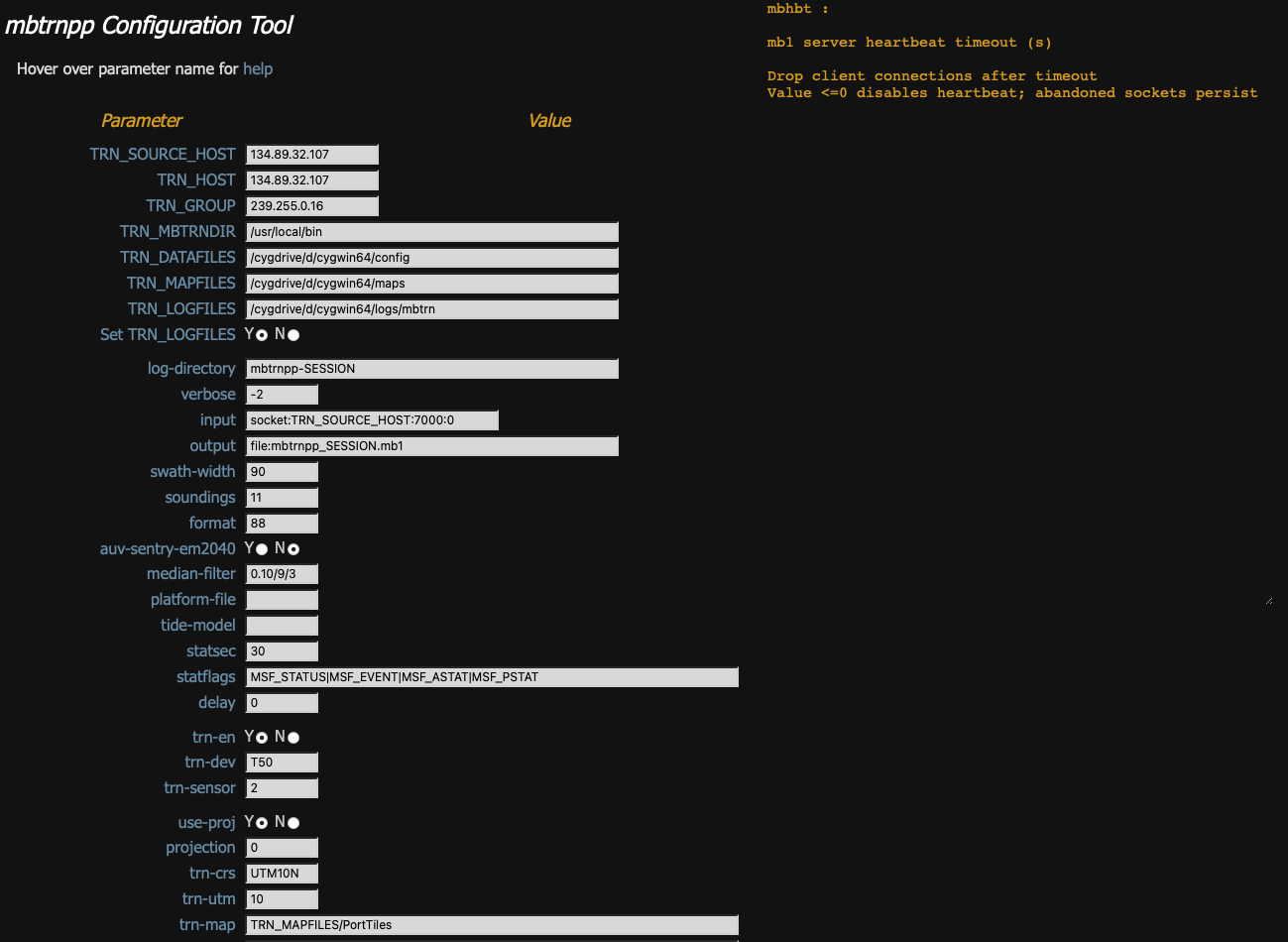
Fig: mbtrnpp options
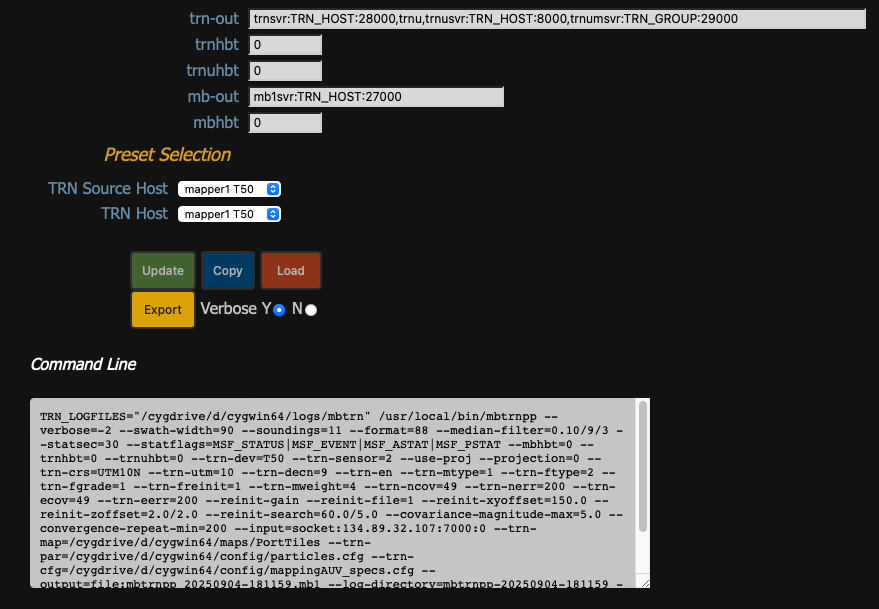
Fig: mbtrnpp controls
Appendix mbtrnpp-plot
The MB-System repository includes mbtrnpp-plot, a tool for generating plots from mbtrnpp log files. It uses qplot, a collection of bash scripts that extract CSV dataset subsets from mbtrnpp log files, and generate PDF plots using gnuplot, an open source plotting library. The plots are aggregated into a PDF file using ghostscript.
The plots generated provide status and performance information about a TRN session. For example, there are plots indicating when/where TRN was converged, changes in TRN state, TRN computation profiling, client connections and disconnections, and TRN output.
mbtrnpp plot output example may be viewed here
Although it is specific to the MB-System TRN application, mbtrnpp-plot may be useful as a template for other applications.
mbtrnpp-plot may be found in MB-System/src/mbtrn/tools/mbtrnpp-plot, and is documented in a README file there.
qplot is maintained in an MBARI bitbucket repo https://bitbucket.org/mbari/qplot.
Appendix: mframe
mframe may be built for linux, macOS, and cygwin/windows; the wrappers present a common API, and simplify instantiation and configuration.
libtrnav uses mframe components for a number of utilities.
Components
| Component | Description/th> |
|---|---|
| mappconfig | application (key/value pair) config |
| mbbuf | byte buffer |
| mcbuf | circular memory buffer |
| mconfig | library configuratio | mframe is a small C library consisting of lightweight, wrappers around commonly used code. Primarily, they are for IO (files, sockets, memory) and various containers and buffers. There are also a collection of debug macros (mxdebug) that enable per-module configuration, and that may easily compiled out if desired. Also, the module mstats enables the collection and use of performance metrics (counting events, e.g.).
| mdebug | debug output macros (deprecated, use mxdebug) |
| medebug | stderr debug output macros(deprecated, use mxdebug) |
| merror | error return and error string |
| mfile | file IO |
| mframe | core framework |
| mhash | dictionary/associative array |
| mkvconf | key/value configuration file reader |
| mlist | list container |
| mmdebug | per-module debug output macros (deprecated, use mxdebug) |
| mmem | reference-counted (mananged) memory allocation |
| mqueue | Wrappers for queue and list functions in sys/queue.h |
| mserial | serial IO |
| mstats | measure/log application statistics and metrics |
| mswap | byte swapping |
| mthread | pthreads wrappers |
| mtime | clocks, timers |
| mutils | utilities, e.g. bit set/test, formatted output (hex/binary, xml), string trim |
| mxdebug | per-module debug output macros |
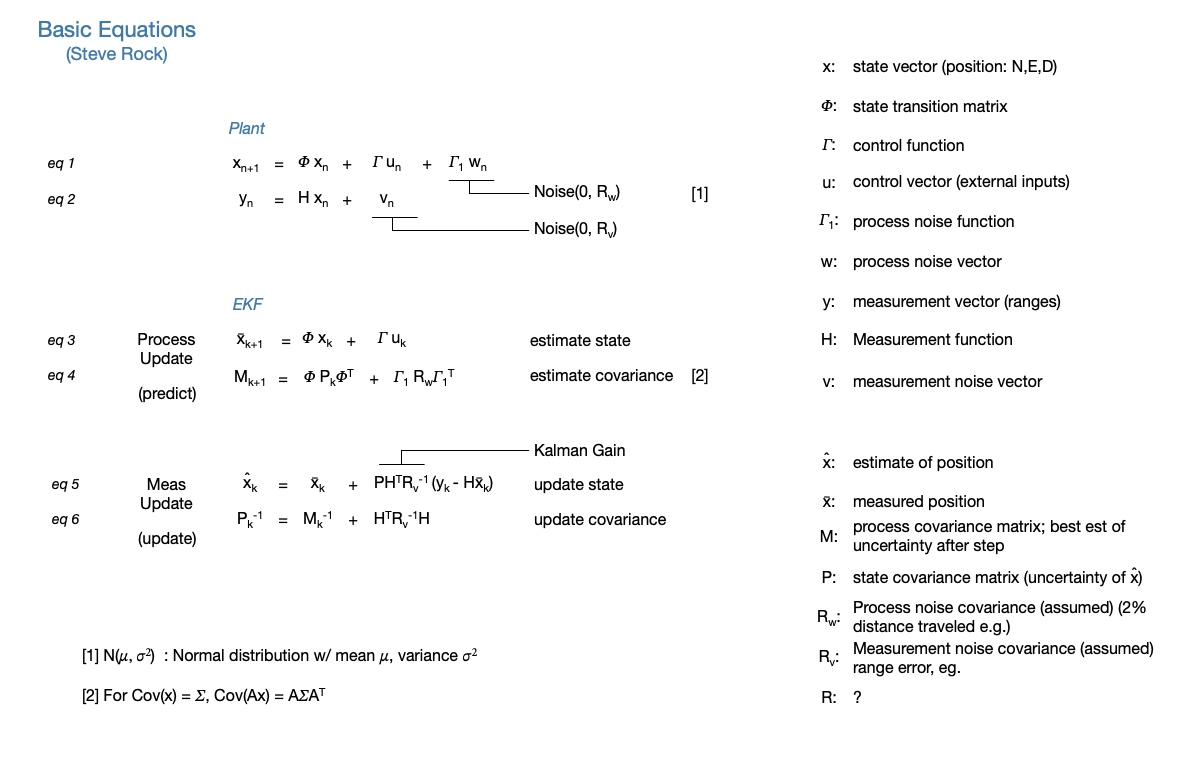
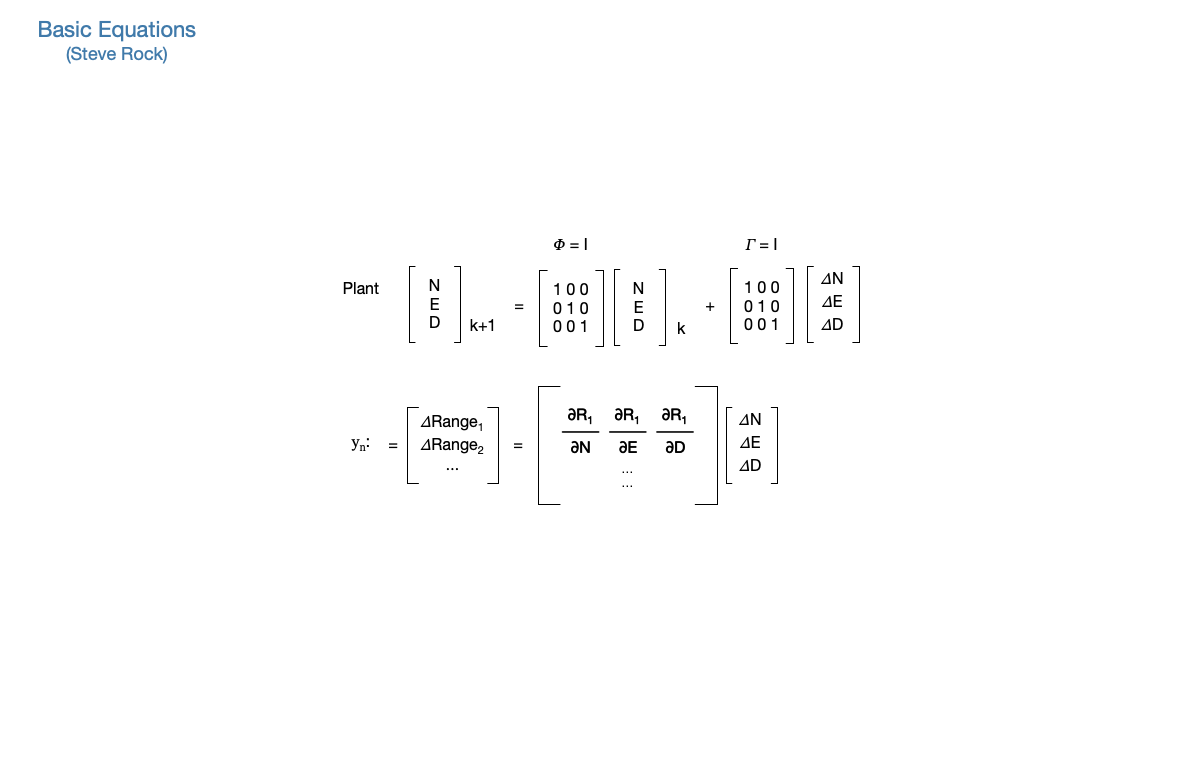
Appendix: TRN Equations
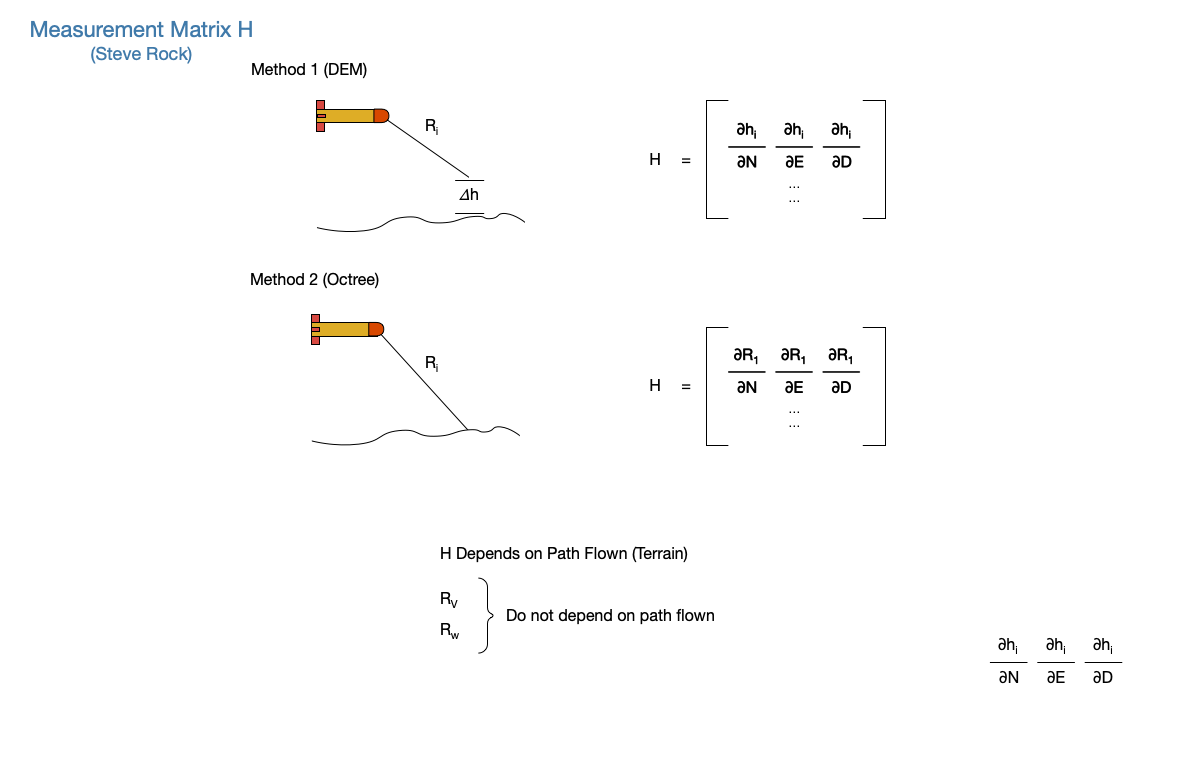


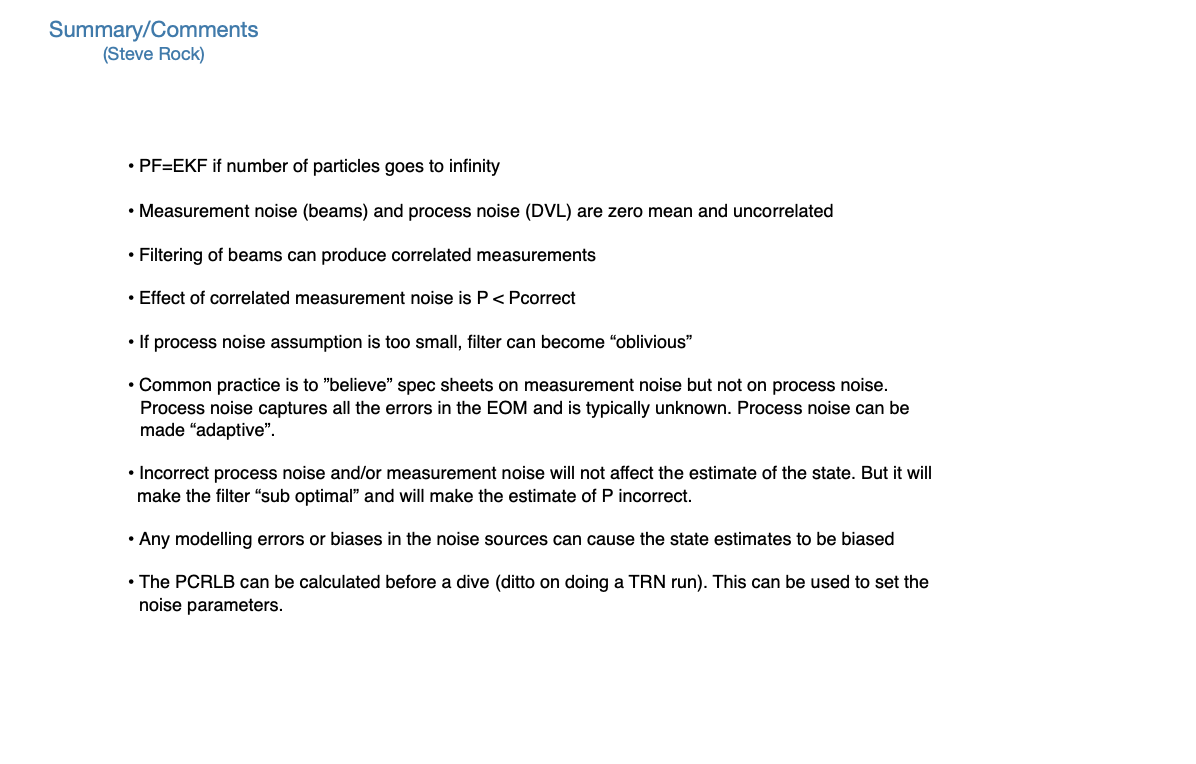
Appendix: Resources
| libtrnav | https://bitbucket.org/mbari/libtrnav | ||||
| mframe | https://bitbucket.org/mbari/mframe | ||||
| MB-System | https://github.com/dwcaress/MB-System
|
||||
| qplot | https://bitbucket.org/mbari/qplot | ||||
| LCM | https://github.com/lcm-proj/lcm |
Appendix: Terminology
| Term | Definition |
|---|---|
| CEP | circular error probability |
| Kalman Filter | |
| NED | North/East/Down |
| Particle Filter | |
| phi, theta, psi | euler angles, roll, pitch, heading |
| TRN | terrain relative navigation |
| u,v,w | body frame components |
| x,y,z | body frame axes |
| Eastings, Northings | coordinates in projection coordinate system |
| UTM | Universal Transverse Mercator projected coordinate system |
| LTM | Local Transverse Mercator projected coordinate system |
Appendix: Binary Octrees
MBARI/Stanford Terrain Relative Navigation (TRN) uses binary octree maps to represent bathymetry for ray-tracing. The basic concepts, data structures, and file formats used to represent binary octrees in software are described below.
Basic Properties
A binary octree is a data structure that represents space in discrete cubic elements that are somewhat analogous to the way that pixels are discrete units for a 2D space. A binary octree map represents a volume as a cube that is bisected into octants. Each octant (called a node) has a binary occupancy value, i.e. false (0) if it is empty, true (1) otherwise, and may be further bisected to create additional nodes of higher precision.
Octree maps inherently represent cubic regions in physical space, i.e. a cube with sides of S units.
The number of subdivisions is known as the octree depth; the physical extents of the tree, together with tree depth, determine the physical resolution of the octree. The number of nodes, N, is function of depth: \(N(d) = 2^(2d)\)
Logical extents (coordinates) are a function of depth: \(E(d)\ |\ 0:(2^d - 1)\)
Resolution (minimum feature size) is given by \(R(d) = S/2^d\)
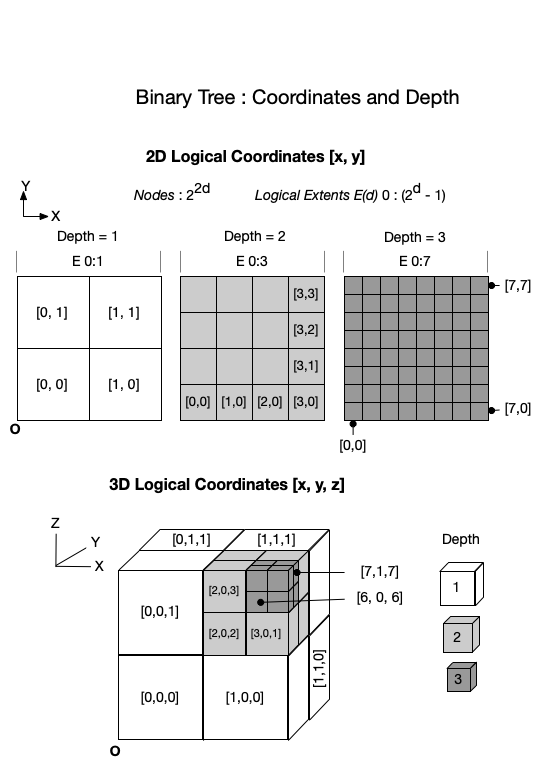
Fig: Binary octree coordinates, depth
Node Paths
A path data structure (also referred to as an index) is used in some computations that use octrees, e.g. ray tracing. A path consists of tuple of unsigned integers, representing the logical coordinates of a point. The path may be represented as single index value, in which the bits represent the coordinates at depths 0:d; the LSB represents depth=1, the MSB represents depth d.
The corresponding nth bits, taken as a tuple, form the logical coordinates at depth n.
In this example (using a quadtree, or 2D binary tree), the path corresponding to physical point (18,6) is calculated and the index computed.
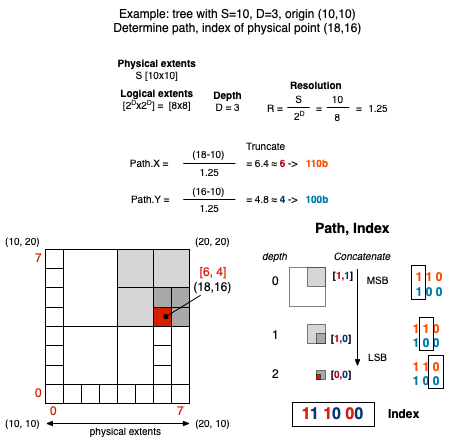
Fig: Example: Binary quadtree coordinates, indexing
Nodes
In the mapping context, boolean node values indicate occupied or unoccupied space. Since nodes represent regions with the same value, the number of nodes reflects the variability of the space represented by the map; however, a node must divided if the value of only one octant differs.
Octree nodes may be one of two types: a branch or leaf. Branches have no value, but contain child nodes that are either other branches or leaves. Leaf nodes have a single value (and no child nodes).
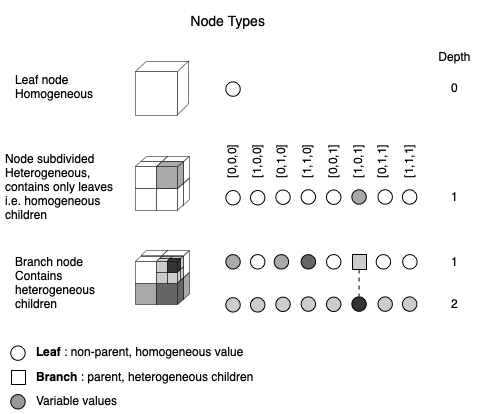
Fig: Binary octree node types
Ocean maps are typically constant at the top (mostly unoccupied, i.e. open water), and more variable at the bottom.
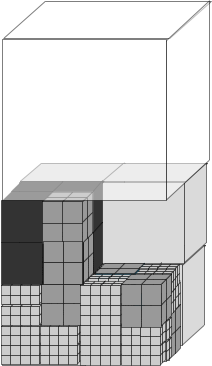
Fig: Binary octree ocean
Octrees contain less information in sparsely occupied regions, and so implement a form of 3D run length encoding compression.
Physical/Logical Mapping
The physical structure is mapped into file and logical structures as shown in the figure below. Note that the entries are arranged depth first; each node in the tree is a pair of values indicating occupancy and a boolean flag (hasChildren) indicating whether the node is a leaf (false) or branch (true). The first entry is the root node.
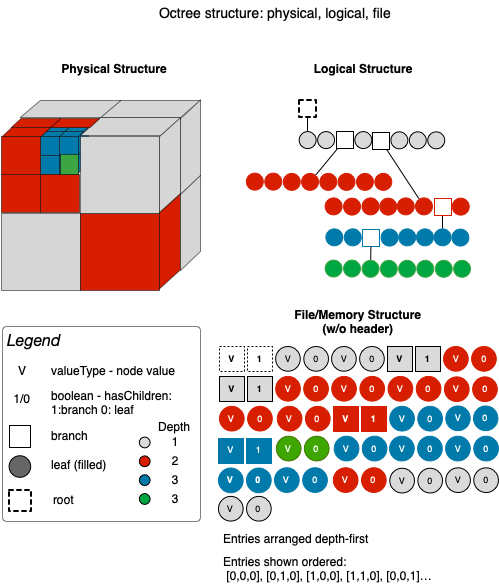
Fig: Binary octree structure
Indexing and Operations
For TRN, ray tracing is done to determine whether a point on the octree map is occupied, i.e. corresponds to a bathymetry measurement (beam).
Ray tracing and other operations on octrees that occur frequently in the mapping context include
- translating between physical and logical space
- calculating the file or memory index (offset) of a node
- finding a path (relative offset) between two nodes
The figure below shows how quadtree nodes are traversed using paths/indices described earlier. The process is similar for octrees.
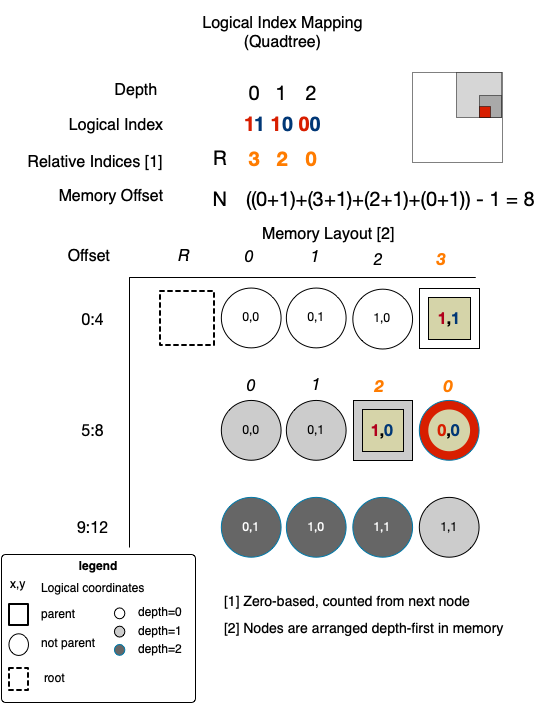
Fig: Quadtree index mapping
Another operation for finding the path to a node nearest to a point on a specified node and depth is explained below.
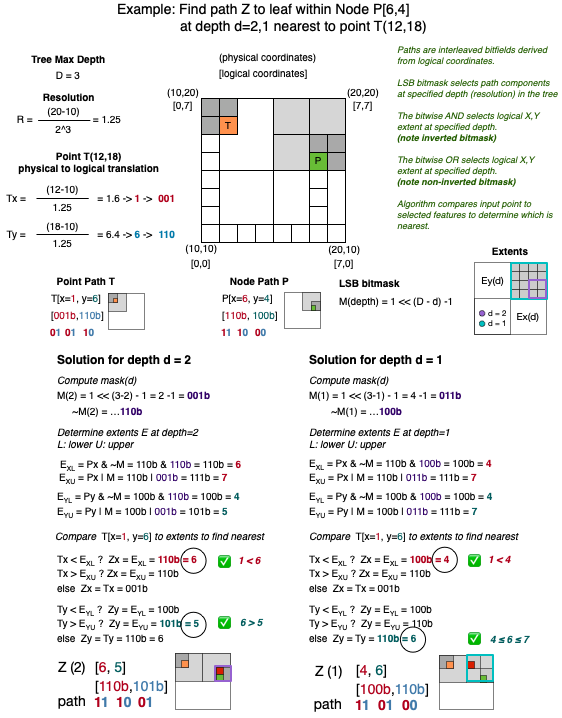
Fig: Example: Binary quadtree path calculation