TRN Software Developers Guide
Terrain Relative Navigation (TRN) capability is provided through a software library called libtrnav, which provides classes and utilities for TRN processing. Generating TRN inputs is platform-specific, given a range of potential Bathymetry and navigation sources.
The sections below begin by describing the contents and functionality provided by libtrnav, followed by a discussion of integration topics and strategies. Finally, several different existing TRN applications are described.
Contents
libtrnav
The libtrnav library is described in detail below. There are instructions for obtaining libtrnav, and information about the libraries, applications, APIs, components, and data structures comprising libtrnav.
Building libtrnav
Dependencies
- libnetcdf
- mframe (MBARI internal repo, git@bitbucket.org:mbari/mframe.git)
- libpthread
- libm
- libcurl (for some versions of NetCDF)
- libhdf5 (for some versions of NetCDF)
- librt (some linux builds)
See the Quick Start Guide for detailed instructions on building and installing libtrnav.
Applications
The following command line applications are built as part of libtrnav. In general, each displays use help using -h or --help.
| Application | Description |
|---|---|
| trn-server | TRN server (TRN instance with TCP/IP interface) |
| trn-client | TrnClient test/diagnostic |
| trnu-cli | TRN UDP client/server test/diagnostic |
| trnu-svr | TRN UDP client/server test (use with trnu-cli) |
| trn-cli | tests trn_cli API; useful as diagnostic application, and to play/replay MB1 files |
| mcpub | general purpose UDP multicast publisher/example (uses stdio sockets) |
| mcsub | general purpose UDP multicast subscriber/diagnostic/LCM receiver (uses stdio sockets) |
| mmcpub | general purpose UDP multicast publisher/example (uses mframe socket wrappers) |
| mmcsub | general purpose UDP multicast subscriber/diagnostic/LCM receiver (uses mframe socket wrappers) |
| mb1rs | MB1 test server (serve MB1 data from files) |
| mb1log-player | MB1 log file player |
| trnlog-player | TRN IO log player |
| csvlog-player | CSV log player |
| readlog | DataLogReader test; read/show TerrainNav.log |
| writelog | DataLogWriter test; write (empty) TerrainNav log file |
| log-to-matlab | output TerrainNav.log (tab/space delimited) |
| log-to-csv | output TerrainNav.log (comma delimited) |
| otree | Binary octree file summary (newer, more options/details) |
| bodump | Binary octree file summary |
| octree2patches | |
| grd-octree-maker | |
| csv-octree-maker | |
| transoct | |
| test-trnif | unit test for trnif; creates interfaces, clients, and connections, logs output |
| test-tile | test tiled map reader; summarize tiled map elements |
| test-trnlog | summarize TRN IO log |
| test-geocon | unit test for GeoCon class (wrapper for geocoordinate conversion, i.e. GCTP, PROJ) |
| test-trnattr | test TrnAttr class |
| trn-player | TRN reference implementation; processes TRN logs and CSV format data. |
Libraries
The following libraries are built/installed as part of libtrnav.
| Library | Description/th> | Sources/th> | Dependencies/th> |
|---|---|---|---|
| geolib | GCTP geocoordinate transformation (lat/lon <> UTM) | gctp/source/* | none |
| newmat | matrices | newmat/* | none |
| qnx | utilities ported from QNX | AsciiFile.cc AngleData.cc CharData.cc BinaryFile.cc DataLog.cc DataLogReader.cc DataLogWriter.cc FileData.cc StringConverter.cc StringData.cc TimeP.cc TimeTag.cc ShortData.cc Math.cc NavUtils.cc IntegerData.cc FloatData.cc DoubleData.cc DataField.cc DataFieldFactory.cc LogFile.cc |
-lgeolib |
| tnav | TRN core | TerrainNav.cpp PositionLog.cpp TerrainNavLog.cpp TNavConfig.cpp T NavFilter.cpp TNavPointMassFilter.cpp TNavParticleFilter.cpp TNavBankFilter.cpp TNavPFLog.cpp TerrainMapOctree.cpp PositionLog.cpp TerrainNavLog.cpp mapio.cpp structDefs.cpp trn_log.cpp myOutput.cpp OctreeSupport.cpp ctree.cpp OctreeNode.cpp TerrainMapDEM.cpp TRNUtils.cpp matrixArrayCalcs |
none |
| geocon | geocoordinate conversion wrapper (GCTP, libproj) |
GeoCon.cpp | -lqnx -lgeolib -lproj |
| trnw | TRN Wrappers (C++ code)| | trnw.cpp | -ltrn -lqnx -lgeolib -lnewmat -lproj -lpthread |
| netif | TRN network interfaces | netif.c trnif_proto.c trnif_msg.c | none |
| trnucli | TRN UDP client component | trnu_cli.c | -lstdc++ -lmframe -lpthread -lm |
| trncli | TRN TCP client component | trn_cli.c | -lgeocon -lqnx -lgeolib -lmframe -lpthread lm |
| mb1 | MB1 message API | mb1_msg.cpp | none |
Scripts
| Script | Description/th> |
|---|---|
| opt/examples/trn-player/pkg/trnplayer-mkpkg.sh | make MacOS binary app-only tar.gz distribution (beta) |
| opt/examples/trn-player/pkg/trnplayer-sandbox.sh | Make sandboxed libtrnav build for trn-player example (beta) |
TRN software architecture
Terrain Relative Navigation (TRN) consists of a set of libraries and tools, collectively referred to as libtrnav, maintained in the repository
https://bitbucket.org/mbari/workspace/projects/TRN
The repository contents are organized as follows:
| Directory | Contents/th> |
|---|---|
| build-utils | cmake find-package files |
| config | example TRN config files |
| cygwin | not sure who checked this in... |
| doc | Doxygen config file and Makefile |
| gctp | GCTP geo-coordinate conversion library |
| newmat | matrix library |
| opt | optional, application-specific code (may have additional dependencies) |
| opt/rov | TRN w/ LCM front end |
| opt/dorado | Dorado AUV |
| opt/stanford | Stanford user utilities |
| opt/sentry | WHOI Sentry |
| qnx-utils | framework code ported from QNX |
| terrain-nav | TRN core classes |
| tools | utility scripts |
| trnw | TRN C API and applications |
| utils | utility applications |
The primary purpose for libtrnav is providing software components to implement TRN particle filters and enable integration with host systems and software.
The essential elements of a TRN application include: configuration, sensor and map inputs, a TRN particle filter (PF), TRN position estimate and uncertainty outputs.
These are illustrated in the diagram below:
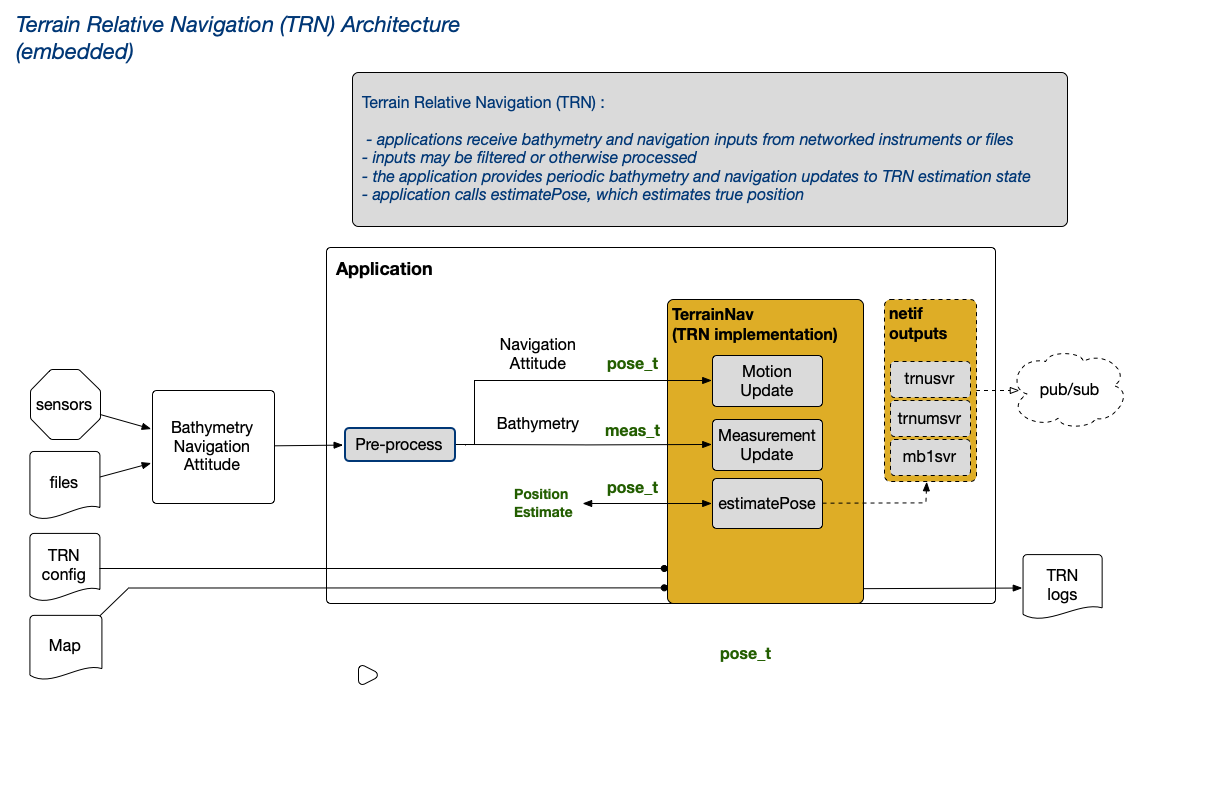
Fig: TRN Architecture (embedded)
A TRN instance may be embedded in an application (as shown above), or run as a separate process and operated over a network using a TCP client.
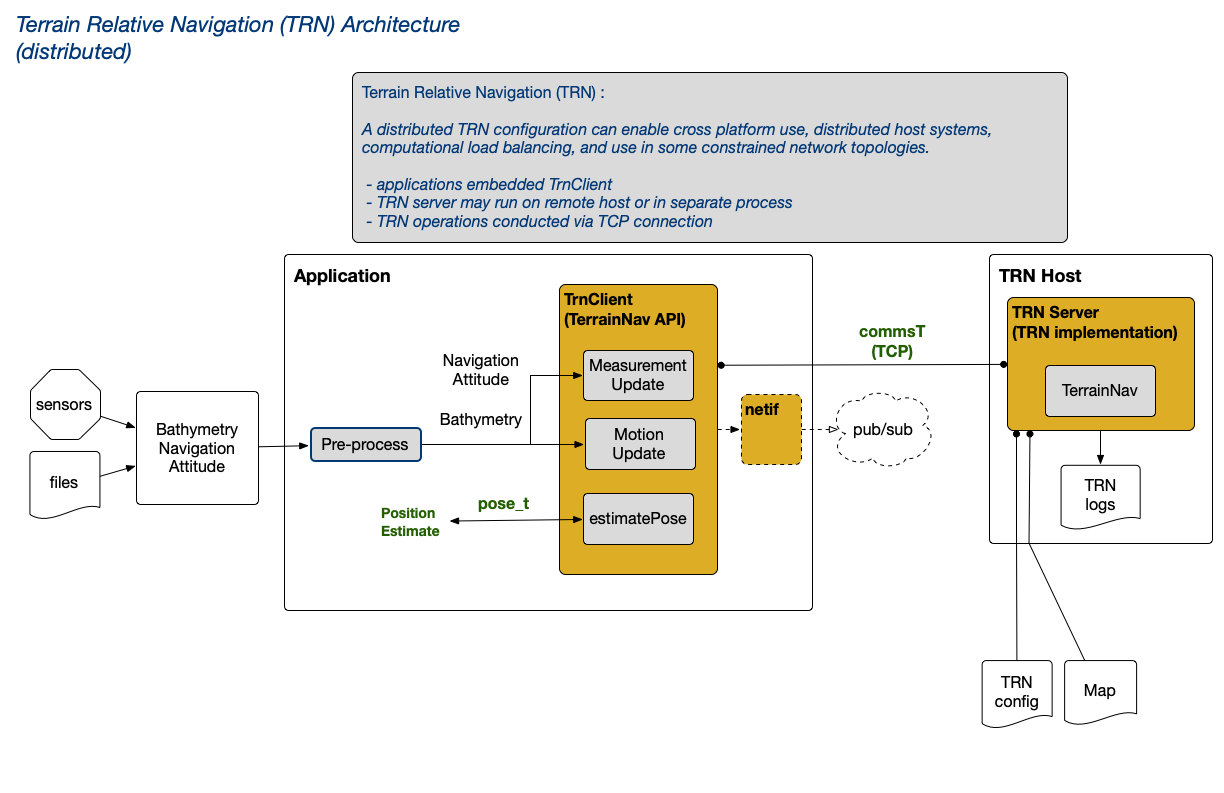
Fig: TRN Architecture (distributed)
libtrnav may be thought of in terms of several conceptual layers, some of which are provided by libtrnav, and application-specific layers implemented by users. Some examples of application-specific code may be found in libtrnav/opt.
The following diagram illustrates TRN architectural elements and some existing implementations.
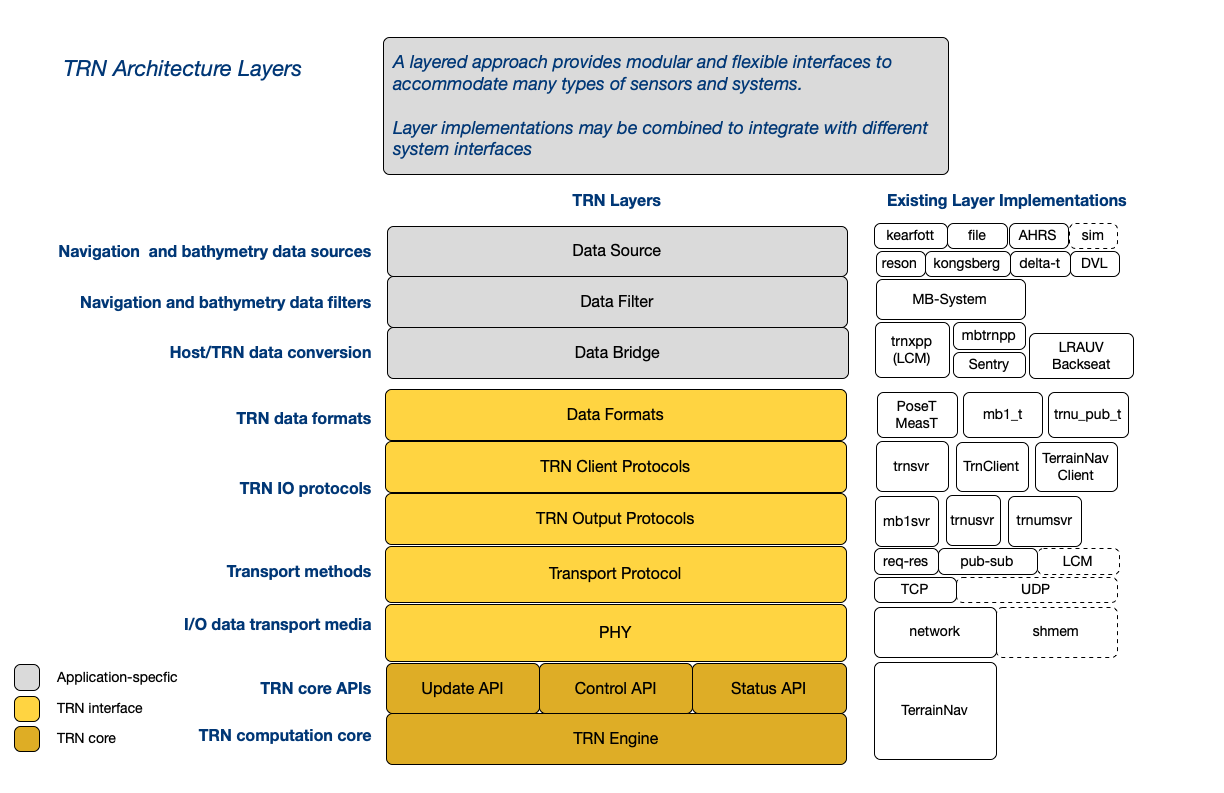
Fig: TRN Architectural Layers
The TRN core implementation provides C++ and C APIs. Key data structures and APIs are briefly summarized below; the TRN Doxygen documentation is recommended for browsing the source and understanding component relationships and details.
libtrnav APIs
Table: libtrnav API summary
| API | Description | Directory | Sources |
|---|---|---|---|
| TRN C++ | TRN core classes | terrain-nav qnx-utils newmat |
|
| TRN C| | TRN core C wrappers | trnw | trnw |
| netif | TRN network interfaces | trnw | netif trnif_msg trnif_proto mb1_msg |
| TRN clients | TRN client interfaces | utils | TerrainNavClient TrnClient |
libtrnav Component Classes
libtrnav Interfaces
Table: libtrnav interface summary
| Interface | Description | Sources |
|---|---|---|
| TerrainNav | TRN object API | Octree OctreeNode OctreeSupport OctreeTestCode PositionLog TNavBankFilter TNavConfig TNavExtendKalmanFilter TNavFilter TNavPFLog TNavParticleFilter TNavPointMassFilter TNavSigmaPointFilter TRNUtils TerrainMap TerrainMapDEM TerrainMapOctree TerrainNav TerrainNavLog TrnLog genFilterDefs mapio matrixArrayCalcs myOutput particleFilterDefs structDefs trn_common trn_log qnx-utils |
| TRN server | TRN TCP socket | trn_server trn_log TNavConfig TerrainNav |
| netif | netif trnif_msg trnif_proto mb1_msg |
R1C3 |
| MB1 server | MB1 UDP socket (output) | netif |
| TRNU server | TRN TCP socket (output) | netif |
| TRNUM server | TRN UDP multicast socket (output) | netif |
| TrnClient | TRN client Extends TerrainNavClient to enable deferred initialization preferred for new applications |
TrnClient |
| TerrainNavClient | TRN Client | TerrainNavClient |
libtrnav Data Structures
Table: libtrnav data structure summary
| Data Structure | Source/th> | Description/th> |
|---|---|---|
| PoseT | terrain-nav/structDefs.h | Position Update Input, Position Estimate Output |
| MeasT | terrain-nav/structDefs.h | Motion (process) Update Input |
| SensorT | terrain-nav/structDefs.h | Bathymetry sensor configuration (geometry, process noise, measurement noise) |
| CommsT | terrain-nav/structDefs.h | TRN server IO messages |
| trnu_pub_t | trnw/trn_msg.h | TRN UDP output message |
| mb1_t | trnw/mb1_msg.h | MB1 format bathymetry output message |
| trncli_t | trnw/trn_cli.h | TRN client (C API) |
| trnmsg_header_t trnmsg_t trn_type_t trn_float_t trn_init_t trn_meas_t trn_triplet_t trn_box_t trn_pose_t |
trnw/trnif_msg.h | TRN network interface message structures (C API) |
| trnucli_t | trnw/trnu_cli.h | TRN UDP client |
| trn_config_t | trnw/trnw.h | TRN configuration (C API) |
Integration
Integration Overview
There are a number of application-specific considerations to be resolved when integrating TRN into a host system:
System Requirements
Processing resources needed for TRN
Input Processing
Sensors, sampling strategies, and protocols for bathymetry, navigation, and attitude sensors. Converting sensor data to TRN input formats.
TRN implementation
TRN implementation selection: embedded, distributed (network), online (real-time), or offline (post-processing).
Outputs
Interpretation and distribution of TRN outputs
Configuration
Handling TRN configuration parameters
These are detailed in the sections that follow.
System Requirements
TRN will perform reasonably well on pentium class hardware with 8 GB of RAM, depending on the working processing load. On the other hand, SBCs like Raspberry PI and Beaglebone with small ARM processors may not be adequate. As a general guideline, it's helpful to run TRN on a well-provisioned host.
libtrnav builds and runs on MacOS, Linux, and Windows (using Cygwin).
As mentioned elsewhere, a particle filter size of N=10000 seems to be a good default (and is currently used in all applications).
The following table summarizes the computing environment for several existing TRN applications.
| Application | CPU | RAM | OS | Notes |
|---|---|---|---|---|
| Dorado | x86 i5? 32/64-bit PC-104 ? MHz | 8 GB | Windows XP/Cygwin | Reson sonar computer |
| Sentry | x86 i7 64-bit PC-104 ? MHz | 8 GB | Ubuntu 22.04 Linux | WHOI Datapod backseat computer |
| LRAUV | ARM 64-bit | 16 GB ? MHz | Custom Linux kernel | nvidia jetson nano backseat computer |
| ROV | x86 64-bit Apple Macbook Pro | 16 GB | MacOS | |
| Offline testing/sim | x86 64-bit | 4 GB RAM | Ubuntu 18+ | VMWare guest on MacOS host |
TRN implementation
libtrnav include a pair of TRN particle filter implementations that may be used to develop applications: embedded and distributed. Selection depends on the application's architecture, host computing platform, and network topology. Some applications combine different implementations for different contexts (e.g. on-line real-time vs off-line post-processing applications).
Embedded
A TRN (TerrainNav) object may be embedded in an application, then configured and managed directly by application code. The TerrainNav class is written in C++, though C bindings are available using the trnw (TRN wrapper) API.
The C++ API has a number of constructors with different configuration information, for example:
// map path
// vehicle spec path (file containing sensor types, geometry)
// filter type: TRN filter implementation ID (typically particle filter)
// map type: Map type ID (typically binary octree)
// directory: TRN log directory

TerrainNav(char *mapName, char *vehicleSpecs,
             const int &filterType, const int &mapType, char *directory);

// This version includes an optional particles file path, which is used to store particle state information

TerrainNav(char* mapName, char* vehicleSpecs, char* particles,
             const int& filterType, const int& mapType, char* directory);
The C API constructor takes a trn_cfg_t structure. The structure members are used to invoke a C++ constructor.
wtnav_t *wtnav_new(trn_cfg_t *cfg);
Applications using an embedded TRN instance include MB-System (mbtrnpp application) and Long Range AUV.
Distributed (TRN server)
TRN also includes an implementation called TRN server (trn-server). TRN server is an application that may be built for Linux, MacOS and Windows (using Cygwin). It includes a TRN instance with a TCP socket interface, enabling clients to perform TRN operations (motion/measurement updates, position estimates) remotely. Each TRN server supports a single client connection.
In this way, distributed applications may be partitioned in a more modular way, with TRN functions hosted in a location, for example, with more compute resources or more convenient network or physical location. It is useful in system architectures with isolated core vehicle functions.
In a distributed implementation, application code uses one of several TRN clients. The client API is similar to the TerrainNav API, with added socket configuration. Clients include TrnClient and TerrainNavClient.
Applications the use a distributed implementation include Dorado AUV and it's simulator.
A variant of distributed implementation uses an embedded TRN instance in conjunction with pub-sub (UDP, UDP multicast) interfaces to distribute TRN output. In this scenario, multiple clients receive TRN outputs, while TRN is managed by the application. The UDP network interface supports TRN filter resets. UDP multicast is unidirectional, and does not support any TRN configuration/control.
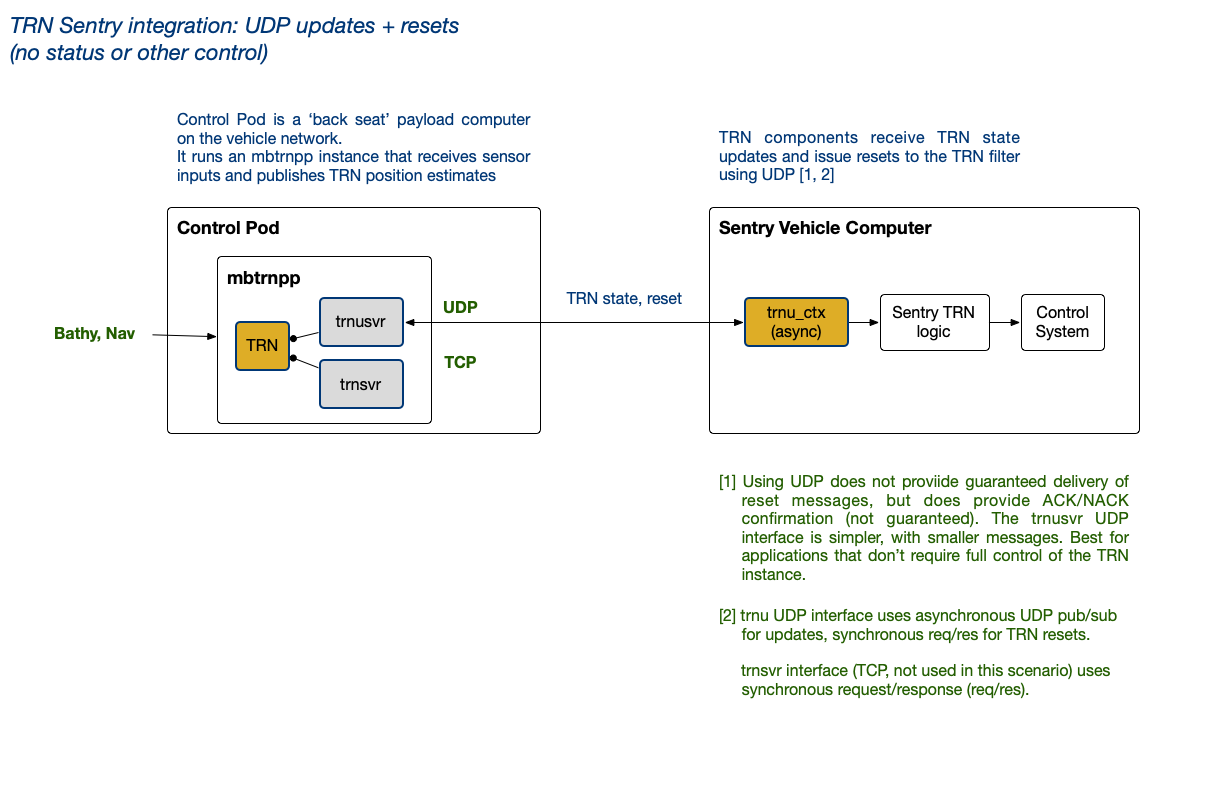
Fig: Sentry TRN Architecture (distributed)
Applications using a distributed implementation include WHOI ROV Sentry, and MBARI ROV Ventana. In both cases, MB-System (mbtrnpp) manages the TRN operations, and publishes outputs used by clients to inform navigation and control.
Using TRN Offline
TRN is expected to work in an online (real-time) context, in which TRN outputs inform navigation. For testing and simulation, TRN may also be used in an offline context, where TRN receives input from files or test software rather than sensors. Offline applications (e.g. simulation) may run in discreet time, i.e. faster than real time.
TRN does not have or impose any intrinsic timing dependencies or requirements. The primary consideration in relationship to timing is TRN computational load/delay, which depends on the size of the particle filter and host computing resources (memory, CPU, disk speed).
Input Processing
As it is very application-specific, input processing accounts for the majority of effort required for TRN integration.
Applications may receive TRN input data from sensors (via serial, sockets), files, databases, messaging middleware framework, e.g. LCM, ROS, ZeroMQ, or a combination of these. Each of these have their own formats, timing, and other considerations that depend on the specific input source.
Whatever the source, bathymetry, navigation and attitude inputs must be acquired, potentially processed (e.g. parsing and unit conversion), and formatted into structures appropriate for TRN.
Because it is so specific to context, libtrnav doesn't include a general purpose framework for managing sensor input streams; these are outside the scope of libtrnav, available elsewhere, and the choice is more sensibly to be left to the developer.
However, libtrnav's application-specific code (libtrnav/opt) includes a number of examples with different platforms and architectures.
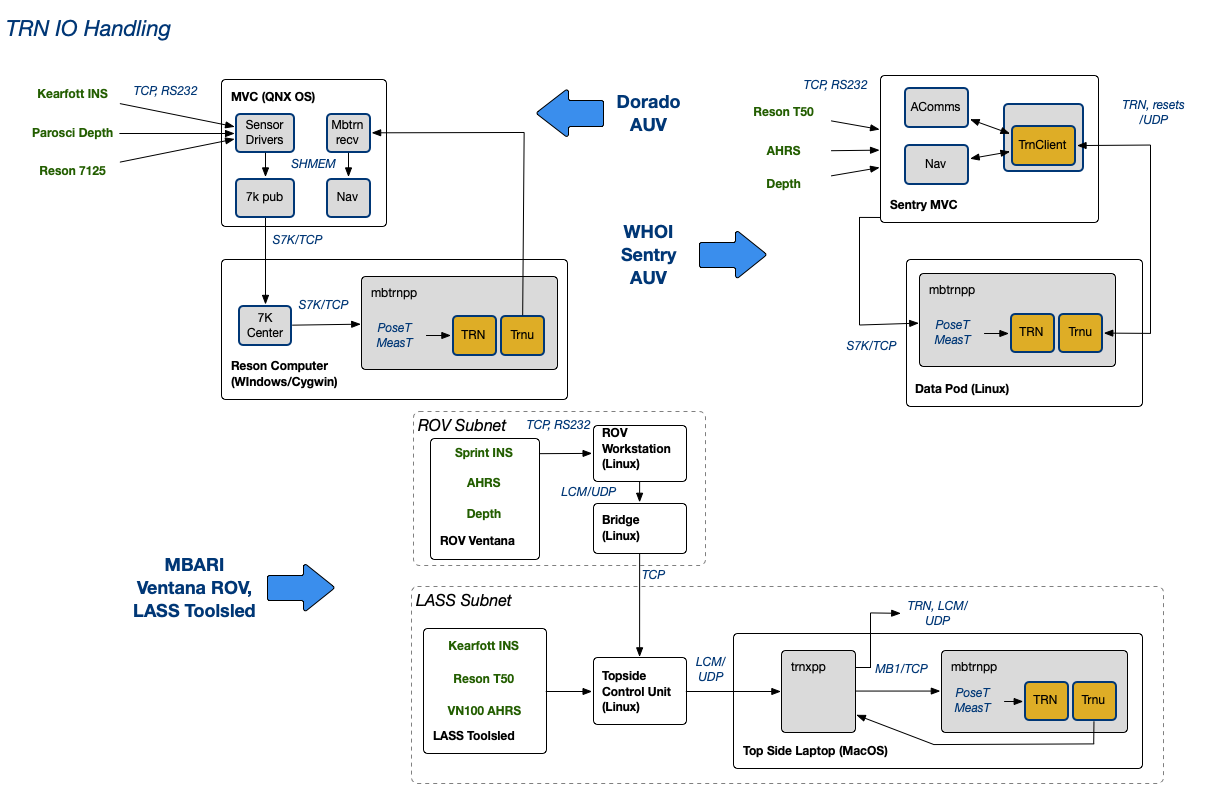
Fig: TRN IO Examples
In general, TRN input rates are typically lower than sensor sampling rates. In fact, as described in the users guide, over-sampling can correlate inputs, leading to to mis-convergence. Sampling for TRN should ensure adequate independence between measurements; the TRN update rate may depend on vehicle speed, sensor orientation and terrain.
For reference, the following table lists output rates for some sensors used for TRN.
| Application | bathymetry | navigation |
|---|---|---|
| Dorado | Kongsberg EM2040 200/400 Khz @ 3 Hz Reson 7125 @ 3 Hz Reson T50 @ ? Hz |
Kearfott INS ? Hz |
| Sentry | Kongsberg EM2040 200/400 Khz @ ? Hz | INS @ ? H |
| LRAUV | RDI Pathfinder DVL @ 0.5 Hz | AHRS-M2 @ 1.5 H |
| ROV | DVL @ ? Hz Kongsberg EM2040 @ 3 Hz (LASS) |
Sprint INS @ 15? Hz |
Input streams may be decimated (sub-sampled) as needed. Sensor data streams are typically at different rates. Bathymetry inputs should correspond to the location and attitude associated with them. If data are buffered, be aware that updates should not use data that is too old, or for which there is significant temporal skew between motion and measurement updates.
As a guideline, TRN inputs should be spaced by at least ~3 m. For example, if a platform is moving at 1 m/s and using a sonar pinging at 3 Hz, there are 3 samples/m; every 9th sample would be ~ 3m apart.
Input data are ultimately converted to the TRN data structures PoseT and MeasT for process and measurement updates, respectively. The C API uses wmeast_t and wposet_t, which are simple C wrappers around PoseT and MeasT objects:
PoseT, MeasT (terrain-nav/structDefs.h)
void TerrainNav::motionUpdate(poseT* incomingNav)
void TerrainNav::measUpdate(measT* incomingMeas, const int& type)
wposet_t, wmeast_t (trnw/trnw.h, .cpp)
void wtnav_motion_update(wtnav_t *self, wposet_t *incomingNav)
void wtnav_meas_update(wtnav_t *self, wmeast_t *incomingMeas, const int type)
poseT
struct poseT {

    double x, y, z;                // North, East, Down position (m)
    double vx, vy, vz, ve;         // Vehicle velocity wrto terrain (m/s) [1]
    double vw_x, vw_y, vw_z;       // Vehicle velocity wrto water (m/s) [1]
    double vn_x, vn_y, vn_z;       // Vehicle velocity wrto an inertial frame (m/s) [1]
    double wx, wy, wz;             // Vehicle angular velocity wrto an inertial frame (rad/s) [1]
    double ax, ay, az;             // Vehicle aceleration wrto an inertial frame (m/s^2) [1]
    double phi, theta, psi;        // 3-2-1 Euler angles relating Body frame to
                                   // an inertial NED frame (rad).
    double psi_berg, psi_dot_berg; // TRN states

    double time;                   // Time (seconds since 01-01-1970T00:00:00)

    bool dvlValid;                 // DVL measurement valid flag
    bool gpsValid;                 // GPS measurement valid flag
    bool bottomLock;               // DVL bottom lock valid flag

    double covariance[N_COVAR];    // Covariances: XYZ, phi, theta, psi, wy, wz
                                   // (passively stable in roll) (see above units)

    // [1] coordinates in Body Frame

    poseT();
    poseT& operator=(const poseT& rhs);
    poseT& operator-=(const poseT& rhs);
    poseT& operator+=(const poseT& rhs);

    int   serialize(char *buf, int buflen);
    int unserialize(char *buf, int buflen);
};
The PoseT structure is used for both input and output to TRN.
For input, most applications use a subset of these fields:
 time
 x, y, z
 vx, vy, vz
 phi, theta, psi
 dvlValid
 gpsValid
 bottomLock
vx is strictly required for TRN; vy, vz are optional.
To fully initialize, TRN requires that a motion update be received with vx (along-track velocity) not equal to zero, which indicates forward motion. Until that happens, TRN emits an error message indicating that TRN has not been initialized when measurement updates are received. Once motion has been established, motion and measurement updates may occur in any order.
vx is used for most configurations to indicate motion, and its value is not critical, but must be != 0 in order for TRN to initialize.
In general, TRN does not require velocity to operate, but in some contexts, velocity may be integrated to determine position, in which case it is needed.
For output, a PoseT instance is passed into estimatePose, which populates these fields:
 time            // time
 x,y,z           // position estimate
 covariance      // covariances (uncertainties)
                 // covariance[0] : x/N covariance
                 // covariance[2] : y/E covariance
                 // covariance[5] : z/D covariance
                 // covariance[1] : XY covariance (?)
The remaining fields are somewhat application-specific, and may be used in some TRN configurations.
measT
The measT structure is used for measurement update (bathymetry) input. In libtrnav, measurements are often referred to as beams; this stems from the fact that TRN bathymetry sensors are historically acoustic instruments, i.e. sonars and DVLs. They could, however, include LIDAR or other sensors. Here, measurement and beams are used interchangeably.
struct measT {
    double time;              // Measurement time (s)
    int dataType;             // Sensor type [1]
    double phi, theta, psi;   // 3-2-1 Euler angles relating Body frame to
                              // an inertial NED frame (rad).
    double x, y, z;           // North, East, Down position (m)

    double* covariance;       // covariance array [2]
    double* ranges;           // beam ranges [2]
    double* crossTrack;       // beam component perpendiclar to velocity [2]
    double* alongTrack;       // beam component parallel to velocity [2]
    double* altitudes;        // beam component downward [2]
    double* alphas;           // alpha values [2]
    bool* measStatus;         // beam measurement valid flag [2]
    unsigned int ping_number; // measurement number
    int numMeas;              // number of beams
    int* beamNums;            // beam numbers (for sensors w/ variable beams) [2]

    // [1] sensor type enumerations
    //      1: DVL
    //      2: Multibeam
    //      3: Single Beam
    //      4: Homer Relative Measurement
    //      5: Imagenex multibeam
    //      6: Side-looking DVL
    // [2] array with dimension numMeas

    measT();
    measT(unsigned int nummeas, int datatype);
    ~measT();
    void clean();
    measT& operator=(const measT& rhs);

    int   serialize(char *buf, int buflen);
    int unserialize(char *buf, int buflen);
};
measT is passed into measUpdate, with these fields populated:
 time
 dataType
 x, y, z
 phi, theta, psi
 ranges
 crossTrack
 alongTrack
 altitudes
 measStatus
 ping_number
 numMeas
 beamNums
Sensor Geometry and Measurements
A bathymetry source with a single beam is sufficient for TRN to produce reliable estimates. While such sensors exist, acoustic sensors with multiple beams are commonly used. In the context of TRN input, each beam is an independent measurement. Each sounding of a sensor with N beams (e.g. DVLs, multibeam sonars) produces N measurements with a common timestamp. Thus the measT structure contains a single timestamp with arrays of beam components. Conversely, a measT structure may contain a single beam. If there were a significant time difference between beams, it would be necessary to timestamp them separately in separte measurement updates. Again, a measurement's time, location and attitude must correspond with it's bathymetry.
The measT dataType member (sensor type) is used to enable TRN to differentiate between different beam geometries.
TRN uses sensor type to select appropriate validation algorithms for certain types.
In the TRN filter base class, TNavFilter, sensor type is used to project measT ranges onto sensor frame components: alongTrack, acrossTrack, altitude. dataType also effects how variances are computed.
For multibeam sensors, TRN uses the measT beam component members (alongTrack, acrossTrack, altitudes). Multibeam sensors are assumed to have coplanar beams, extending radially from the sensors, i.e. a fan.
For DVL and other types, TRN uses the measT ranges member. DVL is assumed to have a radial array of 4 downward looking beams, with azimuth and elevation angles defining the orientaton.
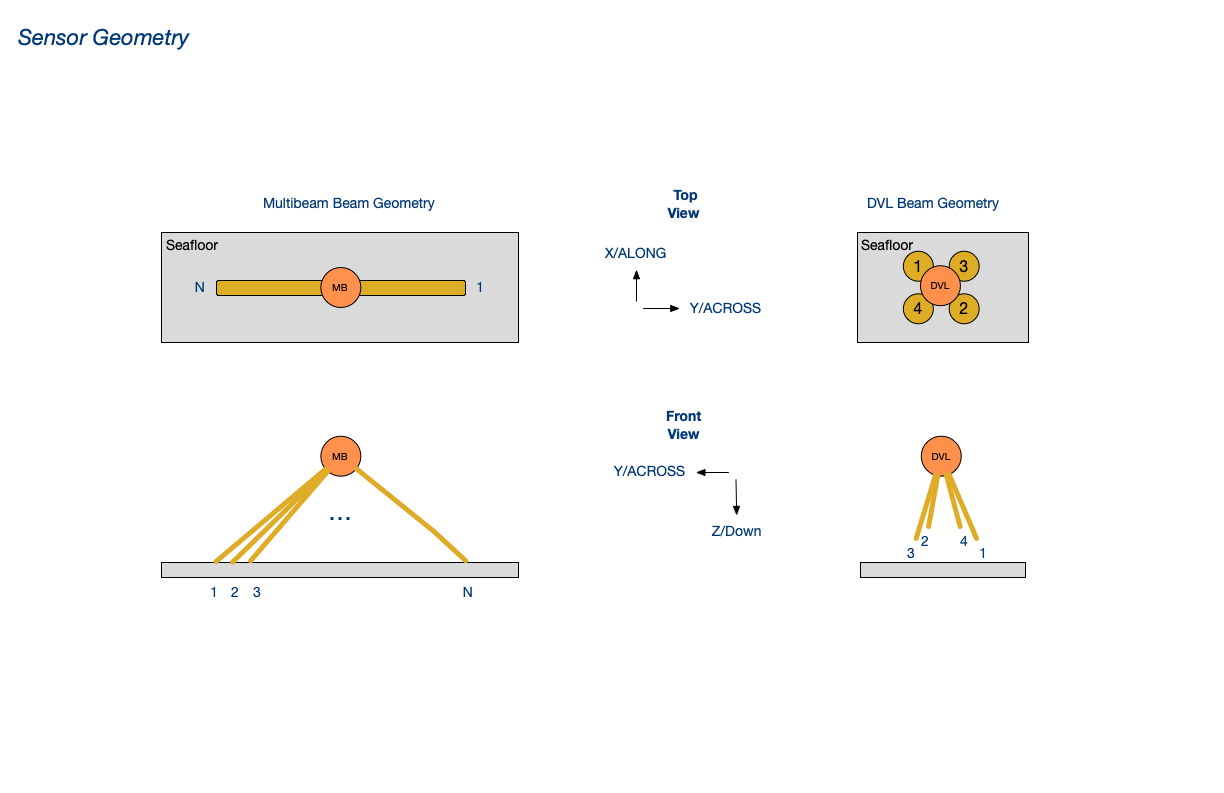
Fig: Sensor Beam Geometry
TRN configuraton parameters describing sensor types and geometry are specified in vehicle specifications and sensor configuration files, further described in the configuration section.
Coordinate Systems
Both poseT and measT use a cartesian coordinate systems, with dimensions in meters. Maps are generally Mercator Projections. Both UTM and local projections have been used. When using UTM, there is significant error when operating in a region far from the origin. Such errors are proportional to the distance from the origin. Using a local Mercator projection enables the origin to be defined in the region of interest, reducing the errors.
Latitude and longitude is the scheme most commonly used by position and navigation sensors. TRN position inputs must use the map's cartesian coordinates (northings and eastings). libtrnav includes the GCTP library for converting lat/lon to UTM; it does not support other projections. Libraries such as libproj may be used, which can support conversions between lat/lon and a wide range of existing and custom projections.
libtrnav provides a class called GeoCon that serves as a wrapper for geocoordinate conversions. It provides a common API that enables conversions with different underlying implementations to be passed into functions using a single type.
GeoCon currently supports GCTP and libproj implementations, but could be extended to support other implementations. GeoCon also has a C API; the C type is wgeocon_t.
The TRN C API (trnw.cpp) functions (for converting MB1 bathymetry records to poseT and measT) demonstrate how GeoCon is used.
int wposet_mb1_to_pose(wposet_t **dest, mb1_t *src, wgeocon_t *geocon)
int wmeast_mb1_to_meas(wmeast_t **dest, mb1_t *src, wgeocon_t *geocon)
Outputs
A TRN instance (or client) obtains the current TRN estimate using the estimatePose method.
# CPP API (TerrainNav.h)
virtual void estimatePose(poseT* estimate, const int &type);

# C API (trnw.h)
void wtnav_estimate_pose(wtnav_t *self, wposet_t *estimate, const int type);
The poseT argument is used to return the TRN update, i.e., the position estimate and covariances, along with measurement time, location, and attitude.
The type argument is an enumerated type to select whether the filter value returned is the MLE (maximum likelihood estimator) or MMSE (minimum mean squared error). As described above, the MLE corresponds tallest peak in the likelihood distribution, and MMSE is the lowest error value. Typically MMSE is used, as MLE may be skewed by multimodal distributions. The two could potentially used in conjunction (with some computational cost) to signal convergence, since they should coincide when TRN is truly converged.
Convergence
The value returned by TerrainNav::lastMeasSuccessful() indicates whether the most recent measurement update resulted in a TRN estimate update; it does not indicate whether TRN is converged or valid.
# CPP API (TerrainNav.h)
virtual inline bool lastMeasSuccessful();
# C API (trnw.h)
wtnav_last_meas_successful(wtnav_t *self);
There is a virtual method that nominally returns a boolean convergence flag:
# CPP API (TerrainNav.h)
bool isConverged();
# C API (trnw.h)
bool wtnav_is_converged_(wtnav_t *self);
However, it may be implemented differently by different TRN particle filter implementations, and is not considered to be a reliable indicator of TRN estimate validity. It is recommended that applications implement convergence criteria that make sense in the use context.
For example, the Dorado mapping AUV evaluates NED covariances over a series of returns. A number of consecutive successful updates with covariances that fall within a specified threshold consitute convergence. Once converged, TRN estimates are considered valid until an measurement falls outside the convergence threshold.
Applications may also implement logic to reset the TRN filter under some circumstances. There are different reset mechanisms that allow a 'global' reset (start fresh using the full spatial particle distribution), or a 'local' reset that redistributes particles using the last valid offset or a specified bounding box. A local reset may be useful when covariances are suspiciously small, possibly indicating that TRN has converged on incorrectly on a local minimum. In terrain with adequate information, TRN should reconverge quickly to a similar value when a local reset is made.
In brief: convergence criteria and requirements are somewhat application-specific, and the application should determine whether to use TRN estimates.
Log Files
TRN generates log files that include a message logs for debugging, and data logs containing input and output.
| Log File | Format/th> | Contents/th> |
|---|---|---|
| trn.log.nnnn | text | TRN message log (segmented, 0000-9999) |
| TrnIO.log | binary | TRN data log (multiple record types) |
| TerrainNav.log | binary | TRN data log (single record type, legacy) |
| TNavPFLog.log | binary | TRN particle state log (a lot of data) |
The TrnIO log may contain multiple record types, identified with IDs:
MOTN_IN = motion update input
MEAS_IN = measurement update input
MSE_OUT = MMSE output
MLE_OUT = MLE output
TrnIO record types are dynamically sized, and contain minimal record headers and sync patterns, making them efficient in terms of storage and straightforward to search and parse, even if corrupted.
The TerrainNav log uses a single record type to record (MLE, MMSE) outputs and inputs, which is less efficient; it writes all fields, including arrays (which are statically sized to TRN_MAX_BEAMS), whether they are used or not. Also, record type is ambiguous, and do not contain any sync patterns.
Logs are written to the directory passed to TerrainNav constructor, along with configuraton files used to configure the TRN instance.
Network Output
For TRN applications that require TRN updates to be distributed, e.g. to multiple processes or across networks, libtrnav provides components implementing socket-based TRN IO, collectively referred to as the netif API.
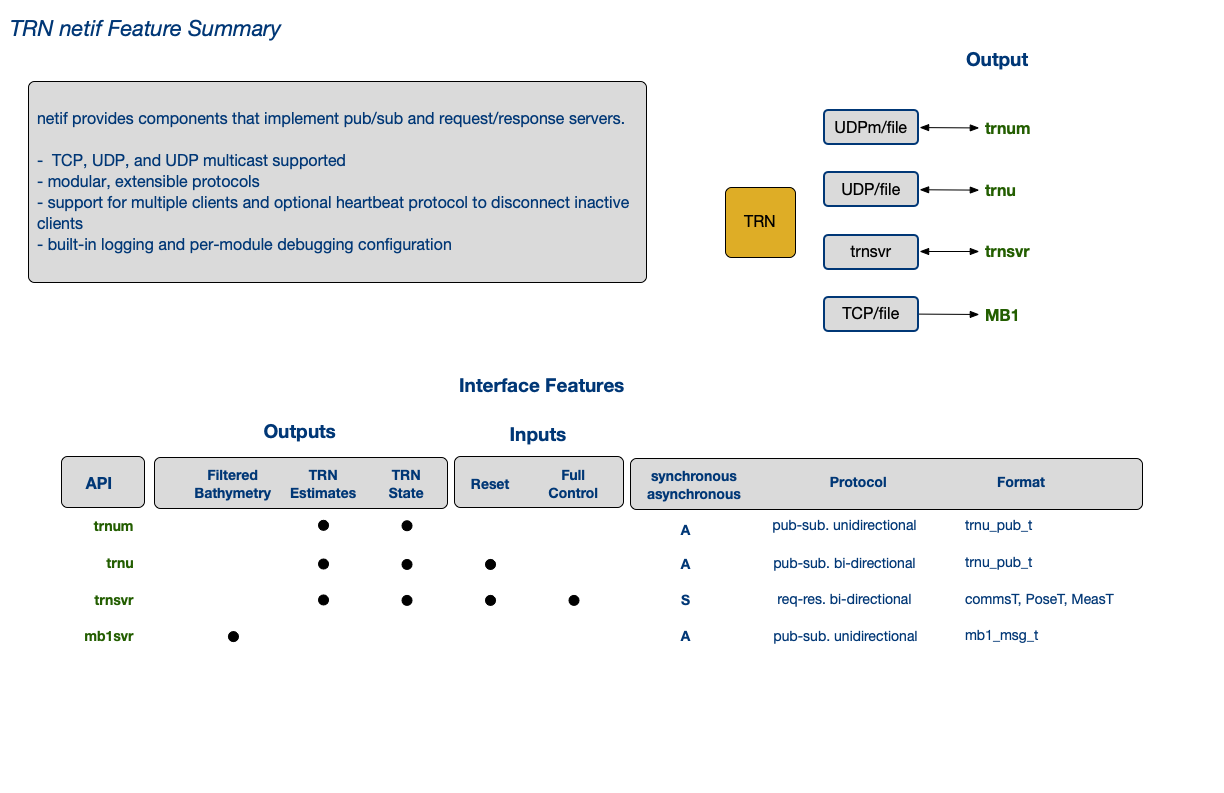
Fig: netif Feature Summary
The following code example shows how a TRN UDP update server is started:
wtnav_t *trn_instance...;

// define a server resource bundle
trnuif_res_t rr_resources={0},*g_trnu_res=&rr_resources;

// log directory, session ID strings
const char *log_dir=."";
const char *session_str="202501010000";
// socket address
const char *host = "192.168.1.1";
int port = 270001;
// disable server heartbeat (< 0)
int hbto = -1;

// create a netif TRN UDP server (trnusvr)
netif_t *svr = netif_new("trnusvr",             // server ID
                         host,                  // socket address
                         port,
                         ST_UDP,                // socket type
                         IFM_REQRES,            // protocol (req/res or pub/sub)
                         hbto,                  // heartbeat config
                         trnif_msg_read_trnu,   // protocol methods
                         trnif_msg_handle_trnu, // defined in netif_proto.c
                         trnif_msg_pub_trnu);

if(NULL!=svr){

    // configure network resource bundle, which contains
    // references needed for server to invoke callbacks

    // TRN instance
    g_trnu_res->trn = trn_instance;

    // TRN reset callback function
    g_trnu_res->reset_callback = s_mbtrnpp_trnu_reset_callback;

    // TRN reset using offset callback function
    g_trnu_res->reset_ofs_callback = s_mbtrnpp_trnu_reset_ofs_callback;

    // TRN reset using box callback function
    g_trnu_res->reset_box_callback = s_mbtrnpp_trnu_reset_box_callback;

    netif_set_reqres_res(svr,g_trnu_res);
    netif_show(svr,true,5);

    // initialize server message log
    netif_init_log(svr, "trnusvr", log_dir, session_str);
    mlog_tprintf(svr->mlog_id,"*** trnusvr session start [%s] ***\n", session_str);
    mlog_tprintf(svr->mlog_id,"libnetif v[%s] build[%s]\n",netif_get_version(),netif_get_build());

    // start server
    retval = netif_connect(svr);
} else {
    fprintf(stderr,"%s:%d - ERR allocation\n",__FUNCTION__,__LINE__);
}

// do stuff...

// release trnusvr resources
 netif_destroy(&trnusvr);
Binary Logs using mframe library
Some libtrnav utilities use mframe, a C library maintained in the MBARI git repo
https://bitbucket.org/mbari/mframe
mframe encapsulates commonly used components including
- files
- sockets
- serial ports
- threads
- clocks
- config files
- debug output writers
- logs
- containers
- utilities
for reuse and reliability, using a simple and consistent API.
The mframe log class, mlog, may be used to create binary or ascii logs.
The example below demonstrates uses mlog to create a TRN update log.
// log handle
mlog_id_t trnu_blog_id = MLOG_ID_INVALID;

// log default configuration
mlog_config_t trnu_blog_conf = {100 * SZ_1M, ML_NOLIMIT, ML_NOLIMIT, ML_OSEG | ML_LIMLEN, ML_FILE, ML_TFMT_ISO1806};

// log path
char *trnu_blog_path = NULL;

// set the log path
trnu_blog_path = (char *)malloc(512);
sprintf(trnu_blog_path, "%s//%s-%s%s", mbtrn_cfg->trn_log_dir, TRNU_BLOG_NAME,
        s_mbtrnpp_session_str(NULL,0,RF_NONE), MBTRNPP_LOG_EXT);

// create log
trnu_blog_id = mlog_get_instance(trnu_blog_path, &trnu_blog_conf, TRNU_BLOG_NAME);

// print log configuration summary to console
mlog_show(trnu_blog_id, true, 5);

// open the log
mlog_open(trnu_blog_id, flags, mode);


// do stuff...

// TRN update structure (filled in elsewhere)
trn_update_t *pstate...

// log it
trn_pub_blog(pstate, trnu_blog_id);

// when done...

// release log resources
mlog_delete_instance(trnu_blog_id);


// write TRN update to log
trn_pub_blog(trn_update_t *update,
                             mlog_id_t log_id)
{
    int retval=-1;

    if(NULL!=update && log_id!=MLOG_ID_INVALID){

        retval = 0;
        int iobytes = 0;
        double offset_n = update->mse_dat->x - update->pt_dat->x;
        double offset_e = update->mse_dat->y - update->pt_dat->y;
        double offset_z = update->mse_dat->z - update->pt_dat->z;

        // serialize data
        trnu_pub_t pub_data = {
            TRNU_PUB_SYNC,
            {
                {update->pt_dat->time,update->pt_dat->x,update->pt_dat->y,update->pt_dat->z,
                    {update->pt_dat->covariance[0],update->pt_dat->covariance[2],update->pt_dat->covariance[5],update->pt_dat->covariance[1]}
                },
                {update->mle_dat->time,update->mle_dat->x,update->mle_dat->y,update->mle_dat->z,
                    {update->mle_dat->covariance[0],update->mle_dat->covariance[2],update->mle_dat->covariance[5],update->mle_dat->covariance[1]}
                },
                {update->mse_dat->time,update->mse_dat->x,update->mse_dat->y,update->mse_dat->z,
                    {update->mse_dat->covariance[0],update->mse_dat->covariance[2],update->mse_dat->covariance[5],update->mse_dat->covariance[1]}
                },
                {update->mse_dat->time,offset_n,offset_e,offset_z,
                    {update->mse_dat->covariance[0],update->mse_dat->covariance[2],update->mse_dat->covariance[5],update->mse_dat->covariance[1]}
                },
                {use_offset_time,use_offset_n,use_offset_e,use_offset_z,
                    {use_covariance[0],use_covariance[1],use_covariance[2],use_covariance[3]}
                },
            },
            update->reinit_count,
            update->reinit_tlast,
            update->filter_state,
            update->success,
            update->is_converged,
            update->is_valid,
            update->mb1_cycle,
            update->ping_number,
            n_converged_streak,
            n_converged_tot,
            n_unconverged_streak,
            n_unconverged_tot,
            update->mb1_time,
            reinit_time,
            update->update_time
        };

        // write data to log
        if( (iobytes=mlog_write(log_id,(byte *)&pub_data, sizeof(pub_data)))>0){
            retval=iobytes;
        }
    }
    return retval;
}
Configuration
TRN applications need to manage configuration parameters. that may need to be incorporated into the host system configuration mechanism as part of an integration process.
TRN configuration parameters are detailed below; these include configuration files, compile time options, and run-time
Configuration Files
- files: map, vehicle spec, device spec : optional: particles
TRN constructors require a map file or directory, and a vehicle config file. The vehicle config file references one or more sensor config files. An optional particles file may also be used.
Maps
A TRN map may be either a binary octree (.bo) or digital elevation map (DEM, .grd format). A map may be provided as a path to a single file or a directory containing a set of map map tiles (sub-maps) and a key file describing the tile boundaries. Since maps can be large, tiled maps limit run-time memory use; switching between tiles incurs modest run-time delays. The tiled map key file (tiles.csv) is a CSV file that includes a header (specifies number of tiles) and a line for each tile that includes filename, origin easting, origin northing:
TileName, Easting, Northing, <number of tiles>
<file>, <origin Easting>, <origin northing>
...
Example: tiles.csv
TileName , Easting , Northing , 9
PortugueseLedgeTile1.bo , 594250 , 4061250
PortugueseLedgeTile2.bo , 594750 , 4061250
PortugueseLedgeTile3.bo , 595250 , 4061250
PortugueseLedgeTile4.bo , 594250 , 4061750
PortugueseLedgeTile5.bo , 594750 , 4061750
PortugueseLedgeTile6.bo , 595250 , 4061750
PortugueseLedgeTile7.bo , 594250 , 4062250
PortugueseLedgeTile8.bo , 594750 , 4062250
PortugueseLedgeTile9.bo , 595250 , 4062250
libtrnav has a few utilities for working with map files:
| Utility | Description/th> | Use Notes/th> |
|---|---|---|
| csv-octree-maker | generates binary octree map from UTM .csv (DEM) map | csv-octree-maker <file> (w/o .grd extension) additional use notes in source header |
| grd-octree-maker | generates binary octree map from UTM .grd (DEM) ma | grd-octree-maker <file> (w/o .grd extension) additional use notes in source header |
| test-tile | checks tiled map directory | test-tile <directory> |
| transoct | translate .bo origin | transoct file (w/o .grd extension) Writes output to <file>Serm.bo Note: contains hard-coded constants |
| octree2patches | ||
| otree | traverse binary tree and show summary optionally print tree as text |
otree [options] <file> Options: -f -p : print tree to console (a LOT of text) -c : compare to Octree.Print tree stats -v : enable verbose output -h : print this help message |
| bodump | like otree, but less capable, and unfortunately named | bodump <file> |
Vehicle Spec File
The vehicle specification file is a text file with a list of sensor config files, mounting geometry, and a process noise parameter. It's format is rigid; it uses a naming convention \<NAME>_spec.cfg, and its contents are arranged as follows:
# comments...

NAME:<config file name (w/o _spec.cfg)>
NUMSENSORS:<number of sensor entries (integer)>
DRIFTRATE:<process noise figure (floating point)>

SENSORNAME:<sensor spec file name (w/o _spec.cfg)>
DR:<phi>,<theta>,<psi>
DT:<x>,<y>,<z>
...
Example: Vehicle Spec File
# Vehicle specification sheet
#----------------------------
NAME:mappingAUV
NUMSENSORS:3
DRIFTRATE:1.5

SENSORNAME:rdiDVL
DR:0,0,0
DT:0,0,0

SENSORNAME:resonSeabat8101
DR:0,0,0
DT:0,0,0

SENSORNAME:imagenexdeltat
DR:0,0,0
DT:0,0,0
The parameters are described as follows:
| Name | Description/th> |
|---|---|
| NAME | Configuration name (matches file name, w/o _spec.cfg suffix) |
| NUMSENSORS | Number of sensor entries to follow |
| DRIFTRATE | Somewhat of a misnomer, represents TRN process noise, typically 1.5/2 depends on terrain, instruments, etc. |
| SENSORNAME | name of sensor spec file (w/o _spec.cfg suffix) |
| DR | sensor orientation, NED Euler angles in vehicle frame |
| DT | sensor mounting location, distance from vehicle center, m |
Sensor Specification File
The sensor specification files, referenced by the vehicle spec file, are text files with a sensor configuration information. It's format is rigid; it uses a naming convention \<NAME>_spec.cfg, and their contents are arranged as follows:
# comments...
NAME:<sensor name (matches file, w/o _spec.cfg suffix)>
TYPE: <sensor type (integer)>
NUMBEAMS: <number of beams>
PERCENTRANGEERROR: <range error, %>
BEAMWIDTH: <beam width (deprecated)>

# optional fields, type-dependent
PITCH ANGLES:<comma separated list of pitch angles>
DELTA_PITCH:<pitch angle increment>
INIT_YAW ANGLE:<comma separated list of yaw angles>
DELTA_YAW: <yaw angle increment>
INIT_PITCH ANGLES|starting pitch angle(s) in sensor frame, decimal degrees|
| Name | Description |
|---|---|
| NAME | Configuration name (matches file name, w/o _spec.cfg suffix) |
| TYPE | Sensor type enumeration value 1: DVL 2: Multibeam 3: Single Beam 4: Homer Relative Measurement 5: Imagenex multibeam 6: Side-looking DVL |
| NUMBEAMS | number of beams |
| PERCENTRANGEERROR | estimated range error (% of range) |
| BEAMWIDTH | width of beams, m (deprecated) |
| PITCH ANGLES | pitch angles in sensor frame, decimal degrees used for non-multibeam types |
| DELTA_PITCH | pitch angle increment, decimal degrees used for non-multibeam types |
| YAW ANGLES | yaw angles in sensor frame, decimal degrees used for non-multibeam type |
| DELTA_YAW | yaw angle increment, decimal degrees used for non-multibeam types |
Multibeam sensors are assumed to extend radially from the sensor origin. Non-multibeam sensors are assumed to be arranged in a radial array around the sensor origin, with azimuth YAW ANGLE (relative to E) separated by DELTA_YAW. The beams are pitched downward at PITCH ANGLE, optionally incrementing by DELTA_PITCH.
Example: multibeam sensor spec file
# Sensor specification sheet
#----------------------------
NAME: resonSeabat8101
TYPE: 2
NUMBEAMS: 20
PERCENTRANGEERROR: 4
BEAMWIDTH: 1.5

PITCH ANGLES: 0
DELTA_PITCH: 0
INIT_YAW ANGLE: 0
DELTA_YAW: 0
Example: DVL sensor spec file
# Sensor specification sheet
#----------------------------
NAME: rdiDVL
TYPE: 1
NUMBEAMS: 4
PERCENTRANGEERROR: 4
BEAMWIDTH: 3.9

PITCH ANGLES:30, 30, 30, 30
YAW ANGLES: -45, 135, 45, -135

#----------------------------------------------------------------
# Sensor beam configuration diagram:
#
# Beam numbering convention, looking down on Dvl from above.
# x and y are the vehicle axes. x points to port, y to starboard.
#
#                  x
#                  ^
#                  |
#                1 | 3
#                  |------> y
#                4   2
#
# Each beam is spaced 45 degrees from the horizontal/vertical.
# The inclination angle is 30 degrees.
Compile Time Configuration
In addition to the build options that are described above, there are a few macros that are not exposed as configuration options, but that it may be good to be aware of:
| macro | file/th> | description/th> |
|---|---|---|
| TRN_MAX_BEAMS | terrain-nav/structDefs.h | Maximum number of beams for a sensor |
| N_COVAR | terrain-nav/structDefs.h | covariance matrix size for TRN estimates (number of TRN states?) |
| TRN_MSG_SIZE | terrain-nav/structDefs.h | Maximum TRN server (commsT) message length (bytes) |
| MAP_NOISE_MULTIPLIER | terrain-nav/genFilterDefs.h | Multiplier on map noise in particle filter |
| MOTION_NOISE_MULTIPLIER | terrain-nav/genFilterDefs.h | Multiplier on motion noise std in particle filter |
| X_STDDEV_INIT | terrain-nav/genFilterDefs.h | X stdev initial value for TRN resets |
| Y_STDDEV_INIT | terrain-nav/genFilterDefs.h | Y stdev initial value for TRN resets |
| Z_STDDEV_INIT | terrain-nav/genFilterDefs.h | Z stdev initial value for TRN resets |
| PHI_STDDEV_INIT | terrain-nav/genFilterDefs.h | phi (roll) stdev initial value for TRN resets |
| THETA_STDDEV_INIT | terrain-nav/genFilterDefs.h | theta (pitch) stdev initial value for TRN resets| |
| PSI_STDDEV_INIT | terrain-nav/genFilterDefs.h | psi (yaw) stdev initial value for TRN resets |
| MAX_PARTICLES | terrain-nav/genFilterDefs.h | number or particles in particle filter |
Run-time Configuration
As described earlier, TRN constructors include arguments specifying several files. Since the path may differ for a remote TRN instance, only the file names are specified. In other words, a TRN client and server are expected to refer to the same file name, but it may be in different places on their respective hosts. The file paths are specified using environment variables; these should always be set for TRN applications:
| Environment Variable | Description |
|---|---|
| TRN_LOGFILES | path to TRN log output |
| TRN_DATAFILES | path to TRN configuration files (vehicle spec, platform spec |
| TRN_MAPFILES | path to TRN map files |
There are a few uncommonly used environment variables:
| Environment Variable | Description |
|---|---|
| TRN_LOGDIR | Used by TrnClient to set directory used for logs and saving config files |
| TRN_GROUP | Application-specific; UDP multicast group used but trnxpp (/opt/rov) |
| TLP_SESSION | Used by csvlog-player, trnlog-player, mb1log-player to set session name used in output |
| LIBGCTP | Used by gctp/test/test_proj; directory containing geolib.a |
For applications that use LCM, these environment variables may also be used:
| Environment Variable | Description |
|---|---|
| LCM_DEFAULT_URL | LCM URL (UDP multicast group/port, TTL parameter) |
| CLASSPATH | Java classpath, needed by lcm-spy (for lcm.jar, application-specific JAR files) |
Developer Integration Tools
libtrnav does not directly provide libraries or frameworks for integration, i.e. configuration, input handling and logging.
Existing applications may provide helpful examples and resources, some of which are highlighted below:
| Application | Of Interest | Location | About |
|---|---|---|---|
| rov | LCM input | opt/rov | See: trnxpp.hpp pcf_utils.hpp |
| rov | configuration | opt/rov | Application configuration file parsing See: trnxpp_cfg.hpp |
| rov | input source abstraction | opt/rov | Scheme to present hetergeneous input sources using common interfaces See: trn_lcm_input.hpp *_provider_IF.hpp *_input.hpp |
| rov | IO handling | opt/rov | TRN clients, servers, file IO, LCM TRN output See: trnxpp.hpp trnxpp_ctx.hpp |
| rov | logging, per-module debugging | opt/rov | See: log_utils.hpp trn_debug.hpp |
| rov | TRN IO utilities | opt/rov | TRN format conversion, formatted output, matrix calcs, beam component decomposition See: trnx_utils |
| sentry | TrnClient example | opt/sentry | Stand-alone TRN UDP client example (w/ test server) See: README-trndev-build.md trnu-svr trnu-cli |
| lrauv | LCM input | opt/lrauv | |
| MB-System:mbtrnpp |