TRN Applications
Existing TRN applications are documented as a user reference, and to serve as practical examples for developing new applications.
Application: MBARI MB-System
libtrnav has been integrated with MB-System, MBARI's open source mapping tools software package. In that context, the MB-System mbtrnpp (MB-System TRN pre-process) ingests multibeam bathymetry from a variety of multibeam sonar devices, and passes the bathymetry and navigation to libtrnav for TRN processing.
This capability is used in Dorado mapping AUV and WHOI Sentry AUV, and is being developed for the Ventana ROV and Low-Altitude Survey Sled mapping tool sled.
Overview
mbtrnpp (MB-System TRN pre-process) is an application that is part of the open source MB-System mapping package (here on github ).
While it is not a part of libtrnav, it plays a role in a number of TRN use cases across platforms. It serves as a TRN instance for multibeam sonar data across in many formats, including MB1, a generic format that could be used for other applications. It also contains example implementations of network interfaces That being so, it is worth describing it in some detail.
Its function is to filter bathymetry and navigation data, the use TRN to estimate location/offset in relation to an existing map. This is done primarily in the context of AUV mapping missions, and is used in several contexts, including MBARI Dorado and ROV/LASS, WHOI Sentry.
mbtrnpp can read multibeam sonar data in a number of different formats, in real time or online. The underlying MB-System code has facilities for parsing the sonar data streams, which typically have navigation/attitude data in them. The underlying MB-System libraries are used to parse and filter the inputs, and generate MB1 records, which include bathymetry and navigation data.
Using the libtrnav C wrapper API (libtrnw), the MB1 records are used to generate PoseT and MeasT data structures and passed to an embedded TRN instance.
mbtrnpp uses the libtrnav network interface libraries (netif) to publish MB1 records and TRN updates (i.e. TRN inputs and outputs) via several pub/sub interfaces:
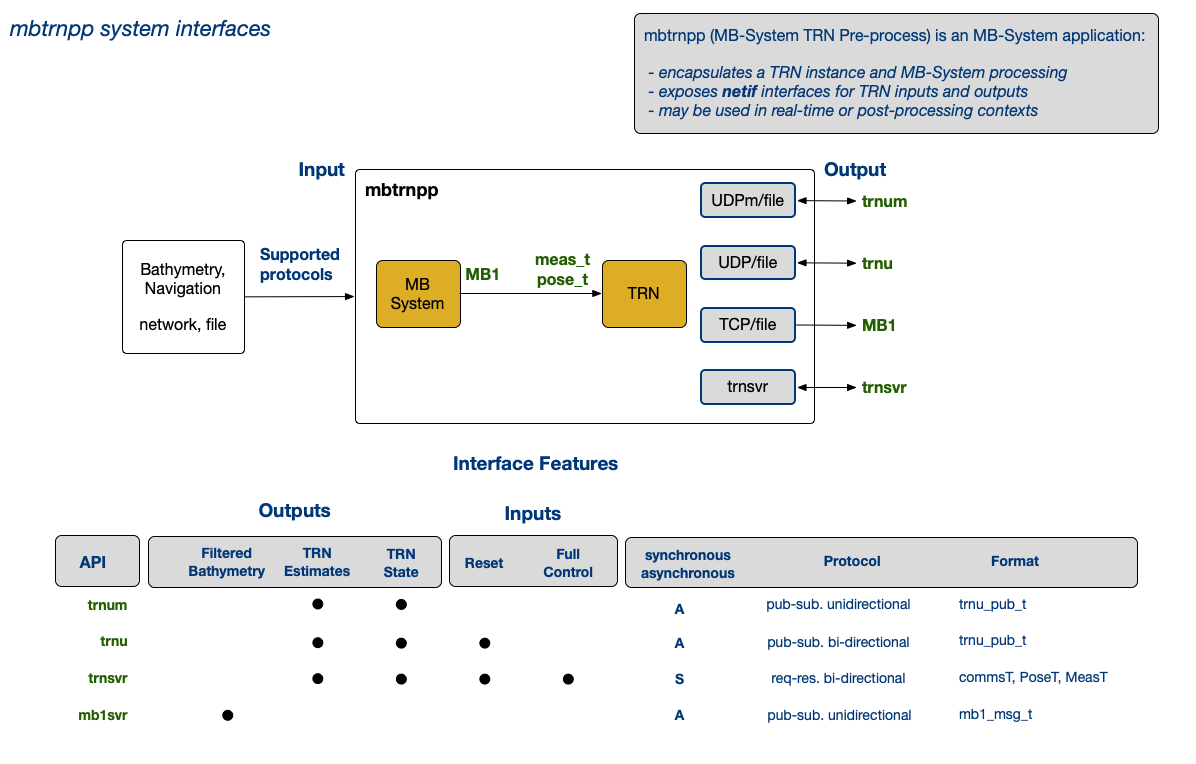
Fig: mbtrnpp system interfaces
mbtrnpp configuration
The configuration file for mbtrnpp contains configuraton items for TRN, as well as the mbtrnpp application.
| Option | Type | Description | ||||||||||||||||
|---|---|---|---|---|---|---|---|---|---|---|---|---|---|---|---|---|---|---|
| verbose=d | int | verbose output | ||||||||||||||||
| help | - | print use info | ||||||||||||||||
| config=path | string | configuration file path | ||||||||||||||||
| log-directory=path | string | log directory path | ||||||||||||||||
| input=datalist|file|socket_definition | string | MB-System datalist file path | ||||||||||||||||
| output=file|'socket' | string | output file path or socket descriptor (?) | ||||||||||||||||
| swathwidth=value | float | total beam swath in degrees | ||||||||||||||||
| soundings=value | int | number of beams to use | ||||||||||||||||
| median-filter=threshold/nx/ny | float/int/int | median filter threshold and dimensions | ||||||||||||||||
| format=format | int | data input format (defined in mbio/mb_format.h) | ||||||||||||||||
| platform-file=file | string | platform file path | ||||||||||||||||
| platform-target-sensor=sensor_id | int | - | ||||||||||||||||
| tide-model=file | string | tide model file path | ||||||||||||||||
| statsec=f | float | log performance metrics every f seconds | ||||||||||||||||
| statflags=<flag>[:<flag>...]; where flags include MSF_STATUS MSF_EVENT MSF_ASTAT MSF_PSTAT MSF_READER |
string | status output selection flags
|
||||||||||||||||
| delay=n | int | loop delay (seconds) | ||||||||||||||||
| trn-en=b | bool | enable TRN processing | ||||||||||||||||
| trn-dev=s | string | - | ||||||||||||||||
| use-proj[=b] | bool | use libproj | ||||||||||||||||
| projection=projection_id | int | projection ID (PROJ) | ||||||||||||||||
| trn-crs=s | string | libproj CRS string used for TRN | ||||||||||||||||
| trn-utm=d | int | TRN UTM zone | ||||||||||||||||
| trn-map=s | string | TRN map file name/directory | ||||||||||||||||
| R1C1 | R1C2 | R1C3 | ||||||||||||||||
| trn-par | string | TRN particles file name | ||||||||||||||||
| trn-mid=s | R1C2 | trn config mission ID (used for log directory prefix, e.g. [mbtrnpp TRN_LOGFILES environment variable must be set] |
||||||||||||||||
| trn-cfg=s | string | TRN config file name | ||||||||||||||||
| R1C1 | R1C2 | R1C3 | ||||||||||||||||
| trn-mtype | string? int? | TRN map type | ||||||||||||||||
| trn-sensor-type | R1C2 | TRN sensor type 1: TRN_SENSOR_DVL 2: TRN_SENSOR_MB 3: TRN_SENSOR_PENCIL 4: TRN_SENSOR_HOMER 5: TRN_SENSOR_DELTAT |
||||||||||||||||
| trn-ftype | int | TRN filter type 0: TRN_FILT_NONE 1: TRN_FILT_POINTMASS 2: TRN_FILT_PARTICLE 3: TRN_FILT_BANK |
||||||||||||||||
| trn-fgrade | int | TRN filter grade | ||||||||||||||||
| trn-freinit | bool | enable TRN filter re-inits | ||||||||||||||||
| trn-mweight | bool | enable modified weighting | ||||||||||||||||
| trn-ncov=d | int | TRN convergence criteria: northings covariance limit | ||||||||||||||||
| trn-nerr | int | TRN convergence criteria: northings error limit | ||||||||||||||||
| trn-ecov | int | TRN convergence criteria: eastings covariance limit | ||||||||||||||||
| trn-eerr | int | TRN convergence criteria: eastings error limit | ||||||||||||||||
| trn-decn | int | TRN decimation modulus | ||||||||||||||||
| trn-decs | float | TRN decimation seconds | ||||||||||||||||
| covariance-magnitude-max=covariance_magnitude_max | int | TRN convergence criteria: max covariance | ||||||||||||||||
| convergence-repeat-min=convergence_repeat_min | int | TRN convergence criteria: min good values | ||||||||||||||||
| reinit-search=reinit_search_xy/reinit_search_z | int | TRN filter reinit stdevs a/b where a: X,Y limit b:Z limit (m) | ||||||||||||||||
| reinit-gain | bool | Enable/disable gating TRN resets using sonar transmit gain | ||||||||||||||||
| reinit-file | bool | Reinitialize TRN every time a new file is read when parsing a datalist | ||||||||||||||||
| reinit-xyoffset=xyoffset_max | float | Reinitialize TRN whenever the magnitude of the lateral converged offset exceeds specified limit | ||||||||||||||||
| reinit-zoffset=offset_z_min/offset_z_max | float | Reinitialize TRN whenever the converged z-offset is outside specified range | ||||||||||||||||
| random-offset | ||||||||||||||||||
| mb-out=mb1svr[:host:port]/mb1/reson | string | TRN MB1 output configuration Options for MB1 record output are selected using one or more comma separated values:
|
||||||||||||||||
| trn-out=interface[:option...][,interface...] where interfaces and options include: trnsvr[:host:port] trnusvr[:host:port] trnumsvr[:group:port:ttl] trnu sout serr |
string | TRN output configuration Options for TRN output are configured using one or more comma separated values:
|
||||||||||||||||
| debug | int | debug output level | ||||||||||||||||
| hbeat=n | int | heartbeat modulus (samples) | ||||||||||||||||
| mbhbn=n | int | MB1 heartbeat modulus | ||||||||||||||||
| mbhbt=n | int | mb1 server heartbeat timeout (s) Drop client connections after timeout Value <=0 disables heartbeat; abandoned sockets persist |
||||||||||||||||
| trnhbt=d | int | trn server heartbeat timeout (s) Drop client connections after timeout Value <=0 disables heartbeat; abandoned sockets persist |
||||||||||||||||
| trnuhbt=d | int | trnu (TRN update pub/sub) server heartbeat timeout (s) Drop client connections after timeout Value <=0 disables heartbeat; abandoned sockets persist |
When mbtrnpp is run and a configuration file is specified, options provided on the command line override those in the configuration file.
MB-System includes a configuration tool (MB-System/src/mbtrn/tools/mbtrncfg) that runs in a web browser; it describes configuration settings, and can generate an mbtrnpp command line and/or export to a file.
mbtrnpp, and it's underlying MB-System and TRN components direct output to the console, as well as a number of different log files.
mbtrnpp and netif Logs
mbtrnpp and netif logs are output to the path specified by the mbtrnpp --log-directory option.
netif and mbtrnpp message logs are named using the convention \<name>-\<session_id> where session_id uses the format yyyymmdd-hhmmssnnnn e.g. mbtrnpp-20220915-2302390000 session_id indicates that log start time and nnnn indicates a segment number.
| Log | Content | Format | |
|---|---|---|---|
| yyyymmdd_hhmmssnnnnnn_mbtrnpp_log.txt | mbtrnpp MB-System summary and stats log | text | |
| mbtrnpp_<session_id>.mb1 | MB1 input log | binary (mb1_t) | |
| mbtrnpp_<session_id>_trn.txt | mbtrnpp TRN console output log | text | |
| mbtrnpp-<session_id>.log | mbtrnpp application message log | text | |
| mb1svr-<session_id>.log | MB1 UDP server message log | text | |
| trnsvr-<session_id>.log | trn-server message lo | text | |
| trnu-<session_id>.log | TRN UDP server message log | binary (trnu_pub_t) | |
| trnub-<session_id>.log | TRN update output log | binary (trnu_pub_t) | |
| trnumsvr-<session_id>.log | TRN UDP multicast server message lo | text | |
| trnusvr-<session_id>.log | TRN UDP server message lo | text |
TRN Logs
The various logs using *-\<session_id_> are useful for debugging; they contain timetamped formatted event messages and optionally statistics and metrics. The content depends on the verbose and debug options.
The --verbose option sets the mbtrnpp (and MB-System) output level to the console and logs; anything >=2 produces a lot of debug to the console (mostly from MB-System). Values <0 suppress the MB-System output and enable varying degrees of output from various modules. When --verbose is zero (default), only the mbtrnpp TRN convergence info and critical errors are directed to the console.
A TRN instance also produces logs, and copies some configuration files to the log directory. These are written to a directory with the format
YYYY.JJJ-TRN, where YYYY is the year and JJJ is the day of year (Julian day).
The log directory is generally set using environment variable TRN_LOGDIR.
In the case of mbtrnpp, it is prefixed by the --trn-mid (TRN mission ID) option and written to the path specified using --log-directory option, e.g.
| File | Content/th> | Format/th> |
|---|---|---|
| TNavPFLog.log| | TRN Particle Filter log | binary |
| TerrainNav.log | TRN input log (single record type) | binary |
| TrnIO.log | TRN inputs and outputs (multiple record types) | binary |
| trn.log.0000 | TRN message log | text |
| mappingAUV_specs.cfg | vehicle configuration file (specifies input devices) | text |
| rdiDVL_specs.cfg | RDI DFL configuration file (referenced by vehicleSpecs) | text |
| resonSeabat8101_specs.cfg | Reson multibeam config file (referenced by vehicleSpecs) | text |
| imagenexdeltat_specs.cfg | Imagenex DeltaT configuration file (referenced by vehicleSpecs) | R1textC3 |
| particles.cfg | Particle filter log? configuration file (optional, typically unused) | text |
Dorado TRN Architecture
On Dorado, TRN runs on the embedded computer in the Reson Sonar, essentially an Intel x86 Windows XP + Cygwin host. TRN is embedded in an application called mbtrnpp, which is part of the open source MB-System mapping package (here on github ).
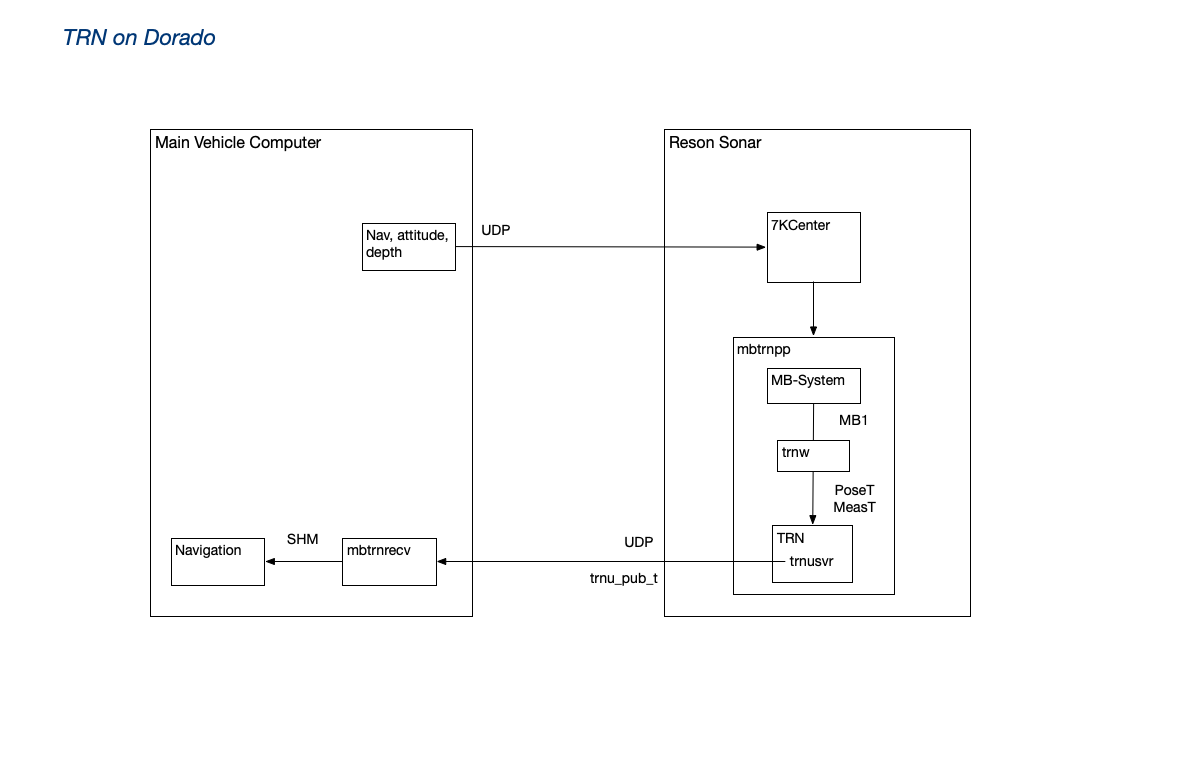
mbtrnpp subscribes to sonar data streams via 7KCenter (sonar vendor application). Navigation and attitude data are injected into the sonar data stream. mbtrnpp parses, validates, and filters the data stream, and generates an MB1 record with each sounding (sonar ping). The libtrnav trnw library (TRN C wrapper API) is used to convert the MB1 records to PoseT and MeasT records, provided as motion and measurement updates.
mbtrnpp checks the return value of the motion/measurement updates and if successful, requests a position estimate using TerrainNav::estimatePose. The estimate is published using a trnu_pub_t message (also part of the trnw library). The Dorado main vehicle computer, a subscriber to the TRN updates, passes the offset to the vehicle navigation, which may optionally apply it.
Previously, Dorado used trn-server (TCP network TRN instance), rather than mbtrnpp. In that configuration (sometimes referred to by the developers as "classic TRN"), navigation/attitude and bathymetry inputs would be marshaled by TerrainAidDriver on the main vehicle computer (MVC), and a TerrainNavClient would interact with the trn-server. In that case, little or no filtering was applied.
Application: MBARI Long Range AUV (LRAUV)
LRAUV-TRN Architecture
The TRN application to support Long Range AUV (LRAUV) navigation (LRTRN) is very similar in architecture to the original developmental version of TRN for Dorado-class vehicles used successfully in the mid to late 2010s. LRTRN contains a single embedded instance of the TerrainNav class that implements the core capabilities of TRN. LRTRN receives data from the LRAUV main vehicle computer (MVC) and calls the TerrainNav instance directly. There are no servers in the architecture, but a server could be substituted in place of the embedded instance.
LRTRN runs on the LRAUV backseat computer (BSC). The BCS is an embedded Linux system that can be powered on and shutdown by the MVC depending on the mission. Communication between the MVC and BCS systems is handled exclusively through LCM channels. As of this writing the BCS is a NVIDIA Jetson Nano running Ubuntu. LRTRN is setup as a system service and starts when the BCS is booted.
LRTRN requires a single parameter specifying the location of the LRTRN configuration file (CFG) on a local filesystem. The first action of LRTRN is loading the CFG which consists of these main sections:
- ‘ops’ section - specifies the UTM zone in which the vehicle will operate
- ‘lcm’ section - settings for LCM communication, i.e.:
- URL used for LCM multicast communication
- Timing settings used for handling LCM messages in coherent groups
- Channel settings specify the message channel names and the message field names used to fill the poseT and measT inputs to TRN
- ‘trn’ section - settings for TRN operation, i.e.:
- Type of sonar instrument (DVL only workable option)
- TRN timing period (time between TRN I/O updates, e.g., 4 seconds)
- Map file name and map type (e.g., PortTiles)
- Traditional TRN top-level configuration file name (e.g., LRAUV_specs.cfg)
- TRN filter type weighting options (e.g., Particle filter)
After CFG is loaded LRTRN instantiates a TerrainNav object and an LCM context using the settings in CFG. When successful, LRTRN simply begins listening for LCM input messages. The data in the messages are used to populate the usual poseT and measT objects that drive the TRN processing. These LCM messages normally come from the MVC during actual missions, but they can also originate from simulations and log file players that are often used to test LRTRN by republishing logged data or logged LCM messages.
Dataflow
As previously mentioned, LCM is used for all communication between the MVC and BCS. That means LCM message channels drive all of the I/O for LRTRN and the embedded TerrainNav instance. The diagram below illustrates dataflow between the two systems.
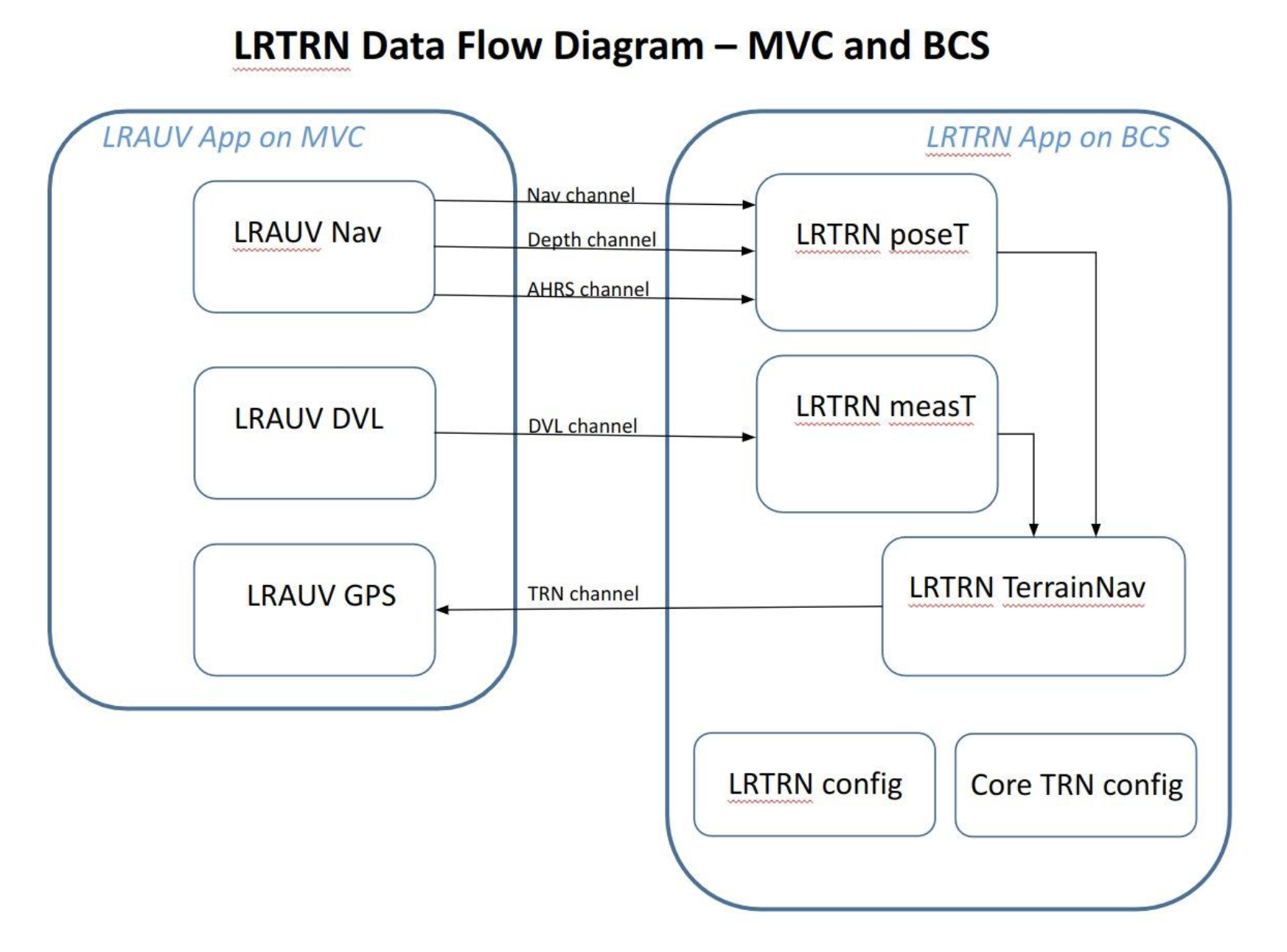
LRTRN receives vehicle state and sonar messages at the nominal MVC control system rate (e.g., 2.5 Hz or 400 ms period) LRTRN publishes updated TRN position estimates at the rate configured in CFG (typically 0.25 Hz or 4 second period). The lrauv-lcmtypes message format is used for all LCM channels.
The lrauv-lcmtypes type message structure contains a timestamp field when the message is sent from the publishing system. The timestamp in messages from the MVC is used as the timing clock in LRTRN processing. The MVC system time is essentially imported into LRTRN via the LCM input messages as a way to synchronize the LRTRN and MVC control system processes. This means the data in both processes is timestamped with the same clock. This timing architecture has a number of benefits including removal of system clock differences and the ability to run tests and simulations faster than real time.
Processing Overview
Refer to the dataflow diagram above for a visual reference to the discussion in this section.
Initialization
Processing begins with the initialization phase. The application starts by loading the configuration file specified in the sole command line parameter. The configuration file specifies all the processing options for the LRTRN application. If the file cannot be loaded or any subsequent files fail to load, the application will fail straight away. Otherwise the application is ready to go. Initialization is outlined below.
- Load LRTRN configuration file (CFG)
- Failure to locate or properly load the file results in immediate termination
- LCM section contains all the channel and message item names as well as the LCM message handling timing attribute (see related item in Application Notes section of this document below)
- TRN section contains the legacy TRN settings and options. For example:
- Core TRN vehicle configuration file - e.g., LRAUV_specs.cfg
- Measurement instrument type and number of beams
- Map file name - e.g., PortTiles
- Filter option - e.g., Particle Filter, Point Mass Filter, etc.
- Weighting option
- Dead Reckoning - default value is true; false value used for testing in piggyback mode
- Load TRN map and core TRN configuration file specified in CFG
- Failure to load results in immediate termination
- Create TerrainNav object used for TRN calculations
- Apply TRN configuration options to the TerrainNav object
- Create LCM context
- Match message handling functions with channel names
- Listen for LCM messages for TRN inputs
Main loop
The main loop runs continuously until the program is halted. The steps taken in the loop are outlined below.
-
Messages received from the Navigation, AHRS, and Depth channels are used to update
the active poseT object
- Message received as part of a burst that occurs at the control system frequency
- The messages from the MVC are all of the type lrauv-lcmtypes
- The timestamp item of these messages update the applications’ internal TRN-clock
-
Messages received from the DVL channel are used to update the active measT object
- Message received as part of a burst that occurs at the control system frequency
- The messages from the MVC are all of the type lrauv-lcmtypes
- The timestamp item of messages update the applications’ internal TRN-clock
-
Periodically call the motion and measurement update functions of the TerrainNav object
- The period is specified in the TRN section of the CFG file (e.g, 4 seconds)
- The internal MVC-driven clock is compared to the previous update time to determine if the period has expired
-
Periodically publish the current TRN estimates obtained by calling the estimate functions of the TerrainNav object
- Same period as the motion and measurement updates (e.g., 4 seconds)
- The TRN channel name is specified in the LCM section of CFG
-
The MVC system closes the control loop on TRN by treating the TRN position estimate
as a GPS fix
- LRTRN publishes the position estimate by taking the dead-reckoning position of the vehicle, adding the offset calculated by TRN, and returning the result as latitude, longitude, and depth
- TRN estimate includes a set of confidence values called covariances
- The MVC can accept the TRN estimate as a GPS fix when the covariances lower to a certain limit
Closing The Loop on the TRN estimate
As discussed in the Main Loop section above, LRTRN publishes the estimated vehicle position from TRN to the MVC. After every motion and measurement update provided to TRN during a mission TRN also updates an internal vehicle position estimate along with a set of covariances that represent the relative confidence level in the estimated values. The estimate can be accepted by the MVC as a GPS fix when the covariances of the northing and easting TRN position estimates fall below a certain threshold. Traditionally, the calculation used is:
acceptable = sqrt[ (covarN*covarN) + (covarE*covarE) ] < THRESHOLD
Lower covariance values mean higher confidence. Likewise, a lower threshold value is more stringent in that it requires more confidence in the TRN estimates. A threshold value of 7 is commonly used.
The decision to use the TRN estimate as a GPS fix in the MVC is a departure from the original usage when TRN was developed. For TRN to perform calculations correctly the input to TRN motion updates (i.e., the change in vehicle position) need to be the consistent dead-reckoned (DR) position of the vehicle, not the TRN-corrected position. The GPS fix provided by TRN produces a tear in the navigated position that would immediately confuse TRN if used as the vehicle position in the next motion update. To avoid this issue, LRTRN internally maintains the DR position of the vehicle to use for motion updates for TRN. This DR position is the input for TRN motion updates.
Application Notes
Bursty LCM Message Handling
The MVC control system calculates and updates the vehicle state and publishes this data in a quick burst of messages at the end of every control cycle. To receive these messages using LCM the programmer subscribes to the named message channels by specifying a local message handling function. A call to an LCM handle function on the receiving system causes LCM to listen for traffic on any one of the subscribed channels. LCM calls the corresponding message handling function when a message is received on a subscribed channel.
In LRTRN we use the handleTimeout(ms) function that returns control back to the caller either when a message is handled or a timeout has expired. It is important to note that when LCM does detect traffic on any channel it returns immediately after the handling that first message. In other words, LCM handles only one message at a time (or none if the timeout has expired).
This message exchanging arrangement introduces an issue in the LRAUV-LRTRN architecture because the MVC uses more than one channel to communicate the state of the vehicle (e.g., Nav, AHRS, DVL, etc.) at the control frequency. Put simply, the LRTRN application will work best if it uses a coherent dataset from the vehicle that was calculated in the same period rather than mixing results from consecutive control cycles. To acquire a coherent dataset LRTRN employs a simple two-mode burst timing strategy to handle LCM messages using two settings in the configuration file: initial-timeout and max-timeout.
LRTRN first uses handleTimeout(initial-timeout) until the first message in a burst is handled. The pseudocode below is for illustration. Assume values of 50 ms for initial-timeout, 100 ms for max-timeout, and 10 ms for nominal-timeout.
// Do nothing until a burst is detected
while (0 == LCM.handleTimeout(initial-timeout)) ;
When a message is handled by LCM the method returns 1 and we assume that was the first message of the incoming burst (this may not be true for the very first burst at startup). LRTRN then moves on to the second stage of the strategy by letting LCM continue to handle messages until the burst is complete:
// Handle messages until max-timeout has expired
while (false == expired(max-timeout)) {
LCM.handleTimeout(nominal-timeout);
}
Usage over the years have demonstrated this to be a simple and effective strategy to quickly detect and consistently home-in on message bursts from the MVC control system. Tests also confirmed that, although TRN will still converge without this burst adaptation, the convergence takes longer and is not as crisp as when using the timing. Or, what one would expect when receiving noisy input data. Observations also show the message bursts usually last less than 50 ms and gaps between bursts are consistently over 300 ms. The burst timing settings can be changed to accommodate faster or slower than real-time message traffic by either reducing or increasing the timeout values.
LRAUV LCM Types
LRTRN makes use of the LRAUV LCM library type known as lrauv-lcmtypes. It is a sort of one-size-fits-all generalized LCM type used to communicate with the MVC. It was developed to halt the spread of application-specific LCM data types and the associated maintenance. The message type is an LCM version of a hash-table, or map, that can be used to define message structures dynamically. Message fields are retrieved using a string name and by calling access function based on C-types. As an example:
// This is code inside of an LCM message handler.
// Assume msg is a lrauv-lcmtype message.
Float timestamp = msg.getFloat(“Timestamp”);
The benefit of using this class is that the LRAUV engineers need only use this one generalized LCM type. The drawback is that much more code is required to set up messages and access fields in those messages. In the LRTRN application you will see a lot of repetitive lines of code that deal with initializing these messages. Source files can become rather verbose, but it’s an understandable tradeoff.
Application: MBARI ROV Ventana/LASS
In the ROV context, TRN is currently being developed; it is primarily motivated by locating the vehicle to a map for repeat surveys of specific features and sites. Doing so efficiently increases potential observing time.
On the ROV, TRN sensor data streams are distributed (pub/sub) and logged using the LCM (lightweight communication and marshaling) middleware library here; the LCM input processing, variable sensor suite, and unique TRN architecture form an interesting implementation.
The ROV is frequently reconfigured for different types of missions. The available senors may change, but bathymetry, attitude, and navigation are virtually always present. Some payloads include their own, for example the Low Altitude Survey System (LASS), a tool sled which carries LIDAR, multi-beam sonar, cameras and an INS for centimeter scale mapping. Some LASS instrumentation is mounted an articulating surface, which pivots to accommodate changes in terrain (e.g. cliff walls).
The libtrnav trnxpp application (opt/rov) implements the sensor input and TRN front-end. trnxpp introduces the concept of a TRN context:
- a set of inputs associated with
- a plug-in processing module
- a TRN instance (which may be a trn-server, mbtrnpp instance, etc.)
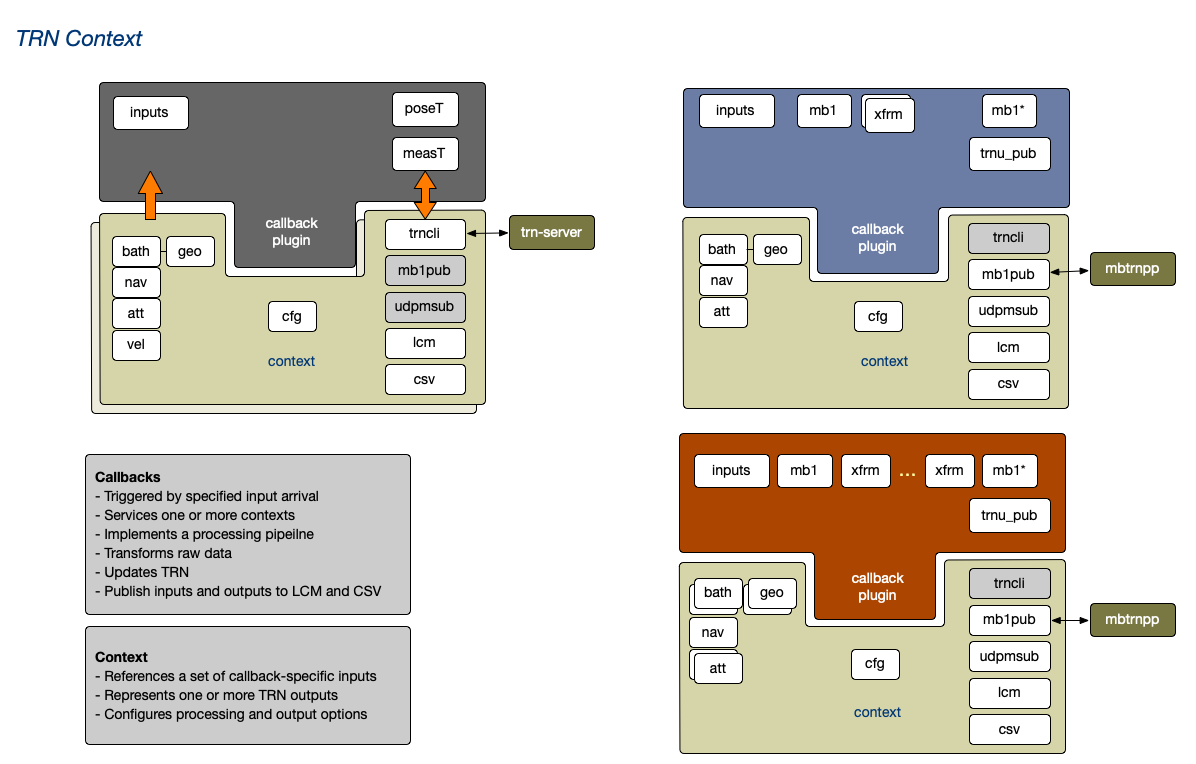
The basic architecture of trnxpp is shown in the figure below.
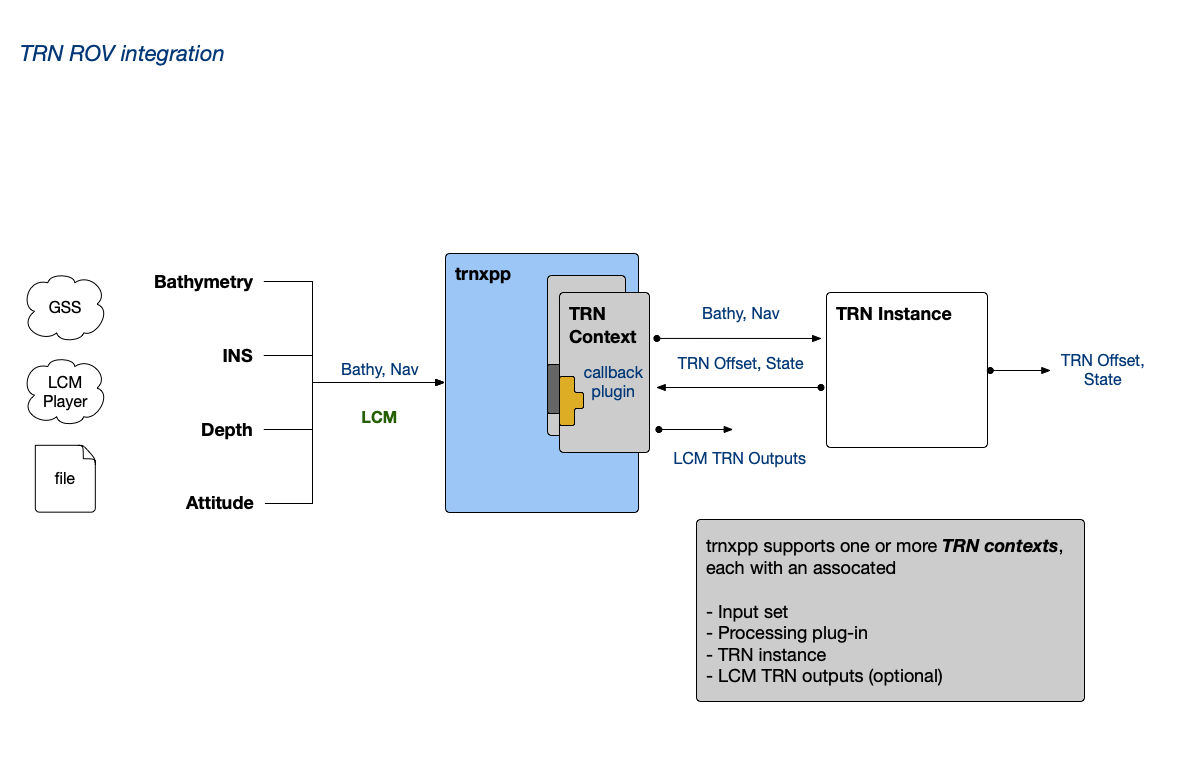
So, trnxpp may be configured to use the available sensor suite. For example if multibeam sonar is available, mbtrnpp may be used as the TRN instance, whereas trn-server may be used with a DVL bathymetry source.
trnxpp can support multiple contexts, though typically only one is used.
All data inputs arrive asynchronously via LCM. An input stream may provide multiple parameters, for example navigation, attitude, and/or velocity. libtrnav opt/rov package includes logic for receiving and validating LCM message data, and presenting them via generic interfaces by type (bathymetry, navigation, attitude, velocity, etc.).
The context processing callback plug-in operates on a specific set of input types (not specific sensors), which may include multiple sources for the same type. Context processing is initiated by the arrival of a designated trigger input (e.g. bathymetry). Upon arrival, the context processing callback is invoked, and the other required data inputs, which are also being updated asynchronously, are sampled and validated. Incoming data streams are queued (depth configurable) to enable interpolation; typically the sample from each input is used.
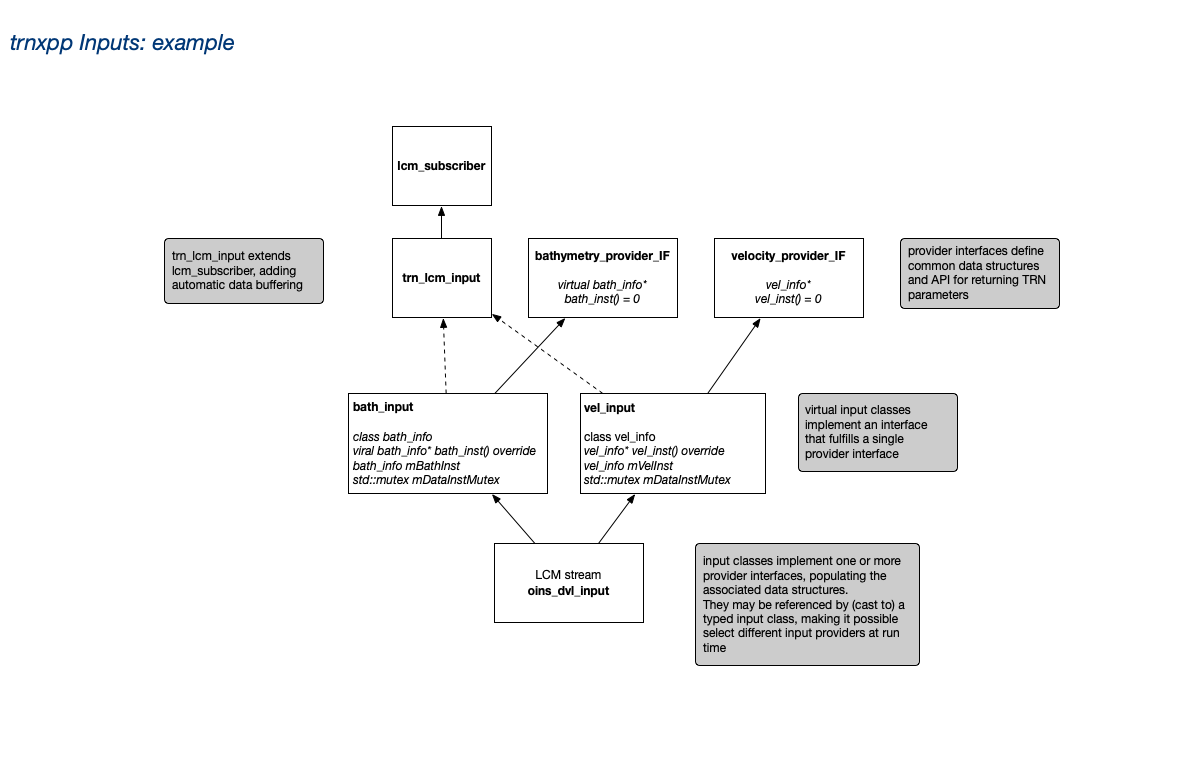
In some applications, for example when sensors able to move relative to the vehicle frame of reference, processing plug-ins require geometry information to resolve bathymetry beam components in the vehicle or world inertial frame. To that end the libtrnav opt/rov package defines some configuration semantics along with parsing and data structure classes to enable these to be defined at configuration time.
Application: WHOI Sentry
TRN for the WHOI Sentry vehicle is similar to the Dorado architecture. There, mbtrnpp (with its embedded TRN instance) is run on an x86 64-bit Ubuntu Linux backset computer. Recent surveys at Axial Seamount have used the Kongsberg EM 2040 multibeam sonar or the Reson T50. Both sonars support ancillary data integration with navigation and attitude streams.
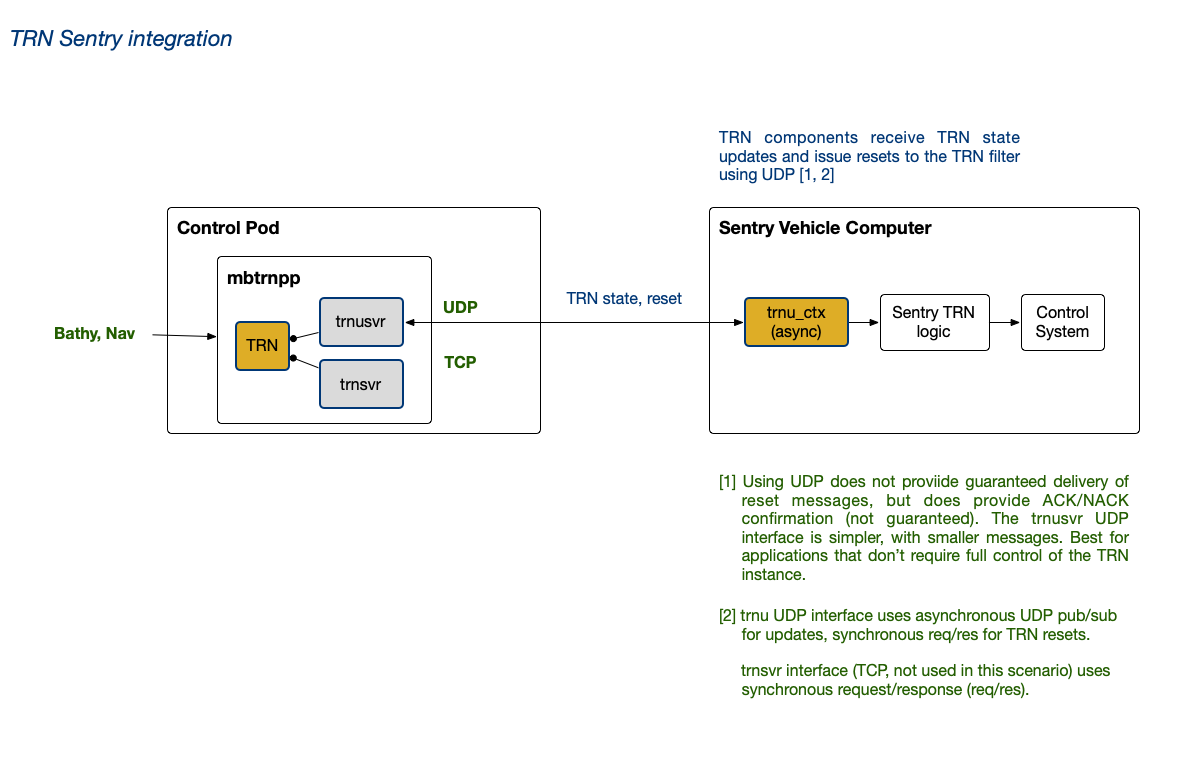
Sentry uses the libtrnav trnu_cli component class to interact with the mbtrnpp trnusvr interface. trnu_cli may be used to receive updates synchronously (req/res) or asynchronously (pub/sub); this is demonstrated in the trnu-cli utility. On Sentry, the asynchronous pub/sub is used to receive TRN updates, and offsets are passed to Sentry's control system via some intermediate logic.
trnu_cli is also used to request TRN filter resets. TRN resets may be triggered in software or manually using acoustic comms. trnu_cli sends UDP reset requests to the mbtrnpp trnusvr, which uses a callback in mbtrnpp to perform the reset.
The trnusvr interface supports only the TRN reset API.