Download
Data can be downloaded in various formats, e.g. COCO, CIFAR, or PASCAL VOC. The type of download depends on the model.
Alert
Be sure to have a solid internet connection and enough disk space to download the data.
Download verified versus unverified data
By default, all data is download. To only download verified data, use the --verified option.
Verified data is data that has been reviewed and labeled by a human. To download only unverified data,
use the --unverified option.
aidata download --token $TATOR_TOKEN --version Baseline --labels "diatoms, copepods" --config https://docs.mbari.org/internal/ai/projects/config/config_cfe.yml
Download specific labels
If your leave off the labels option or set to "all", the default is to fetch all labels.
multiple versions can be combined during download, e.g. to download both Baseline and Test
aidata download  --token $TATOR_TOKEN --version Baseline --labels "diatoms, copepods" --config https://docs.mbari.org/internal/ai/projects/config/config_cfe.yml
--version Baseline --version Test
Alternatively, you can also use the following format to download multiple versions. Here a string is provided to the version flag which will be read as a list of the versions you want to combine.
aidata download dataset --crop-roi --resize 224 --voc --token=$TATOR_TOKEN --config https://docs.mbari.org/internal/ai/projects/config/config_planktivore_hm.yml --base-path /mnt/ML_SCRATCH/<your folder> --verified --version='mbari-ptvr-vits-b8-20250513_20250526_130025,mbari-ifcb2014-vitb16-20250318_20250320_025000'
Note
If no version is specified, all versions are downloaded and combined through Non-Maximum-Suppression to remove duplicate boxes.
Download by version
# Download all versions except two
aidata download dataset --config https://docs.mbari.org/internal/ai/projects/config/config_cfe.yml --exclude-versions "Baseline,ver0"

# This is invalid: mutually exclusive selectors
aidata download dataset --config https://docs.mbari.org/internal/ai/projects/config/config_cfe.yml --version "Baseline" --exclude-versions "ver0"
Other options
There are other options to download data, e.g. by group, depth, section. These options are available in the help message. For example, to download data for the Baseline version, with labels "Atolla", use the following command:
aidata download --token $TATOR_TOKEN --version Baseline --labels "Atolla" --config https://docs.mbari.org/internal/ai/projects/config/config_i2map.yml --depth 200
Crop ROIs from an external video source
When using --crop-roi, you can optionally crop from external video files instead of the Tator streaming URL (or locally downloaded media).
- Option:
--external-video-root /path/to/videos - Lookup rule: for each Tator media item, use the media filename stem and search under
external-video-rootfor: <stem>.mov(preferred)- otherwise
<stem>.mp4 - Search behavior: the root is searched recursively.
Example:
aidata download dataset \
  --token $TATOR_TOKEN \
  --config https://docs.mbari.org/internal/ai/projects/config/config_uav.yml \
  --labels "Bird" \
  --verified \
  --crop-roi \
  --external-video-root /mnt/video_sources/uav
Download data by section
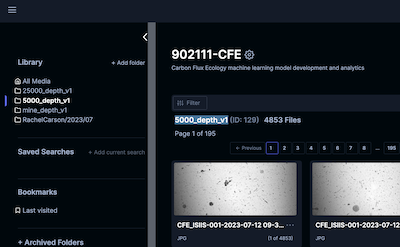
To download all data in the section 5000_depth_v1, use the following command:
aidata --no-capture-output python3 aidata download dataset --base-path ./data/i2map --version Baseline --section "5000_depth_v1" --labels "all" --config config_cfe.yml
Data format
Download data format is saved to a directory with the following structure e.g. for the Baseline version:
Baseline
    ├── labels.txt
    ├── images
    │   ├── image1.jpg
    │   ├── image2.jpg
    ├── labels
    │   ├── image1.txt
    │   ├── image2.txt
Download data in various formats
PASCAL VOC data format
If you want to download data also in the PASCAL VOC format, use the optional --voc flag, e.g.
aidata download --token $TATOR_TOKEN --version Baseline --labels "diatoms, copepods" --voc --config https://docs.mbari.org/internal/ai/projects/config/config_cfe.yml
Download data format is saved to a directory with the following structure e.g. for the Baseline version:
Baseline
    ├── labels.txt
    ├── images
    │   ├── image1.jpg
    │   ├── image2.jpg
    ├── voc
    │   ├── image1.xml
    │   ├── image2.xml
    localizations.csv
localizations.csv contains the normalized bounding box coordinates with reference to the image for convenience.
COCO data format
Use the optional --coco flag to download data in the COCO format, e.g.
aidata download --token $TATOR_TOKEN --version Baseline --labels "diatoms, copepods" --coco --config https://docs.mbari.org/internal/ai/projects/config/config_planktivore_lm.yml
Download data format is saved to a directory with the following structure e.g. for the Baseline version:
Baseline
    ├── labels.txt
    ├── images
    │   ├── image1.jpg
    │   ├── image2.jpg
    ├── coco
    │   └── coco.json
CIFAR data format
Use the optional --cifar flag to download data in the CIFAR format, e.g.
aidata download --token $TATOR_TOKEN --version Baseline --group NMS --base-dir VARSi2MAP --labels "Atolla" --cifar --voc --cifar-size 128 --config https://docs.mbari.org/internal/ai/projects/config/config_bio.yml
The CIFAR data is saved in a npy file with the following structure, e.g. for the data version Baseline:
Baseline
    ├── labels.txt
    ├── cifar
    │   ├── images.npy
    │   └── labels.npy
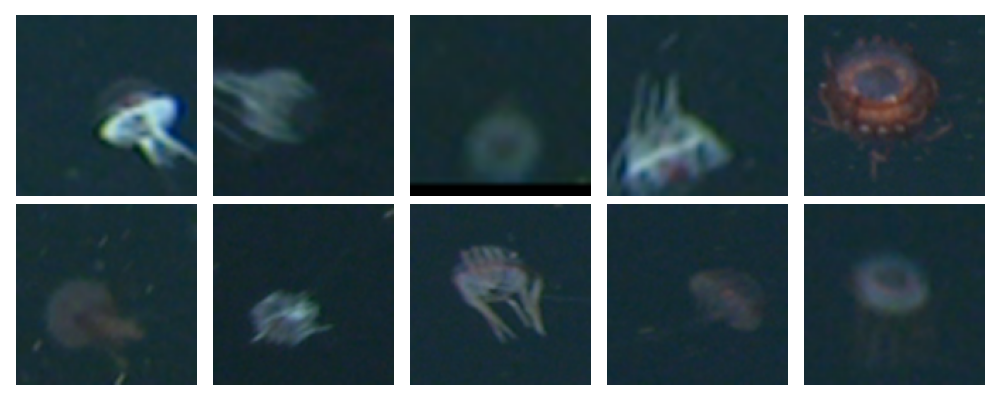
Read the data (and optionally visualize) with the following code:
import numpy as np
import matplotlib.pyplot as plt
images = np.load('Baseline/cifar/images.npy')
labels = np.load('Baseline/cifar/labes.npy')

# Visualize a few images from the CIFAR data
fig, axes = plt.subplots(nrows=2, ncols=5, figsize=(10, 4))

for i, ax in enumerate(axes.flat):
    ax.imshow(images[i])
    ax.axis('off')

plt.tight_layout()
plt.show()
last updated: 2026-05-05