Transform
The transform command is used to transform exported data.
Note
Currently only voc formatted input data is supported as the starting format for transformation. You can export your data to voc at download with the --voc option
Assuming you have downloaded a dataset in voc format with the download dataset command, your directory structure should look something like this:
Baseline/
├── images
│   ├── trinity-2_20230412T162917_DSC01533.JPG
└── voc
    ├── trinity-2_20230412T162917_DSC01533.JPG.xml
Note
The image directory may be named either images (older downloads) or media (current aidata download
output) — both transform voc and transform voc-to-yolo accept either name automatically.
Transform voc to yolo with augmentations
Augmenting the data with bounding box crops and resizing can help improve the model's performance. This can
be done during the model training, or done aprior to training which is what this command does.
This command will transform your voc data per the--crop-size, --crop-overlap, and optional --resize parameters. Resize will in addition to the cropping,
scale the images and labels to the specified size; this will not crop the images.
For example, the following command will create four images and labels from the original image and label files with a crop size of 1280 and 50% overlap. Only image crops that contain bounding boxes will be kept.
aidata transform voc --base-path Baseline --crop-size 1280 --crop-overlap 0.5 --min-visibility 0.5
Original image (2795x5304). Scaled down for display
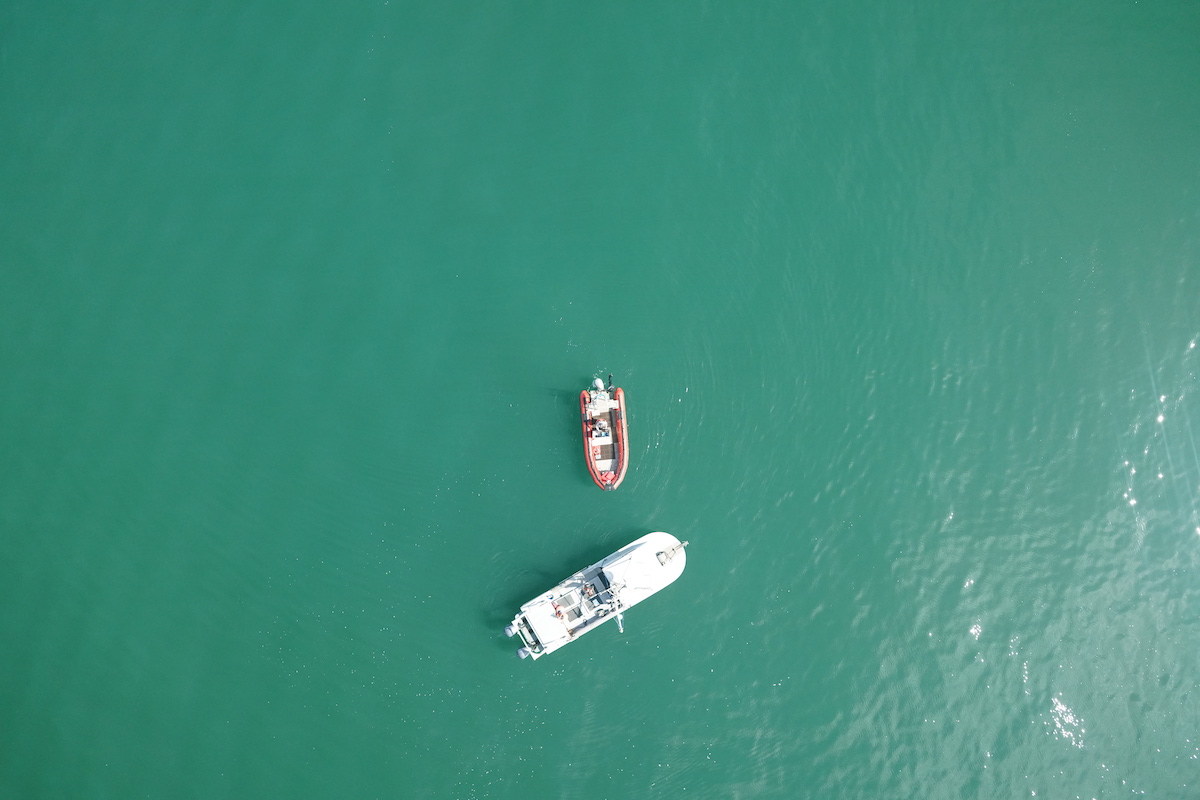
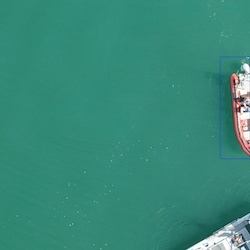
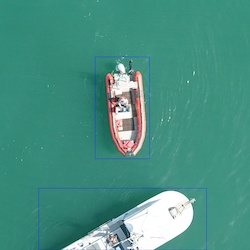
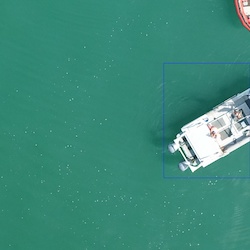
Cropped images with 50% overlap, crop size of 1280 and min-visibility 0.5.
Important
If the ratio of the bounding box area after augmentation is smaller than min-visibility, it will be dropped.
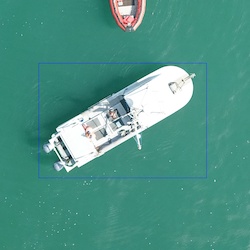
Here, we see it drops the RIB bounding box in the 3rd and 4th images. Set --min-visibility 0. to keep all bounding boxes.
Cropped images 1280x1280. Scaled down for display
Negative (background) examples
By default, crops/resizes with no bounding boxes left after augmentation are dropped. Training with some
negative (background) examples can help reduce false positives, so this can optionally be kept using the
--negative-percent option.
--negative-percent is a fraction between 0 (default, disabled) and 1 (exclusive) that caps how many negative
examples are kept relative to the number of positive (annotated) examples, e.g. 0.1-0.2 for 10-20%. A
randomly sampled subset of the empty crops/resizes is kept — just enough so that:
negatives / (positives + negatives) <= negative-percent
For example, to keep up to 15% of the transformed dataset as negative examples:
aidata transform voc --base-path Baseline --crop-size 1280 --crop-overlap 0.5 --min-visibility 0.5 --negative-percent 0.15
Negative images are written alongside the positive crops/resizes in transformed/images and transformed/voc,
named with a _neg suffix (e.g. trinity-2_20230505T170550_DSC02193_c_5_neg.JPG) so they're easy to identify or
filter out downstream. Their VOC XML files have no <object> entries.
Transformed data to yolo format for training a yolo model
Once the data is transformed, it can be converted to yolo format with the following command
aidata transform voc-to-yolo --base-path Baseline/transformed
The final output structure should look something like
Baseline/
├── images
│   ├── trinity-2_20230412T162917_DSC01533.JPG
│   ├── trinity-2_20231006T165315_DSC04481.JPG
├── transformed
│   ├── images
│   │   ├── trinity-2_20230412T162917_DSC01533_c_0.JPG
│   │   ├── trinity-2_20230412T162917_DSC01533_c_1.JPG
│   │   ├── trinity-2_20230412T162917_DSC01533_c_2.JPG
│   │   ├── trinity-2_20230412T162917_DSC01533_c_3.JPG
│   ├── labels
│   │   ├── trinity-2_20230412T162917_DSC01533_c_0.txt
│   │   ├── trinity-2_20230412T162917_DSC01533_c_1.txt
│   │   ├── trinity-2_20230412T162917_DSC01533_c_2.txt
│   │   ├── trinity-2_20230412T162917_DSC01533_c_3.txt
│   └── voc
│       ├── trinity-2_20230412T162917_DSC01533_c_0.xml
│       ├── trinity-2_20230412T162917_DSC01533_c_1.xml
│       ├── trinity-2_20230412T162917_DSC01533_c_2.xml
│       ├── trinity-2_20230412T162917_DSC01533_c_3.xml
└── voc
    ├── trinity-2_20230412T162917_DSC01533.JPG.xml
Other options
| Option | Description |
|---|---|
--min-area |
Minimum area of a bounding box in pixels. If the area of a bounding box after augmentation becomes smaller than min_area, it will be dropped. |
--min-dim |
Minimum dimension of a bounding box in pixels. If the area of a bounding box after augmentation becomes smaller than min_area, it will be dropped. Defaults to 10. |
--resize |
Resize the image to a specific size, e.g. 640x480. Don't resize if not specified. Done in addition to crop if crop is specified |
--negative-percent |
Fraction (0-1, exclusive) of negative (no-annotation) examples to keep relative to the number of positive examples, e.g. 0.1-0.2 for 10-20%. Defaults to 0.0 (disabled). See Negative (background) examples. |
--max-images |
Only process up to this many images. Useful for testing. Defaults to processing all images. |
Split
Useful for splitting YOLO formatted datasets into train/validation/test sets. workflows. Automatically splits data into 85% train, 10% validation, 5% test. Uses fixed random seed (0) for consistent train/val/test assignments.
Like transform voc/voc-to-yolo, the input's image directory may be named either images or media.
Example usage:
aidata transform split -i Baseline/transformed -o /path/to/output
Input Structure
Baseline/
├── transformed
│   ├── images
│   │   ├── trinity-2_20230412T162917_DSC01533_c_0.JPG
│   │   ├── trinity-2_20230412T162917_DSC01533_c_1.JPG
│   │   ├── trinity-2_20230412T162917_DSC01533_c_2.JPG
│   │   ├── trinity-2_20230412T162917_DSC01533_c_3.JPG
│   ├── labels
│   │   ├── trinity-2_20230412T162917_DSC01533_c_0.txt
│   │   ├── trinity-2_20230412T162917_DSC01533_c_1.txt
│   │   ├── trinity-2_20230412T162917_DSC01533_c_2.txt
│   │   ├── trinity-2_20230412T162917_DSC01533_c_3.txt
Output Structure
output/
├── images.tar.gz  (contains images/train, images/val, images/test)
└── labels.tar.gz  (contains labels/train, labels/val, labels/test)

dataset/
├── autosplit_train.txt
├── autosplit_val.txt
└── autosplit_test.txt
Next Steps - Training a YOLO model  !
!
See the object detection training guide for more information on training a YOLO model.
last updated: 2026-07-14