ReadiNet Developer Guide
This document is the definitive reference for engineers working on the ReadiNet project. It covers architecture, local development, OS image builds, cloud server deployment, and a detailed tour of every significant file in the codebase.
Table of Contents
- System Overview
- Repository Layout
- Architecture Deep Dive
- Local Development Setup
- Building the OS Image
- Deploying to Hardware
- Cloud Server Setup
- File Reference
1. System Overview
FIDO is a distributed water sampling system. Each field deployment consists of one or more RockPi S devices running the READI-Net OS, each physically connected to a FIDO sampler via USB serial. A central cloud server (AWS EC2) provides remote management and data aggregation.
/opt/web/instance/
readinet-prod.db) systemd-timers(Systemd Timers for Scheduled Events) end cloud <-- Tailscale VPN Tunnel --> rockpi
The same Flask application codebase runs in both roles, controlled by a single ROLE environment variable. The device is considered ground truth for its own data; the server is a synchronized mirror with an administrative UI on top.
2. Repository Layout
readi-net/
├── README.md                ← end-user and high-level developer docs
├── compose.yml              ← Docker Compose for local development
├── .tool-versions           ← python 3.10.12 (asdf/mise)
├── .gitignore
│
├── docs/                    ← Markdown Documentation
├── os/                      ← Armbian image build system
│   ├── build-os.sh          ← main local build script
│   ├── build-aws.sh         ← launches AWS spot instance to build
│   ├── aws-userdata.sh      ← EC2 user-data: clones repo, builds, uploads to S3
│   ├── set-device-vars.sh   ← pre-flash provisioning utility
│   ├── build-vagrant.sh     ← alternative: build in local Vagrant VM
│   ├── Vagrantfile          ← Vagrant config for local build VM
│   └── userpatches/         ← Armbian build overrides
│       ├── config-readinet.conf  ← board/kernel/package config
│       ├── config-default.conf   ← symlink → config-readinet.conf
│       ├── lib.config            ← extra apt packages
│       ├── customize-image.sh    ← post-build chroot script
│       ├── kernel/archive/       ← custom kernel patches
│       └── overlay/              ← files copied into the image
│           ├── readinet-web.service
│           ├── readinet-firstboot.{service,sh}
│           ├── readinet-network.{service,sh}
│           ├── readinet-hotspot.{service,sh}
│           ├── readinet-nginx-setup.{service,sh}
│           ├── readinet-event@.{service,timer}
│           ├── readinet-install-schedule.service
│           ├── {Ethernet,Hotspot,Uplink,WiredConnection1}.nmconnection
│           ├── nginx.conf
│           ├── 99-readinet.conf   ← sshd config
│           ├── rk3308-*.dtbo      ← device tree overlays
│           └── web -> ../../../web  ← symlink to web/ app
│
├── web/                     ← Flask application (device + server)
│   ├── Dockerfile
│   ├── pyproject.toml       ← Python dependencies (Poetry)
│   ├── mosquitto.conf       ← MQTT broker config
│   ├── .env.sample          ← template for local .env
│   ├── bootstrap.sh         ← container init: db upgrade + seed
│   ├── device_simulator/    ← virtual FIDO sampler for local dev
│   └── readinet/
│       ├── app.py           ← Flask application factory
│       ├── config.py        ← configuration, logging setup
│       ├── models.py        ← SQLAlchemy models + MQTT sync hooks
│       ├── api.py           ← API blueprint (all POST/GET actions)
│       ├── sync.py          ← MQTT sync message protocol
│       ├── background.py    ← background workers (MQTT, sampler, ping)
│       ├── events.py        ← log parsing + LogMessageListener
│       ├── sampler.py       ← serial communication with FIDO device
│       ├── util.py          ← auth decorators
│       ├── errors.py        ← custom exceptions
│       ├── views/
│       │   ├── device.py    ← device-role Blueprint routes
│       │   └── server.py    ← server-role Blueprint routes
│       ├── scripts/
│       │   ├── seed.py      ← flask seed command
│       │   ├── scheduled_events.py  ← schedule installation + dispatcher
│       │   └── network.py   ← flask set_hotspot_ssid command
│       ├── templates/       ← Jinja2 HTML templates
│       ├── static/          ← CSS, JS, vendor libraries
│       └── migrations/      ← Alembic database migrations
│
└── devops/
    ├── ansible/             ← server configuration management
    │   ├── hosts            ← dev/prod/test server IPs
    │   ├── server.yml       ← main playbook
    │   └── roles/
    │       └── readinet-web/ ← web app deployment role
    └── terraform/           ← AWS infrastructure as code
        ├── readinet.tf      ← root module
        └── readinet-server/ ← EC2, EIP, IAM, security groups
3. Architecture Deep Dive
3.1 The Two Roles: Device and Server
The entire Flask application lives in one codebase. The ROLE environment variable determines which mode it runs in. This is evaluated at startup in web/readinet/app.py.
ROLE=device (runs on a RockPi S in the field):
- Does not register
server_pagesblueprint — no login page, no user management - Redirects
/to/device(singular) - Auth decorators are bypassed — the device UI has no login screen
- Background workers:
MQTTThread+SamplerSelfCheckDriver+ConnectivityPingDriver - Hybrid property setters for WiFi SSIDs/PSKs call
systemctl restart readinet-network SensorExecution.commandsetter opens the serial port and runs the command directly- Writes to two log files on disk + publishes log lines to MQTT
log/{device_id}topic
ROLE=server (runs in Docker on AWS EC2):
- Registers
server_pagesblueprint — adds/login,/logout,/devices,/users,/organizations - Redirects
/to/devices(plural) - Auth decorators enforce Flask-Login session + role checks
- Background workers:
MQTTThreadonly SensorExecution.commandsetter storesSERVER_ENQUEUED— the record syncs to the device via MQTT, where the device's setter detectsROLE=deviceand runs it- Receives device logs via MQTT and writes them to server-side log files
The THIS_DEVICE_ID variable identifies who is running. By default it is a UUID but can be changed using the set-device-vars.sh script before installing on the RockPi. On the server it's the literal string "server", used in MQTT publisher identification and is_from_self() checks.
3.2 MQTT Synchronization Protocol
Every database change is automatically propagated between device and server via MQTT. This is implemented through SQLAlchemy event hooks and a message queue.
How a change propagates
- SQLAlchemy fires
after_insert/after_updateon any model instance (web/readinet/models.py:832-839) model_change_listener()checks the_is_mqttflag. IfTrue, the change originated from MQTT and is skipped (prevents infinite loops)SyncMessage.save()is called, which serializes the row viaas_dict()and puts a JSON message onMQTT_SEND_QUEUE- The
MQTTThreadinweb/readinet/background.pydrains the queue and publishes to the appropriate MQTT topic - The receiving side's
on_messagehandler routes the message toSyncMessage.apply_operation() apply_operation()upserts the record into the local database, setting_is_mqtt = Trueto suppress re-propagation
MQTT Topics
| Topic | Publisher | Subscriber | Purpose |
|---|---|---|---|
sync/{device_id} |
Device | Server (sync/+) |
Device DB changes → server |
sync/{device_id} |
Server | Device (sync/{device_id}) |
Server DB changes → device |
log/{device_id} |
Device | Server (log/+) |
Log stream from device |
snapshot/{device_id} |
Device | Server (snapshot/+) |
Full reconciliation snapshot |
snapshot_request/{device_id} |
Server | Device | Request device to send snapshot |
Initial Handshake
Every time a device connects to MQTT, it calls send_initial_handshake() (web/readinet/models.py:249), which publishes its full truth_snapshot to snapshot/{device_id}. The server's SnapshotMessageListener compares update_hash values and, if they differ, does a full destructive reconciliation — deleting server-side records and rebuilding from the device snapshot.
QoS and Persistence
MQTT uses QoS 2 (exactly-once delivery) and clean_session=False (persistent sessions). This means messages queued while a device is offline are delivered when it reconnects. The broker (Mosquitto) persists these to /mosquitto/data.
The update_hash
Each Device record has an update_hash hybrid property (web/readinet/models.py:430) that computes an xxhash of all record IDs associated with that device (device + device_status + scheduled_events + historical_events). It changes only when records are added or deleted, not when fields change. This is used by SnapshotMessageListener to detect whether a full reconciliation is needed.
_exclude_from_mqtt_sync
Models that set the class attribute _exclude_from_mqtt_sync = True are skipped by the SQLAlchemy event hooks. Use this for server-only models that should not be synced to devices.
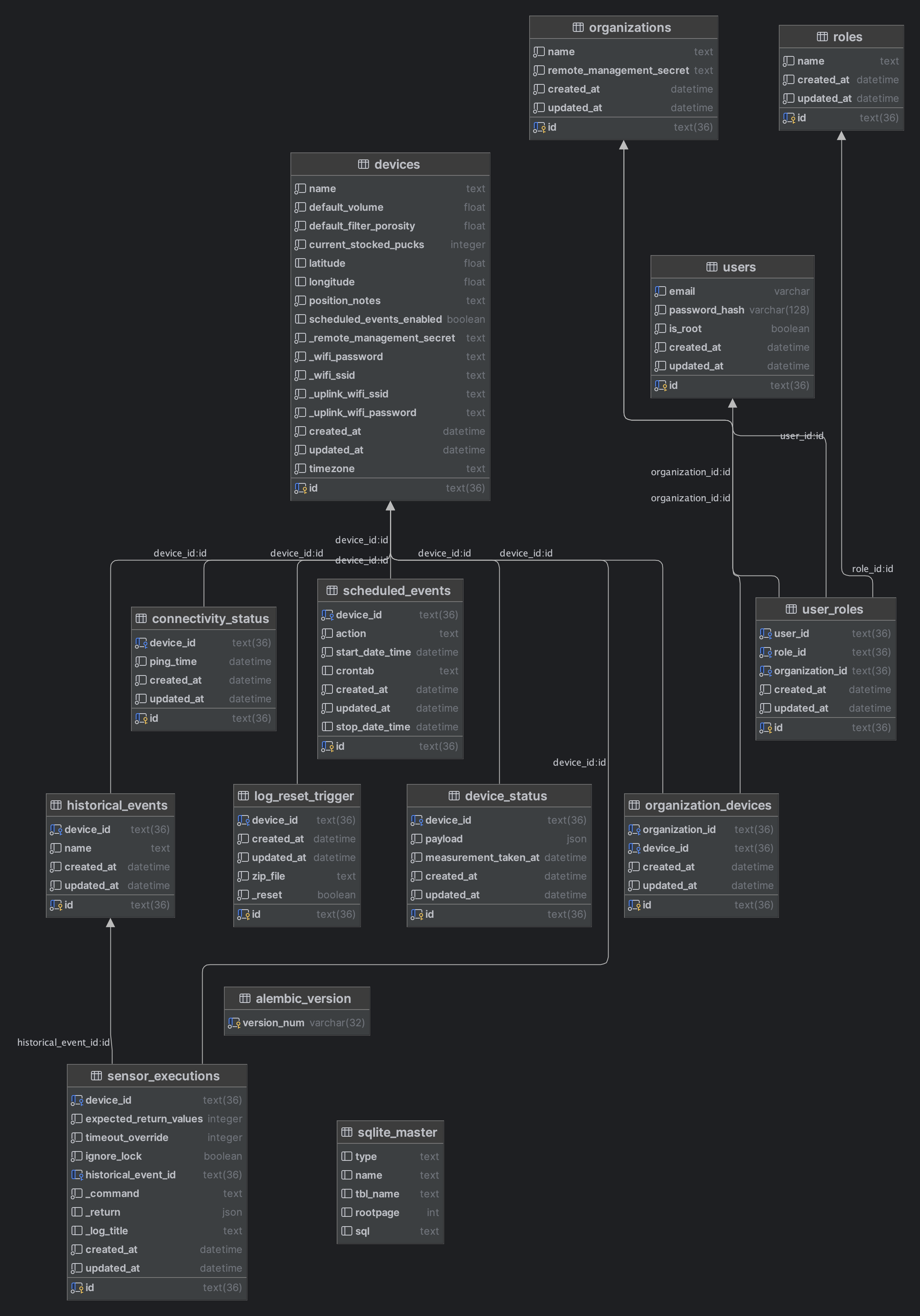
3.3 Database and Models
All models live in web/readinet/models.py. They all inherit CommonMixin, which provides:
- created_at, updated_at timestamp columns
- as_dict() — ordered dict serialization (hybrids last, for correct MQTT apply ordering)
- as_truth_snapshot() — row ID + data dict used for hash computation
- resolved_device_id() — determines the parent device for any record
- topic_for_instance() — determines the MQTT sync topic
Models:
| Model | Table | Description |
|---|---|---|
Device |
devices |
Core device record. Holds all device config including WiFi credentials (hybrid properties with side effects), location, sampler defaults, and puck inventory. |
DeviceStatus |
device_status |
Latest sampler status payload. Updated by SamplerSelfCheckDriver every 30 minutes. |
ConnectivityStatus |
connectivity_status |
Heartbeat from the device. Updated every 60 seconds by ConnectivityPingDriver. Server uses this to determine if device is online (within last 5 minutes). |
HistoricalEvent |
historical_events |
A named, timestamped event record. Created when sample/decon operations complete. |
SensorExecution |
sensor_executions |
A command record. On device: triggers actual serial communication. On server: stores SERVER_ENQUEUED and syncs to device via MQTT. |
ScheduledEvent |
scheduled_events |
A scheduled sample/decon. Has either a one-time start_date_time or a crontab string for recurring events. |
LogResetTrigger |
log_reset_trigger |
Triggers log archival and rotation when reset is set. Has a 60-second TTL check to prevent stale triggers from executing. |
Organization |
organizations |
A tenant group. Has devices and users. Auto-generates an 8-character remote_management_secret. |
OrganizationDevice |
organization_devices |
Many-to-many join: Organization ↔ Device. |
ScheduledEvent |
scheduled_events |
Sample/decon schedule, per device. |
Role |
roles |
Named role: user or admin. |
UserRole |
user_roles |
User + Role + Organization triple. |
User |
users |
Login credentials. is_root grants access to organization management. |
Important Device hybrid properties with side effects:
| Property | On Set (device role) | On Set (server role) |
|---|---|---|
wifi_ssid / wifi_password |
systemctl restart readinet-network |
No side effect |
uplink_wifi_ssid / uplink_wifi_password |
systemctl restart readinet-network |
No side effect |
remote_management_secret |
No side effect | Links device to matching Organization |
3.4 Background Workers
All workers are gevent greenlets registered in web/readinet/app.py when RUN_BACKGROUND_THREADS is set.
MQTTThread (web/readinet/background.py:135):
- Waits up to 120 seconds for network readiness (DNS resolution of
MQTT_BROKER_URL) - Connects with exponential backoff
- On connect: subscribes to appropriate topics based on role, sends initial handshake (device only)
- Runs two concurrent loops:
loop_forever()greenlet for receiving, drain loop for the send queue - Uses
spawn_in_app_context()for all DB operations to ensure Flask app context is available
SamplerSelfCheckDriver (web/readinet/background.py:314, device only):
- On startup: installs the device schedule (
install_schedule_on_device()), initializes the sampler withfido.init() - Every
SAMPLER_SELF_CHECK_SECONDS(default 1800s): if sampler is unlocked, runsfido.check()and updatesDeviceStatus
ConnectivityPingDriver (web/readinet/background.py:368, device only):
- Every
CONNECTIVITY_PING_CHECK_SECONDS(default 60s): writes current timestamp toConnectivityStatus - This record is synced to the server, allowing the server to know the device is alive
spawn_in_app_context(func, *args) (web/readinet/background.py):
A helper that runs a function in a new gevent greenlet within a Flask app context. Always call db.session.remove() on completion. Use this whenever you need to do DB work from within an MQTT message handler or other non-request context.
3.5 Networking on the Device
The device has up to three network interfaces managed by NetworkManager:
| Interface | Connection Profile | Role |
|---|---|---|
eth0 |
Ethernet.nmconnection |
Wired ethernet, DHCP, route-metric=90 |
wlan1 |
Hotspot.nmconnection |
AP mode, SSID readinet-XXXXX, 10.42.0.1/24 |
wlan2 |
Uplink.nmconnection |
STA mode, connects to site WiFi, route-metric=201 |
wlan0 is explicitly unmanaged (via 30-ignore-wlan0.conf) to prevent NM from interfering with it.
NetworkManager's ipv4.method=shared on the Hotspot profile provides DHCP and NAT automatically — no separate dnsmasq configuration is needed (the included dnsmasq.conf is a legacy artifact).
The readinet-network.sh script, run at every boot via readinet-network.service, reads the desired WiFi credentials from the SQLite database and patches the NM connection files in place, then reloads NetworkManager. This allows the admin to change WiFi settings through the web UI without needing to touch the device directly.
3.6 Sampler Serial Communication
The FIDO sampler is a MicroPython device connected via USB serial (typically /dev/ttyUSB0). Communication goes through web/readinet/sampler.py.
Protocol:
- Commands are written as text (e.g.,
fido.sample('name, date', 1.0, 0.5, "note")) - The sampler echoes back text during operation
- End of response is signaled by
^^^followed by a JSON array of return values - Lock file
/tmp/readinet.lockprevents concurrent access
SamplerControl.run(commands, num_return_vals_expected, timeout_override, ignore_lock):
- Acquires
/tmp/readinet.lock(raisesDeviceLockedif held) - Opens the serial port configured by
SAMPLER_TTYandSAMPLER_BAUD - Writes each command in sequence
- Reads 256-byte chunks in a loop, accumulating lines
- Detects the
^^^response terminator - Parses the JSON return array
- Releases the lock
gevent.sleep(0) is called between reads to yield control without blocking the gevent event loop.
Device simulator (web/device_simulator/): For local development, run simulate.sh inside a device container. It creates a virtual serial port pair via socat and runs esp.py as a mock FIDO sampler.
3.7 Scheduled Events
Scheduled samples and decons are implemented using systemd timers, not cron or an in-process scheduler.
How it works:
- A
ScheduledEventrecord is created (via the web UI calendar) - This record syncs to the device via MQTT
install_schedule_on_device()(web/readinet/scripts/scheduled_events.py:106) translates the DB records into systemdOnCalendar=directives and writes them to override files at/etc/systemd/system/readinet-event@<name>.timer.d/override.confsystemctl daemon-reloadand timer restarts apply the new schedule- When a timer fires, it triggers the paired
.serviceunit which POSTs tohttp://127.0.0.1:8000/private/event/<command> - The API endpoint (
web/readinet/api.py:349) callsrun_scheduled_task(command)which dispatches to the appropriateSensorExecution.run()call
The six timer instances:
readinet-event@sample-only.timerreadinet-event@sample-and-decon.timerreadinet-event@decon-only.timerreadinet-event@recurring-sample-only.timerreadinet-event@recurring-sample-and-decon.timerreadinet-event@recurring-decon-only.timer
One-shot events use start_date_time. Recurring events use a crontab string which is converted to OnCalendar= format by cron_to_systemd().
Schedule reinstallation is also triggered automatically whenever a ScheduledEvent is inserted, updated, or deleted (via SQLAlchemy event hooks on ScheduledEvent, web/readinet/models.py:851-863).
3.8 Authentication and Authorization
Authentication uses Flask-Login and is only enforced on the server role. On the device, all auth decorators are no-ops — the device is accessed locally over the hotspot and has no login screen.
Auth decorators (web/readinet/util.py):
| Decorator | Behavior |
|---|---|
@requires_login |
Server: checks Flask-Login session. Device: no-op. |
@set_device |
Resolves g.device from ?device_id= (server) or THIS_DEVICE_ID env var (device). |
@requires_root |
Aborts 403 unless current_user.is_root. |
@requires_organization |
Sets g.organization from ?organization_id=. Auto-redirects to first org if not specified. |
@requires_admin_at_organization |
Wraps requires_organization. Aborts 403 unless user is root or admin at the org. |
User roles:
is_root=True: Full access including organization creation/management. Onlyroot@mbari.netby default.adminrole at an org: Can manage users in that org and access all device data for the org's devices.userrole at an org: Read-only access.
Seeded accounts (all password: R3AdiN#Tdone-litmus-maturing):
root@mbari.net— is_root, no org affiliation neededadmin@mbari.net— admin role at MBARI orguser@mbari.net— user role at MBARI org
3.9 Logging
Loguru is used for structured logging (web/readinet/config.py).
Log sinks:
- stderr (DEBUG+) — always active
/var/log/mbari_readinet_{device_id}.log— INFO+, filtered to records for this device. This is the full log file read by the Events and Samples pages./var/log/mbari_readinet_{device_id}_device.log— INFO+, device-only messages (serial output). Device role only.- MQTT
log/{device_id}topic — Serialized loguru JSON records. Device role only. The server receives these and appends them to its own log files.
Log format: {timestamp}|{level}|{module}:{function}:{line}||{message}
Log parsing: web/readinet/events.py contains complex regex-based parsers that extract structured data (sample records, engineering time-series) from the log files. The EventControl class provides the main interface used by the Events and Samples pages.
Log reset: Triggered via the "Reset Logs" button in the web UI. Creates a zip archive of the current log and truncates it. Synchronized to the device via MQTT (with a 60-second TTL to prevent stale resets).
4. Local Development Setup
It is very helpful to be able to connect to the RockPi via an onboard serial port that you can use to ssh into the Pi. First, power off the RockPi, then you have to open the black case by removing the screw on the bottom of the case. Once open follow the instruction on the RockPi serial console docs to connect the USB-Serial cable to the RockPi. The docs show you how to connect to the RockPi through the serial port for different operating systems. One handy note is that on Linux/Mac machines, you might want to capture a listing of the /dev directory before plugging in the USB cable so you have an easier time figuring out which port is the new USB-Serial port. On my Ubuntu machine, I used picocom to connect by running:
sudo picocom -b 1500000 -d 8 /dev/ttyUSB0
and then powering on the RockPi. This is a VERY handy way to get to a prompt.
Note
One thing to note with the console is that the width of the lines is very limited, but you can expand the width of the lines by running stty rows 50 cols 250 (you can tweak the numbers to fit your needs)
Note
Once the RockPi is connected to your local network through a router, you can ssh into it via the IP address. The trick if finding what the IP address is. If you hook up a serial console as described above, you can run ifconfig -a to see the list of network interfaces and their assigned IP addresses. You can then ssh at root to that IP address.
Prerequisites
- Docker (with Compose v2)
- Python 3.10.12 (optional, for running linting/tests outside Docker; use
asdformisewith.tool-versions)
Steps
# 1. Clone the repo
git clone git@github.com:mbari-org/readi-net.git
cd readi-net

# 2. Create the .env file
cp web/.env.sample web/.env
# Edit web/.env if needed. The defaults work out-of-the-box for local dev.
# MQTT_BROKER_URL=broker is the docker service name, correct for compose.

# 3. Start all containers
docker compose up
# This starts: readinet_server (port 5001), readinet_device1 (port 5002),
#              readinet_device2 (port 5003), and the MQTT broker.

# 4. Initialize each container's database
docker exec -it readinet_server ./bootstrap.sh
docker exec -it readinet_device1 ./bootstrap.sh
docker exec -it readinet_device2 ./bootstrap.sh
# bootstrap.sh runs: flask db upgrade && flask seed
Access
| Service | URL | Notes |
|---|---|---|
| Server | http://localhost:5001 | Login with admin@mbari.net / R3AdiN#Tdone-litmus-maturing |
| Device 1 | http://localhost:5002 | No login required |
| Device 2 | http://localhost:5003 | No login required |
Simulating the FIDO Sampler
Without a physical sampler, sampling commands will time out. To attach a virtual sampler:
docker exec -it readinet_device1 /opt/web/device_simulator/simulate.sh
# Ctrl+C to stop
This creates a virtual serial port pair via socat and runs esp.py as a mock FIDO device. The Flask app communicates with it as if it were a real sampler.
Live Code Reloading
The compose.yml mounts ./web as a volume into all containers. However, gunicorn does not auto-reload. To pick up Python changes, restart the affected container:
docker compose restart server
docker compose restart device1
Exploring a Container
# Open a shell in a container (disable background threads to avoid MQTT noise)
docker exec -it -e RUN_BACKGROUND_THREADS='' readinet_device1 bash

# Run a flask shell for DB queries
docker exec -it readinet_server flask --app readinet.app shell
>>> from readinet import models, db
>>> db.session.query(models.Device).all()
Running Database Migrations
# After adding/modifying a model:
docker exec -it readinet_server flask db migrate -m "describe your change"
docker exec -it readinet_server flask db upgrade
# Also run on device containers if needed:
docker exec -it readinet_device1 flask db upgrade
Port Reference
The compose file maps:
5001→ server container port 50005002→ device1 container port 50005003→ device2 container port 50001883→ MQTT broker
5. Building the OS Image
The OS image is Armbian (Ubuntu 22.04 Jammy) for the Rock Pi S (RK3308 SoC). Building requires a Linux x86 host with Docker; macOS is not supported for the build process.
5.1 Building Locally
You need a Linux machine (or VM). Building from macOS is not supported by the Armbian build system.
# From the repo root:
os/build-os.sh VERSION_NUMBER

# Examples:
os/build-os.sh 42
os/build-os.sh 43-dev
What it does:
- Clones (or updates) the Armbian fork (
https://github.com/brentr/buildat tagfido25.8.2) intoos/armbian-build/ - Removes patches for unsupported boards (Helios64) that would fail to apply
- Symlinks
os/userpatches/into the Armbian build tree - Appends device tree overlay configuration to the Rock Pi S board config
- Rsyncs the
web/directory into the overlay so it's embedded in the image - Writes version stamps into the overlay
- Runs Armbian's
compile.sh readinet - Renames the output from
Armbian-*.imgtoreadinet-os-<VERSION>.img
Output: os/armbian-build/output/images/readinet-os-<VERSION>.img (and .sha)
Wipe options (via WIPE env var):
WIPE=all os/build-os.sh 42       # delete all of armbian-build/ and start fresh
WIPE=images os/build-os.sh 42    # delete only previous output images
WIPE=no os/build-os.sh 42        # default: incremental build (fastest)
Alternative: Vagrant VM (if you're on macOS or want isolation):
os/build-vagrant.sh VERSION_NUMBER
# Spins up a local QEMU/Libvirt VM, runs the build inside it
5.2 Building in AWS
For reproducible CI builds or when no Linux workstation is available, use the AWS build script:
os/build-aws.sh VERSION_NUMBER
# Example: os/build-aws.sh 42
What it does:
- Looks up the latest Debian 12 AMD64 AMI in
us-west-2 - Launches a
t3.xlargespot instance withaws-userdata.shas user-data - The instance:
- Installs git, rsync
- Adds SSH keys for project contributors from GitHub
- Retrieves the GitHub deploy key from AWS Secrets Manager (
github_deploy_key) - Clones
git@github.com:mbari-org/readi-net.git - Runs
os/build-os.sh VERSION_NUMBER - Uploads the image to
s3://mbari-readinet-images - Publishes an SNS notification when complete
- Terminates itself
Prerequisites:
- AWS CLI configured with the
414844587818_AWSAdministratorAccessprofile - Access to the
github_deploy_keysecret in AWS Secrets Manager (regionus-west-2) - The build security group (
sg-04dd09170d092d1a0) and subnet (subnet-056123e8157180bc3) must exist
Retrieving the built image:
aws s3 ls s3://mbari-readinet-images/ --profile 414844587818_AWSAdministratorAccess
aws s3 cp s3://mbari-readinet-images/readinet-os-42.img . --profile 414844587818_AWSAdministratorAccess
6. Deploying to Hardware
6.1 Provisioning the Image
Before flashing, use os/set-device-vars.sh to embed device identity and WiFi credentials into the image. This is the recommended way to configure a device; the alternative is letting readinet-firstboot.sh derive a device ID from /etc/machine-id on first boot.
# On an image file:
sudo os/set-device-vars.sh \
  --id fido-001 \
  --ssid "SiteWiFiNetwork" \
  --psk "wifipassword" \
  --path ./readinet-os-42.img
What it writes to the image:
| File | Mode | Contents |
|---|---|---|
/etc/environment |
644 | READINET_DEVICE_ID="fido-001" |
/etc/profile.d/readinet_device_id.sh |
644 | export READINET_DEVICE_ID="fido-001" |
/etc/device-id |
644 | fido-001 (raw string, no newline) |
/etc/systemd/system.conf.d/10-readinet-env.conf |
600 | DefaultEnvironment=READINET_DEVICE_ID=... SEED_UPLINK_SSID=... SEED_UPLINK_PSK=... |
/etc/seed/seed-uplink.env |
600 | SEED_UPLINK_SSID="..." and SEED_UPLINK_PSK="..." |
The systemd drop-in (10-readinet-env.conf) makes all three variables available as environment variables for all systemd services, including readinet-firstboot.service and readinet-web.service.
6.2 Flashing to SD Card
After provisioning, flash the image to a microSD card:
Graphical (Balena Etcher):
1. Download Balena Etcher
2. Select the .img file
3. Select the SD card (be careful — it will overwrite everything)
4. Click Flash
Command line:
# Identify your SD card device (look for the right size):
lsblk

# Flash (replace /dev/sdb with your device):
sudo dd if=readinet-os-42.img of=/dev/sdb bs=4M status=progress conv=fsync
sudo sync
6.3 Flashing to eMMC
The Rock Pi S has an optional onboard eMMC module. eMMC is more reliable than SD cards for embedded use (better wear leveling, power-loss tolerance) and is recommended for production deployments.
- On your Linux host, open a terminal and change to a location where you can checkout the code for a utility to write to the RockPi eMMC
- Run
sudo apt-get install libudev-dev libusb-1.0-0-dev dh-autoreconfto install build dependencies - Then run
git clone https://github.com/rockchip-linux/rkdeveloptool.git - Change into the new directory using
cd rkdeveloptooland run:./autogen.sh./configuremake
- After the
rkdeveloptoolutility is built, you need to download a support binary by opening your browser and pointing it to: http://xogium.performanceservers.nl/archive/rockpi-s/u-boot - Click on the
rk3308_loader_uart0_m0_emmc_port_support_sd_20190717.binlink to download the support file (remember where it was downloaded to) -
Next, tell the tool to load the support file by running (the path to your downloded .bin might be different)
sudo ./rkdeveloptool db ~/Downloads/rk3308_loader_uart0_m0_emmc_port_support_sd_20190717.bin -
Next, hold the
MASKROMbutton down while connecting the RockPi via the USB-C serial port of your computer (wait for about 2 seconds before releasing the button) - Then, run
sudo ./rkdeveloptool wl 0 ~/Downloads/readinet/readinet-os-xxxxx.imgwhere the .img is the READI-Net OS image you downloaded and configured earlier - Finally, run
sudo ./rkdeveloptool rdto finalize the write and then you can unplug the RockPi from your computer and power it on normally
No code changes are needed for eMMC — the image is identical, just stored on different flash media.
6.4 First Boot and Verification
- Insert the SD card (or ensure eMMC is installed), power on the device
- Wait 2–3 minutes for the first-boot provisioner to complete
- Look for a WiFi network starting with
readinet-(the SSID isreadinet-{device-id}) - Connect to it (default password:
readinet) - Open https://10.42.0.1 in a browser (accept the self-signed cert warning)
- SSH access:
ssh root@10.42.0.1(password:readinet)
Verify services are running:
systemctl status readinet-web
systemctl status readinet-network
systemctl status readinet-hotspot
systemctl status NetworkManager
journalctl -u readinet-firstboot --no-pager  # check first-boot log
Connect to cloud:
# Initiate Tailscale VPN (production):
tailscale up --login-server https://vpn.prod.readinet.org

# Then on the server, a sysadmin must run:
headscale nodes register --user readinet --key nodekey:THE_NODE_KEY

# Verify VPN:
tailscale status
ping server.readinet.local

# Restart the web app to pick up the new VPN interface:
systemctl restart readinet-web
7. Cloud Server Setup
The cloud server runs the Flask application in ROLE=server mode behind nginx, orchestrated by Docker Compose, on an AWS EC2 instance provisioned by Terraform and configured by Ansible.
7.1 Infrastructure (Terraform)
Location: devops/terraform/
Managed resources:
- EC2 instances (Debian 12):
t3.xlargefor prod,t3.largefor dev/test - 100 GB gp3 EBS root volumes
- Elastic IPs
- IAM role with S3 access to
mbari-readinet-backups - Security group allowing ports: 22 (SSH), 80 (HTTP), 443 (HTTPS), 1883 (MQTT), 8080 + 41641 (Headscale)
Environments: dev (dev.readinet.org), prod (prod.readinet.org), test
cd devops/terraform
terraform init
terraform plan
terraform apply
7.2 Application Deployment (Ansible)
Location: devops/ansible/
Inventory: devops/ansible/hosts
[dev]
54.71.128.24

[prod]
54.218.178.215
Deploy:
cd devops/ansible
ansible-galaxy install -r requirements.yml
ansible-playbook -i hosts server.yml -l prod  # deploy to production
ansible-playbook -i hosts server.yml -l dev   # deploy to development
What the playbook does:
- Creates
/opt/readinet-web/on the server - Installs system packages:
rsync,cron,dbus-user-session, Docker - Rsyncs
web/to/opt/readinet-web/(excluding.env,instance/,__pycache__) - Generates a random
SECRET_KEYviaopenssl rand -hex 32 - Templates
compose.yml.j2to/opt/readinet-web/compose.yaml(server-only service, no device containers) - Installs and starts the
readinet-web.service(runsdocker compose up -d) - On first deploy: runs
flask db upgradeandflask seed(guarded by.seededmarker) - Obtains a Let's Encrypt TLS certificate via certbot
- Installs nginx as a reverse proxy with LE TLS
- Installs daily backup timer (
backup-readinet-web.service) that backs up the SQLite DB tos3://mbari-readinet-backups
SSH access:
ssh admin@prod.readinet.org   # or dev.readinet.org
# Key-based auth only. Add authorized keys to /home/admin/.ssh/authorized_keys
Useful server commands:
# Check application status
docker compose -f /opt/readinet-web/compose.yaml ps

# View logs
docker compose -f /opt/readinet-web/compose.yaml logs -f server

# Open a Flask shell for DB queries
docker exec -it readinet_server flask --app readinet.app shell

# Run a database migration after deploying new code
docker exec -it readinet_server flask db upgrade

# Manually trigger a seed (will overwrite users)
docker exec -it readinet_server flask seed

# Restart the application
docker compose -f /opt/readinet-web/compose.yaml restart server
7.3 VPN Setup (Headscale/Tailscale)
Devices connect to the cloud server via a Tailscale VPN. The server runs Headscale (an open-source Tailscale control plane) rather than relying on Tailscale's commercial SaaS.
Headscale is managed separately from this repository (it runs on the same EC2 instances via the headscale Ansible role). Key points:
- VPN domains:
vpn.prod.readinet.org(prod),vpn.dev.readinet.org(dev) - A single Headscale user
readinetis used for all devices - Devices appear in the VPN as
server.readinet.local(the server) and by hostname (the devices)
Registering a new device:
# On the device:
tailscale up --login-server https://vpn.prod.readinet.org

# On the server (SSH in as admin):
headscale nodes register --user readinet --key nodekey:PRESENTED_KEY_HERE
MQTT connectivity:
The Flask app on the device connects to MQTT at MQTT_BROKER_URL=server.readinet.local, which resolves through the Tailscale VPN. If the VPN is not connected, MQTT sync will not work. After connecting to Tailscale, always restart readinet-web on the device:
systemctl restart readinet-web
8. File Reference
8.1 Root Level
| File | Purpose |
|---|---|
README.md |
End-user documentation and high-level developer notes |
DEV-NOTES.md |
Deep technical notes on the OS build and boot sequence |
DEVELOPER.md |
This file — comprehensive developer guide |
compose.yml |
Docker Compose for local development (server + 2 devices + MQTT broker) |
.tool-versions |
Python 3.10.12 version pin for asdf/mise |
.gitignore |
Ignores: *.db, __pycache__/, .env, *.log, .web-secret, .DS_Store |
8.2 os/ — Image Build System
Build Scripts
| File | Purpose |
|---|---|
os/build-os.sh |
Main image build script. Run on Linux. Takes VERSION_NUMBER arg. Clones Armbian fork, runs build, renames output. |
os/build-aws.sh |
Launches AWS EC2 spot instance (t3.xlarge) to run the build. Outputs image to S3 and sends SNS notification. |
os/aws-userdata.sh |
EC2 user-data script. Clones repo using deploy key from Secrets Manager, runs build, uploads to S3, terminates instance. |
os/set-device-vars.sh |
Pre-flash provisioning utility. Mounts image or block device, writes device ID and WiFi credentials to the filesystem. |
os/build-vagrant.sh |
Alternative build using a local Vagrant/QEMU VM. |
os/Vagrantfile |
Vagrant config: generic/ubuntu2204, 8 CPUs, 8 GB RAM, 128 GB disk, sshfs sync. |
Armbian Configuration
| File | Purpose |
|---|---|
os/userpatches/config-readinet.conf |
Armbian build config: BOARD=rockpi-s, RELEASE=jammy, BUILD_MINIMAL=yes, NETWORKING_STACK=network-manager, EXTRAWIFI=yes. |
os/userpatches/config-default.conf |
Symlink to config-readinet.conf. Required by Armbian's build system. |
os/userpatches/lib.config |
Extra apt packages: bluez python3-pip vim nano network-manager iptables sqlite3 git make dnsmasq minicom net-tools nginx zip ppp picocom |
os/userpatches/customize-image.sh |
Chroot script run by Armbian after package installation. Sets up users, installs/enables systemd units, configures NM, installs Tailscale, installs web app, configures kernel boot params. |
os/userpatches/kernel/archive/rockchip64-6.12/ |
Custom kernel patches for RK3308 (RTL8723DS concurrent mode, UART CTS/RTS polarity). |
Overlay Files (os/userpatches/overlay/)
Systemd Units:
| File | Type | Purpose |
|---|---|---|
readinet-web.service |
Service | Starts gunicorn (gevent worker, 127.0.0.1:8000). Restart=always, RuntimeMaxSec=7d. Reads env from /opt/web/.env. |
readinet-firstboot.service |
Oneshot | Runs once on first boot (guarded by !/opt/web/.provisioned). Sets device ID, hostname, runs flask db upgrade && flask seed, configures NM connections. |
readinet-network.service |
Oneshot | Reads WiFi credentials from DB and patches NM connection files. Depends on readinet-firstboot. |
readinet-hotspot.service |
Oneshot | Forces the WiFi hotspot AP up via nmcli. Runs after firstboot. |
readinet-nginx-setup.service |
Oneshot | Generates self-signed TLS cert/key for nginx (only if cert doesn't exist). |
readinet-install-schedule.service |
Oneshot | Runs flask install_schedule_on_device to write systemd timer overrides from DB. |
readinet-event@.service |
Template | Parameterized unit: POSTs to http://127.0.0.1:8000/private/event/%i when triggered. |
readinet-event@.timer |
Template | Parameterized timer. Default OnCalendar=@0 (overridden per-instance). |
readinet-timer-default-override.conf |
Drop-in | Default timer override. Copied into each timer instance's .d/ directory during build. |
Shell Scripts:
| File | Installed As | Purpose |
|---|---|---|
readinet-firstboot.sh |
/usr/local/bin/readinet-firstboot |
First-boot provisioner. Seeds device ID from env or /etc/machine-id, sets hostname, runs DB migrations and seed, configures NM connections, marks provisioned. |
readinet-network.sh |
/usr/local/bin/readinet-network |
Reads WiFi SSIDs/PSKs from SQLite DB, patches NM connection files, reloads NM, brings up connections. |
readinet-hotspot.sh |
/usr/local/bin/readinet-hotspot |
Thin wrapper: nmcli connection up/down Hotspot with 5-second startup delay. |
readinet-nginx-setup.sh |
/usr/local/bin/readinet-nginx-setup |
Generates self-signed TLS cert via openssl (CN=10.42.0.1, 10-year validity). |
signalQuality |
/usr/local/sbin/signalQuality |
Reads cellular modem signal quality (for PPP/USB modem deployments). |
stickup, ifLink, ifTTY, ifUnlink |
/lib/udev/ |
udev helper scripts for USB modem management. |
NetworkManager Profiles:
| File | Interface | Mode | Config |
|---|---|---|---|
Ethernet.nmconnection |
eth0 | STA/DHCP | route-metric=90 (prefer over WiFi) |
Hotspot.nmconnection |
wlan1 | AP/shared | SSID=readinet-mgmt, PSK=readinet, 10.42.0.1/24 |
Uplink.nmconnection |
wlan2 | STA/DHCP | SSID=MBARI-Guest, route-metric=201 |
WiredConnection1.nmconnection |
eth1 | STA/DHCP | Secondary wired connection |
30-ignore-wlan0.conf |
wlan0 | — | Tells NM not to manage wlan0 |
Other Config Files:
| File | Destination | Purpose |
|---|---|---|
nginx.conf |
/etc/nginx/nginx.conf |
Reverse proxy: 443 (TLS) → gunicorn:8000, serves /static/ directly, 80 → 443 redirect |
99-readinet.conf |
/etc/ssh/sshd_config.d/ |
Enables password auth, root login, sets MaxAuthTries 12 |
rk3308-otg-host.dtbo |
/boot/dtb/rockchip/overlay/ |
DT overlay: USB OTG in host mode |
rk3308-uart1.dtbo |
/boot/dtb/rockchip/overlay/ |
DT overlay: UART1 (GPS) |
rk3308-uart2.dtbo |
/boot/dtb/rockchip/overlay/ |
DT overlay: UART2 |
rk3308-uart3.dtbo |
/boot/dtb/rockchip/overlay/ |
DT overlay: UART3 |
70-persistent-net.rules |
/etc/udev/rules.d/ |
Persistent network interface naming |
92-ifmodem.rules |
/etc/udev/rules.d/ |
udev rules for USB modem/PPP interface management |
dnsmasq.conf |
/etc/dnsmasq.conf |
Legacy DHCP config. Not active — dnsmasq is masked; NM method=shared handles DHCP. |
web |
overlay/web |
Symlink to web/ app directory. Embedded in image during build. |
8.3 web/ — Flask Application
Top-Level Files
| File | Purpose |
|---|---|
web/Dockerfile |
python:3.10-buster base, installs socat sqlite3 zip, installs Poetry, runs poetry install. CMD: gunicorn -b 0.0.0.0:5000 -k gevent readinet.app:app |
web/pyproject.toml |
Python dependencies managed by Poetry. Key deps: Flask 2.3, SQLAlchemy, Flask-Migrate, Flask-Login, paho-mqtt, pyserial, gevent, loguru, xxhash, python-crontab. |
web/mosquitto.conf |
Mosquitto config: anonymous auth, port 1883, persistence to /mosquitto/data. Used in local dev (Docker) and on the cloud server. |
web/.env.sample |
Template for web/.env. Copy to web/.env before running locally. |
web/bootstrap.sh |
Container initialization: flask db upgrade && flask seed. Run once after docker compose up. |
web/README.md |
Do not delete — required by the build (used as Poetry package readme). |
web/readinet/ — Application Package
| File | Purpose |
|---|---|
app.py |
Flask application factory. Creates app, registers blueprints, configures Flask-Login, sets up SQLite pragmas (WAL, busy_timeout), registers CLI commands, spawns background greenlets. |
config.py |
Loads .env via python-dotenv, applies gevent monkey-patching, configures loguru sinks, defines Config / DevelopmentConfig / TestingConfig / ProductionConfig, exports config_manager dict. |
models.py |
All SQLAlchemy models + CommonMixin. Global SQLAlchemy event hooks for MQTT sync. Device hybrid properties with side effects. update_hash and truth_snapshot properties. |
api.py |
api Blueprint. All action endpoints: device config, sampling, decon, restock, log management, user management, scheduled event data. |
sync.py |
MQTT sync protocol. SyncMessage dataclass: serialization, apply_operation() (upsert/delete from MQTT message). SnapshotMessageListener: destructive reconciliation from full device snapshot. |
background.py |
BackgroundJob ABC and three implementations: MQTTThread, SamplerSelfCheckDriver, ConnectivityPingDriver. spawn_in_app_context() helper. |
events.py |
Log parsing (parse_samples_from_log(), regex extractors for all sample fields and engineering data). EventControl class (interface for the Events and Samples pages). LogMessageListener (server-side MQTT log receiver). |
sampler.py |
SamplerControl class. Lock file management, serial port open/read/write, ^^^ response detection, return value parsing. is_device_present() check. |
util.py |
Auth decorator factories: requires_login, set_device, requires_root, requires_organization, requires_admin_at_organization. |
errors.py |
DeviceLocked and DeviceTimeout exception classes. |
web/readinet/views/
| File | Blueprint | Routes |
|---|---|---|
device.py |
device_pages |
GET /device, GET/POST /schedule, GET /management, GET /events, GET /samples |
server.py |
server_pages |
GET/POST /login, GET /logout, GET /devices, GET /users, GET/POST /organizations |
web/readinet/scripts/
| File | Purpose |
|---|---|
seed.py |
flask seed command. Clears and repopulates: users (3), roles (2), organizations (2), device record (if ROLE=device). |
scheduled_events.py |
install_schedule_on_device(): writes systemd timer overrides from DB, reloads. run_scheduled_task(): dispatches sampler commands from timer-triggered API calls. delete_scheduled_event_if_no_more_executions_scheduled(): post-run cleanup of one-shot events. |
network.py |
flask set_hotspot_ssid <ssid> command. Updates hotspot SSID in DB. |
web/readinet/templates/
| File | Purpose |
|---|---|
base.html |
Minimal base template. |
device.html |
Device dashboard: current status, next scheduled event, puck inventory, recent events, map. |
schedule.html |
Calendar view (FullCalendar). Modal for creating/editing events. |
management.html |
Device configuration: WiFi credentials, GPS location, sampler defaults (volume, filter), remote adoption code. |
events.html |
Event log table with INFO/WARNING/ERROR filtering. ?full=true shows all events including DEBUG. |
samples.html |
Parsed sample records table with engineering data. |
login.html |
Server login form. |
sidenav.html |
Navigation sidebar partial (included in all pages). |
flash.html |
Flash message partial. |
server/devices.html |
Server dashboard: all devices in org with connectivity status. |
server/users.html |
User management: list, add, reset password, remove. |
server/organizations.html |
Organization management (root only). |
web/readinet/static/
| File/Dir | Purpose |
|---|---|
app.css |
Application styles. |
favicon.ico |
Site favicon. |
global-util.js |
Shared JS utilities used across pages. |
schedule.js |
FullCalendar integration. Event click/create handlers, recurrence form logic, timezone-aware date handling via Day.js. |
sidenav.js |
Sidenav org selector behavior. |
management/ |
JS modules for each management form section: device_management.js, location.js (Leaflet map), modal_*.js (action modals), uplink_internet.js, remote_management.js, sensor_management.js. |
server/users.js |
User management form JS. |
vendor/ |
Bundled third-party libraries: FullCalendar, Day.js, Leaflet, Tailwind CSS, Tailwind Elements. |
web/readinet/migrations/
Alembic migrations. Run flask db upgrade to apply all pending migrations. Run flask db migrate -m "description" after model changes to generate a new migration file.
| Migration | Description |
|---|---|
3f3b44e28298_initial |
Initial schema: all core tables |
5e531384b942_switch_to_float_volume |
default_volume → Float |
62bc00dcbabc_reset |
Schema reset |
883ebbf4e394_add_timezone_field |
devices.timezone column |
8eb36a9416a2_add_connectivity_status |
connectivity_status table |
a9b94b69a303_add_log_reset |
log_reset_trigger table |
e1d983d1130a_add_stop_date |
scheduled_events.stop_date_time |
e7548e46a4f1_add_zip_file_location |
log_reset_trigger.zip_file |
web/device_simulator/
A virtual FIDO sampler for local development. simulate.sh creates a virtual serial port pair via socat and runs esp.py as a mock FIDO device. Run inside a device Docker container after docker compose up.
8.4 devops/ — Infrastructure
| File | Purpose |
|---|---|
devops/ansible/hosts |
Inventory: dev, prod, test server IPs |
devops/ansible/server.yml |
Main playbook: applies common, readinet-web, headscale roles |
devops/ansible/requirements.yml |
Ansible Galaxy role dependencies |
devops/ansible/roles/readinet-web/tasks/main.yml |
Deployment tasks: rsync code, configure Docker Compose, certbot TLS, nginx, backup timer |
devops/terraform/readinet.tf |
Root Terraform module: instantiates dev/prod/test environments |
devops/terraform/readinet-server/ec2.tf |
EC2 instance, EIP, IAM role, security group |
Default Credentials Reference
| Resource | Username / Access | Password / Key |
|---|---|---|
| Device SSH | root@10.42.0.1 |
readinet |
| Device WiFi | SSID: readinet-{device-id} |
readinet |
| Device Web UI | (no login) | — |
| Server Web (root) | root@mbari.net |
R3AdiN#Tdone-litmus-maturing |
| Server Web (admin) | admin@mbari.net |
R3AdiN#Tdone-litmus-maturing |
| Server Web (user) | user@mbari.net |
R3AdiN#Tdone-litmus-maturing |
| Cloud SSH | admin@prod.readinet.org |
SSH key (see Terraform user_data) |
Important: Change all default passwords before any production deployment.
Database Schema