Vehicle connection history
The direct connection status dialog shows the last hour of the two kinds of direct connection with the vehicle, in aligned one-minute cells, so both can be compared for the same minute:
- Ping: whether TethysDash could reach the vehicle (ping results, when the check is enabled). Green: all pings in that minute reachable; orange: some; red: none; grey: no checks.
- Link: the vehicle's own
/dataLinkrequests to TethysDash. Dark blue: with at least one upload; light blue: requests only; grey: no requests.
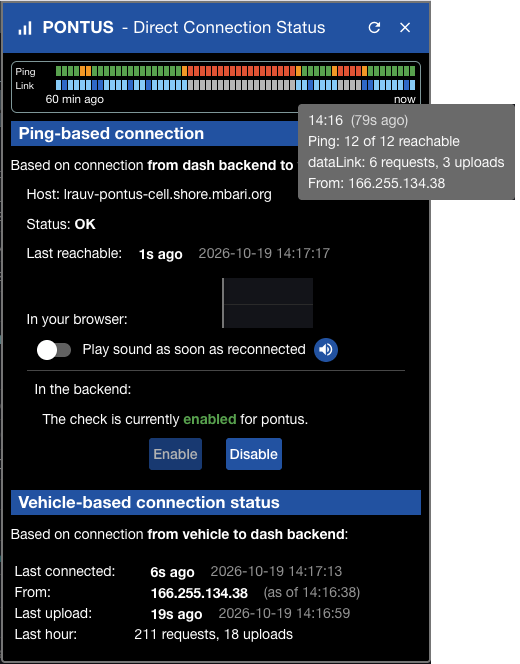
Hovering over a minute shows both counts and the IP the requests came from.
Below, the "Vehicle-based connection status" section shows the last connection, its IP, the last upload,
and the request and upload counts of the last hour.
An IP is only known once fetched from TethysDash, not with the live updates;
(as of HH:mm:ss) indicates when the shown IP was last seen.
The refresh button in the title bar fetches both histories again.
The two kinds tell different things, and disagreements are informative, for example: reachable but no requests, or requests but no uploads. The IP is as reported by the proxy in front of TethysDash, so it should be taken as a hint.
Supported by TethysDash 4.99.156 and Dash4 4.99.71. Both histories are kept in memory, and saved and restored across a regular TethysDash restart.
Earlier, as of TethysDash 4.99.48 and Dash4 4.98.9, the dialog showed only a short ping history.